Vibe Coding for Beginners: Build Your First App (2026)
Complete beginner's guide to vibe coding. Learn to build working apps using AI without code. Step-by-step tutorial. Practical guidance, examples, and tools you.
Last month, my friend Sarah—a marketing manager with zero coding experience—built a customer feedback tool for her team. It has a form, stores responses in a database, emails summaries to stakeholders, and runs as a real web app. She did this in an afternoon.
Five years ago, this would have required hiring a developer. Two years ago, she might have struggled through a no-code platform. In 2026, she described what she wanted in plain English and an AI built it.
This is vibe coding. And if you’ve ever wanted to build software but felt locked out by the technical barrier, this guide is for you. I’ll walk you through everything: what vibe coding actually is, which tools to use, how to build your first project step by step, and how to avoid the most common mistakes. By the end, you’ll know exactly how to turn your ideas into working applications.
What Exactly Is Vibe Coding?
Vibe coding is a term coined by AI researcher Andrej Karpathy in early 2025. It describes building software by having a conversation with AI rather than writing code yourself. The name captures something important: it’s less about precise specifications and more about conveying the “vibe” of what you want and iterating toward the result.
Here’s the fundamental shift: traditional programming requires you to learn syntax, memorize commands, understand data structures, and debug cryptic error messages. Vibe coding requires you to clearly describe what you want.
Traditional coding:
def calculate_discount(price, percentage):
    if percentage < 0 or percentage > 100:
        raise ValueError("Invalid percentage")
    return price * (1 - percentage / 100)
Vibe coding:
“Create a function that calculates discounted prices. It should take a price and discount percentage, validate that the percentage is between 0 and 100, and return the discounted amount.”
Both produce working code. But one requires you to already know Python. The other requires you to explain what you need.
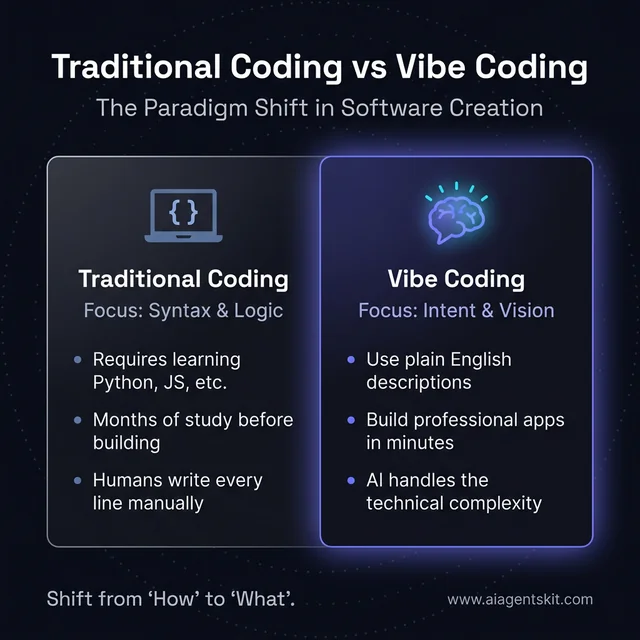 The paradigm shift from traditional coding to vibe coding: Traditional programming focuses on learning manual syntax and complex logic, while vibe coding leverages natural language to convey intent. This transition allows beginners to build production-grade applications in minutes by focusing on the ‘what’ instead of the ‘how’.
The AI handles syntax, structure, best practices, and even catches edge cases you might not think of. Your job is being clear about the outcome. This reverses the traditional learning curve—instead of spending months learning programming fundamentals before building anything useful, you start building immediately and learn concepts as needed.
The human skill that matters: Clear communication. The better you can describe what you want—the user experience, the visual design, the functionality—the better results you’ll get. This is a transferable skill you already use in your work and personal life.
What the AI handles: Programming languages, frameworks, database design, security best practices, responsive design, error handling, and dozens of other technical concerns that would take years to master traditionally.
Is This Just No-Code With Extra Steps?
Good question. No-code platforms like Bubble or Zapier use visual interfaces—drag boxes, connect things, configure settings. They’re powerful but still require learning their specific systems.
Vibe coding is different because:
- Natural language input: You describe in plain English, not visual components
- Full code output: The AI generates actual code, not platform-locked configurations
- More flexibility: Less constrained by pre-built templates and components
- Transferable skills: What you learn applies across any AI coding tool
Think of no-code as assembly from prefab parts. Vibe coding is more like having an AI carpenter who’ll build whatever you describe.
What You Can Build Without Coding Knowledge
Let me be specific about what’s realistic for beginners in 2026:
Definitely Achievable
- Web applications: Forms, dashboards, data viewers
- Internal tools: Team databases, workflow automation
- Simple games: Quizzes, text adventures, basic arcade games
- Landing pages: Marketing sites, portfolios, event pages
- Utilities: Calculators, converters, generators
- CRUD apps: Create-Read-Update-Delete applications
- Prototypes: Proof-of-concept for any software idea
Challenging but Possible
- Apps with user accounts: Login systems, personal data
- Database-backed tools: Storing and retrieving complex data
- API integrations: Connecting to external services
- E-commerce: Basic store functionality
Still Requires Developer Help
- Complex security: Banking, healthcare, sensitive data
- High-scale systems: Millions of users, complex infrastructure
- Complex algorithms: Machine learning, advanced math
- Mobile apps: Native iOS/Android (though web apps work on mobile)
The first two categories are where beginners thrive with vibe coding. You can build genuinely useful things without ever touching code.
Real Examples from Beginners:
- A realtor built a property showcase site with contact forms
- A teacher created a classroom assignment tracker
- A restaurant owner made an online menu with ordering
- A consultant developed a client intake questionnaire
- A fitness coach built a workout generator tool
None of these people had programming backgrounds. They described what they needed and iterated until it worked.
Understanding the Boundaries: Vibe coding works best for applications where:
- Functionality is more important than perfection
- You’re the primary user or serving a small audience
- Speed of development matters more than scalability
- Data sensitivity is low to moderate
- You can iterate and improve over time
When you need enterprise-grade security, massive scale, or complex computational processes, you’ll need professional developers. But for everything else—and that’s a lot—vibe coding delivers.
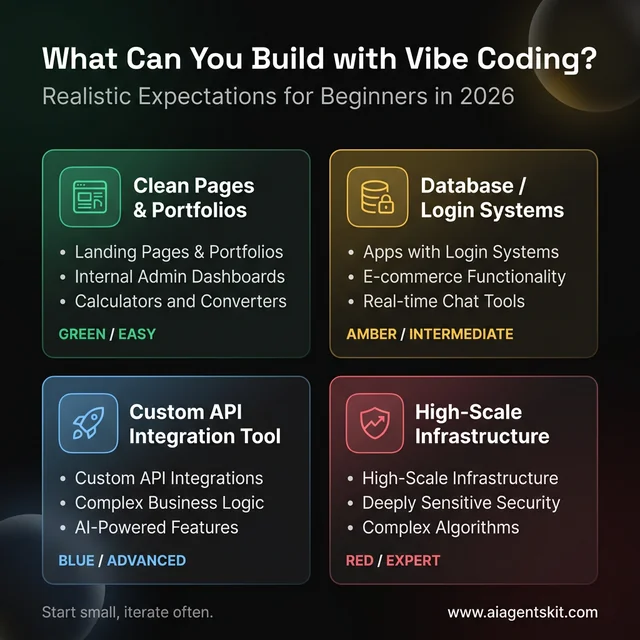 Realistic expectations for vibe coding in 2026: Beginners can easily build landing pages and internal tools, but more complex systems like those involving high-scale infrastructure or deeply sensitive security still benefit from professional developer oversight. Understanding these boundaries ensures you start with achievable projects that deliver immediate value.
Real Examples from Beginners:
- A realtor built a property showcase site with contact forms
- A teacher created a classroom assignment tracker
- A restaurant owner made an online menu with ordering
- A consultant developed a client intake questionnaire
- A fitness coach built a workout generator tool
None of these people had programming backgrounds. They described what they needed and iterated until it worked.
Tools You’ll Need (All Free to Start)
Here are the vibe coding platforms designed for beginners:
Google AI Studio
Google AI Studio, Google’s free tool lets you “vibe code” with their Gemini AI. Describe an app, get working code. Great for experimentation with zero cost.
Bolt.new
My recommendation for beginners. Zero setup required—it runs entirely in your browser. Describe an app, watch it build in real-time, deploy with one click.
Replit Agent is best for learning. It builds apps from prompts but also explains what it’s doing. The built-in tutorials help you understand the code even if you didn’t write it.
v0 by Vercel
Specializes in user interfaces. If you need beautiful buttons, forms, and layouts, v0 generates them from descriptions. Best used alongside another tool for full apps.
Lovable focuses on design-first app building. Describe what you want it to look like and function like, get a polished web application.
My suggestion: Start with Bolt.new for your first project. It’s the fastest path from idea to working software with zero friction.
Choosing the Right Tool for Your Project
Different tools excel at different things:
For complete web apps: Bolt.new or Replit Agent—they handle frontend, backend, and deployment
For beautiful interfaces: v0 or Lovable—when design matters most
For learning while building: Replit Agent—it explains what it’s doing
For quick experimentation: Google AI Studio—fast, free, no commitment
For AI-powered features: If your app needs AI capabilities, understanding how LLMs work can help you communicate requirements better to these tools.
Most vibe coders eventually use multiple tools. Start with one, get comfortable, then explore others for specific needs.
Tool Comparison at a Glance
| Tool | Best For | Learning Curve | Free Tier |
|---|---|---|---|
| Bolt.new | Full apps | Very Low | Generous |
| Google AI Studio | Experimentation | Very Low | Unlimited |
| Replit Agent | Learning | Low | Limited |
| v0 | UI Design | Low | Limited |
| Lovable | Design-focused | Low | Limited |
The ecosystem keeps expanding—new tools launch regularly. The skills you develop transfer across platforms.
Your First Vibe Coding Project: Step by Step
Let’s build something real. We’ll create a personal habit tracker—an app where you log daily habits and see your streaks.
Step 1: Get Clear on What You Want
Before touching any tool, write down:
- What is it? A web app to track daily habits
- Who uses it? Just me (no login needed for now)
- What can you do? Add habits, check them off daily, see streak counts
- What does it look like? Simple list with checkboxes and numbers
This clarity makes your prompts better. Vague requests get vague results.
Step 2: Open Bolt.new
Go to bolt.new and log in (free account works).
You’ll see a prompt box. This is where the magic happens.
Step 3: Write Your First Prompt
Type something like:
Create a personal habit tracker app. It should show a list of habits with checkboxes to mark them complete for today. Each habit should display the current streak (consecutive days completed). Include a way to add new habits and remove existing ones. Use a clean, modern design with a dark theme. Store data in the browser’s local storage so it persists between sessions.
Watch what happens. Bolt.new will:
- Acknowledge your request
- Start generating code
- Show a live preview as it builds
- Ask clarifying questions if needed
In about 30-60 seconds, you’ll have a working app.
Step 4: Refine Through Conversation
The first version is rarely perfect. That’s fine—iterate through conversation:
“Add a calendar view that shows which days each habit was completed this month”
“Make the streak number green when it’s above 7 days”
“Add a button to export my habit data as a text file”
Each prompt updates your app. You’re designing through description.
Step 5: Test and Adjust
Click through your app. Try things. When something doesn’t work right:
“The date display is showing wrong. It should show today’s date in the format January 11, 2026”
“When I refresh the page, my habits disappear. Make sure the local storage save is working”
The AI will debug issues you describe. You don’t need to understand the code—just explain what’s wrong.
Step 6: Deploy
When you’re happy with your app, click the deploy button. Bolt.new will give you a live URL like your-app-name.netlify.app.
Congratulations—you’ve just built and deployed a web application without writing code.
Prompt Engineering for Beginners
The quality of your prompts directly affects the quality of your results. Here’s what I’ve learned about writing good vibe coding prompts:
Be Specific About What, Not How
Too vague: “Make a to-do app”
Better: “Create a to-do list app where I can add tasks with due dates, mark them complete with a checkbox, and filter to show only incomplete tasks. Use a minimalist design with lots of white space.”
You’re describing the experience, not the implementation.
Include Visual Details
Missing context: “Build a login page”
With visual details: “Build a login page with centered form, email and password fields, a large blue login button, and a link below for ‘forgot password’. Include a simple header with the app name ‘TaskFlow’.”
The AI interprets your vision, so give it more to work with.
Break Down Complex Requests
Instead of one massive prompt, build incrementally:
- “Create the basic structure for a recipe app with a home page showing recipe cards”
- “Add a detail page that shows when I click on a recipe card”
- “Add a form to create new recipes with title, ingredients list, and instructions”
- “Add the ability to mark recipes as favorites”
Each step builds on the previous one. Easier to debug, easier to steer.
Iterate Through Conversation
Your first prompt rarely produces perfection—and that’s expected:
Refinement Prompts:
- “Make the buttons larger and more prominent”
- “Add error messages when form validation fails”
- “Change the color scheme to blues and grays”
- “Make this work better on mobile screens”
Feature Addition Prompts:
- “Add the ability to filter by category”
- “Include a search function for finding items”
- “Add export functionality to download data”
- “Include analytics to track usage”
Bug Fix Prompts:
- “The date shows wrong—use DD/MM/YYYY format”
- “The form submits even when empty—add validation”
- “The page reloads and loses data—fix the save function”
Each exchange improves your app incrementally.
Use System Context Setting
Many tools let you set context before starting:
“For this project, you are a senior full-stack developer building a professional web application. Use modern best practices, include proper error handling, and write clean, maintainable code. Prioritize user experience and accessibility.”
This sets expectations that persist through the conversation.
Specify Technical Requirements When Needed
Sometimes specific technologies matter:
“Build this using React with Tailwind CSS for styling and Supabase for the database. Use TypeScript for type safety.”
Even if you don’t fully understand these, specifying them ensures compatibility with existing ecosystems.
Ask for Alternatives
When the first approach isn’t right:
“This works but feels complicated. Can you suggest a simpler approach?”
Or:
“I like this design but need something more minimalist. Show me alternatives.”
The AI can generate multiple options for you to choose from.
Learn From Mistakes
When something goes wrong, describe the problem clearly:
Unhelpful: “It’s broken”
Helpful: “When I click the submit button, nothing happens. The form should show a success message and clear the fields.”
The better you articulate problems, the better the AI fixes them.
Common Beginner Mistakes (And How to Avoid Them)
I’ve watched dozens of beginners try vibe coding. Here are patterns I see:
Mistake 1: Starting Too Big
What happens: “Build me an Airbnb clone” → overwhelming, broken results
Better approach: Start with the smallest version. A place to list one property. Then add features incrementally.
Mistake 2: Not Testing Each Step
What happens: Adding 5 features at once, then confused about what broke
Better approach: Add one feature, test it works, then add the next. This makes debugging possible.
Mistake 3: Ignoring Data Persistence
What happens: Building an app that loses all data on refresh
Better approach: Always specify data storage: “Save data to local storage” or “Connect to a Supabase database”
Mistake 4: Assuming the AI Understood
What happens: The result isn’t what you meant, frustration ensues
Better approach: Review carefully after each generation. If something is off, clarify immediately rather than building on a flawed foundation.
Mistake 5: Not Asking for Explanations
What happens: You have working code but no idea how it works
Better approach: Ask “Explain how the habit streak calculation works” or “What would I need to change to track weekly habits instead?” Understanding makes you better at iterating.
What to Build Next
Your habit tracker is done. Here are natural next projects to expand your skills:
Level 2: Add External Data
Build a weather dashboard that fetches real weather data from a public API. This teaches you about connecting to external services.
Level 3: Add User Accounts
Create a simple notes app with login, so multiple people can have their own notes. This introduces authentication concepts.
Level 4: Build for Others
Make something useful for a friend, family member, or colleague. Real users give real feedback that pushes your skills.
Level 5: Combine Your Apps
Connect your habit tracker to your weather app—maybe display a “go outside” habit when weather is nice. Combining systems is where things get interesting.
Will You Need to Learn “Real” Coding Eventually?
Honest answer: maybe, depending on your goals.
You can stay in pure vibe coding if:
- You’re building tools for personal or small team use
- You’re prototyping and validating ideas
- You’re creating content or marketing sites
- The tools keep improving (and they are)
You’ll benefit from learning code if:
- You want to customize beyond what AI generates
- You’re building complex, production systems
- You enjoy understanding how things work
- You want to debug issues yourself
Here’s the thing: vibe coding actually makes learning traditional coding easier. You’ve seen working code, you understand what it does conceptually, you just need to learn the syntax. Many beginners find that after vibe coding for a while, “real” coding makes way more sense.
Advanced Vibe Coding Techniques
Once you’re comfortable with basics, these techniques elevate your results:
Multi-Session Development
For larger projects, spread work across sessions:
Session 1: Foundation
- Core structure and navigation
- Main features without polish
Session 2: Features
- Secondary functionality
- User preferences
- Data handling
Session 3: Polish
- Visual refinement
- Error handling
- Edge cases
This prevents overwhelming the AI with massive prompts and gives you checkpoints.
Reference Architecture Prompting
Describe apps you know:
“Build a task management app similar to Trello. Have columns for different stages, cards you can drag between columns, and the ability to add labels and due dates to cards.”
Familiar references give the AI context that pure abstract descriptions miss.
Context Layering
Build context through conversation:
- “I’m building a fitness tracking app for gym beginners”
- “The main users are people who’ve never had a gym routine before”
- “The tone should be encouraging, not intimidating”
- “Now create the workout logging screen…”
Each message adds context the AI incorporates into subsequent generations.
Debugging Through Description
When things break:
“The submit button shows ‘undefined’ instead of the success message. Walk me through what happens when a user clicks submit and identify where the text should come from.”
Asking for explanation often reveals the issue—to both you and the AI. For a deeper dive into iterative AI-assisted debugging techniques, see our guide on the Ralph Wiggum AI Loop technique, a viral coding pattern for rapid iteration with AI.
Vibe Coding for Different Industries
Different fields benefit from vibe coding in specific ways:
Marketing and Content
Marketers use vibe coding for:
- Landing pages: Quick campaign pages without agency costs
- Lead capture forms: Custom forms that integrate with CRM
- Content calculators: ROI estimators, comparison tools
- Interactive content: Quizzes, assessments, generators
The speed advantage is key—marketers can test ideas before competitors react.
Small Business Operations
Small businesses build:
- Customer intake forms: Replacing paper with digital
- Appointment schedulers: Beyond generic booking tools
- Inventory trackers: Simple stock management
- Invoice generators: Custom billing tools
These tools would cost thousands from developers; vibe coding makes them accessible.
Creative Professionals
Designers, photographers, and creatives create:
- Portfolio sites: Unique presentations without templates
- Client galleries: Proofing and delivery tools
- Project briefs: Interactive brief collection
- Pricing calculators: Custom quote generators
The creative control matters—templates feel limiting, but custom code was inaccessible. Vibe coding bridges this gap.
Education and Training
Educators build:
- Study tools: Flashcard apps, quiz generators
- Progress trackers: Student achievement monitoring
- Resource libraries: Organized content collections
- Interactive lessons: Engaging learning activities
Understanding AI for teachers helps educators leverage these tools in classroom contexts.
Personal Productivity
Individuals create personal tools:
- Habit trackers: Custom to personal goals
- Budget apps: Tailored to spending patterns
- Journal apps: Private, personalized formats
- Life dashboards: Aggregating what matters to you
These deeply personal tools weren’t economically viable before—they are now.
Understanding the Code (Optional but Helpful)
You don’t need to understand code to vibe code. But some code literacy helps:
Reading AI Explanations
When you ask “explain this code,” you’ll understand:
- Functions: Named blocks that do specific things
- Variables: Named storage for data
- Control flow: If/then decisions and loops
- Data structures: How information is organized
You don’t need to write these—just recognize what they mean when explained.
Recognizing Patterns
Common patterns appear repeatedly:
- CRUD operations: Create, Read, Update, Delete
- Form handling: Collecting and processing user input
- API calls: Fetching data from external services
- State management: Tracking what’s happening in the app
Recognizing these helps you communicate more precisely with AI.
Using Documentation
When the AI references technologies:
- React, Vue, Svelte = ways to build user interfaces
- Supabase, Firebase = database and backend services
- Tailwind, CSS = styling and design systems
- APIs = ways to connect to other services
You don’t need to learn these—just know they exist.
Common Vibe Coding Patterns
Successful vibe coders share these approaches:
The Prototype-First Pattern
- Build the simplest possible version
- Test with real use
- Identify what’s missing
- Iterate with specific improvements
- Repeat until sufficient
This pattern accepts that first versions are never final.
The Clone-and-Customize Pattern
- Find an app you like
- Describe it to AI
- Get a working clone
- Customize for your needs
Starting from existing references accelerates development.
The Modular Building Pattern
- Build independent features
- Test each separately
- Combine working pieces
- Add integration logic
This limits complexity at each step.
The Progressive Enhancement Pattern
- Start with core functionality
- Add convenience features
- Add polish and aesthetics
- Add edge case handling
This ensures the basics work before investing in extras.
Future of Vibe Coding
The vibe coding landscape continues evolving:
Improving AI Capabilities
AI assistants are getting:
- Better at complex tasks: More sophisticated apps from single prompts
- More reliable: Fewer bugs, better defaults
- Context-aware: Understanding project history
- Collaborative: Working with multiple AI models
What requires careful prompt engineering today may become effortless.
Platform Evolution
Vibe coding platforms are adding:
- Native mobile app generation: Beyond web apps
- Team collaboration: Multiple people building together
- Version control: Better history and rollback
- Deployment options: More hosting and infrastructure choices
The gap between vibe-coded and professionally-coded apps continues shrinking.
Integration with No-Code
Vibe coding and traditional no-code are merging:
- Hybrid interfaces: Visual building with AI assistance
- AI-enhanced no-code: Traditional platforms adding AI
- Interoperability: Moving between approaches
The future isn’t one or the other—it’s both.
Frequently Asked Questions
Do I need any technical background?
Genuinely no. If you can clearly explain what you want and are willing to iterate, you can vibe code. Basic computer literacy helps, but programming knowledge isn’t required.
How much does this cost?
You can start completely free with Google AI Studio, Bolt.new’s free tier, or Replit’s free plan. Paid plans ($20-25/month) give you more usage and better features, but aren’t required for learning.
What if the AI generates something broken?
This happens! Describe what’s wrong, and ask it to fix it. If you’re truly stuck, start fresh with a more detailed initial prompt. The AI doesn’t remember past mistakes—each conversation can be a clean start.
Can I build mobile apps?
Web apps built with vibe coding work on mobile browsers. Native iOS/Android apps are harder, though tools like Natively are starting to bridge this gap. For most cases, a mobile-responsive web app is perfectly good.
How long until I can build “real” things?
Most people build something genuinely useful within their first week. The learning curve is flat—if you can describe clearly, you can build immediately.
Is my data/code safe?
Code you generate is yours. For data storage, pay attention to where data lives—local storage is on your device, cloud databases are on servers. For sensitive data, research the platform’s security practices.
Conclusion
Vibe coding has genuinely democratized software creation. The barrier between “idea” and “working app” is now just a clear description and some patience for iteration.
Start today:
- Pick a simple app idea (really simple)
- Open Bolt.new or Google AI Studio
- Describe what you want
- Iterate until it works
- Deploy and share
You’ll build your first app faster than you expect. And that momentum—seeing your ideas become real—is addictive in the best way.
The technology continues improving. What required careful prompting today will become effortless tomorrow. The AI assistants get better at understanding context, producing working code, and catching edge cases. Early adopters who develop these skills now will have significant advantages as the tools mature.
Consider the broader implications: skills that once required years of education are now accessible to anyone who can clearly describe what they want. This doesn’t diminish the value of professional software development—complex, mission-critical systems still need experts. But for the vast universe of personal tools, business utilities, and prototype applications, vibe coding opens doors that were previously locked.
For more on the ecosystem, check out our comparison of vibe coding tools to find which platform fits your style. And when you’re ready to level up your prompting skills, read our guide on vibe coding best practices. Explore topics like AI agents to understand what else AI can do beyond coding assistance.
The only thing standing between you and building software is starting. So start.
Additional Resources
Getting Started:
- Bolt.new free tier for immediate building
- Google AI Studio for experimentation
- YouTube tutorials on vibe coding techniques
- Community forums for troubleshooting
Continued Learning:
- Understanding AI prompting improves results
- Basic web concepts help communication
- Design fundamentals make better apps
- User experience basics create polished products
Community and Support:
- Reddit communities focused on vibe coding
- Discord servers for real-time help
- Twitter/X accounts sharing techniques
- Blog posts from experienced vibe coders
The community is welcoming to beginners—everyone started somewhere. Don’t hesitate to ask questions and share your creations.