What Is Vibe Coding? The AI Programming Revolution Explained
Discover what vibe coding is, how it works, and why Andrej Karpathy's concept is revolutionizing software development. Complete guide to tools like Cursor.
The first time I watched someone build a fully functional web app in under ten minutes using nothing but natural language prompts, I knew something fundamental had shifted in software development. They weren’t writing code—they were describing what they wanted, and the AI made it happen. Welcome to the era of vibe coding.
Vibe coding is a software development approach where you describe your intent in plain English (or any natural language), and AI generates the functional code for you. Coined by legendary AI researcher Andrej Karpathy in February 2025, the term captures this new paradigm perfectly—you focus on the vibe of what you’re building rather than the syntax of how to build it.
This isn’t just tech industry chatter. Vibe coding was named the Collins English Dictionary Word of the Year for 2025, signaling its mainstream breakthrough. And the numbers back up the hype: according to recent surveys, 84% of developers now use or plan to use AI coding tools, with 51% using them daily.
In this comprehensive guide, I’ll break down exactly what vibe coding is, how it works, the best tools to use, and whether this really is the future of programming—including the parts that enthusiasts don’t always mention.
What Is Vibe Coding? A Clear Definition
Let me give you the definition you’re looking for:
Vibe coding is a software development practice where developers use AI tools to generate functional code from natural language descriptions, focusing on communicating intent rather than writing specific syntax. Instead of coding line by line, you describe what you want the software to do, and large language models (LLMs) handle the implementation details.
The term comes from the idea that you’re conveying the “vibe” or essence of what you want—the feel and function of the application—rather than specifying every technical detail.
Andrej Karpathy, former Director of AI at Tesla and OpenAI co-founder, introduced this concept in February 2025 with what became a viral observation. His core insight was that LLMs had crossed a capability threshold where you could build impressive programs simply by having a conversation in English. He suggested developers could essentially “forget that the code even exists” and embrace this new way of working.
Karpathy described this evolution as part of what he calls “Software 3.0”—a progression where programming transitions from writing machine code (1.0) to high-level languages (2.0) to natural language interfaces (3.0).
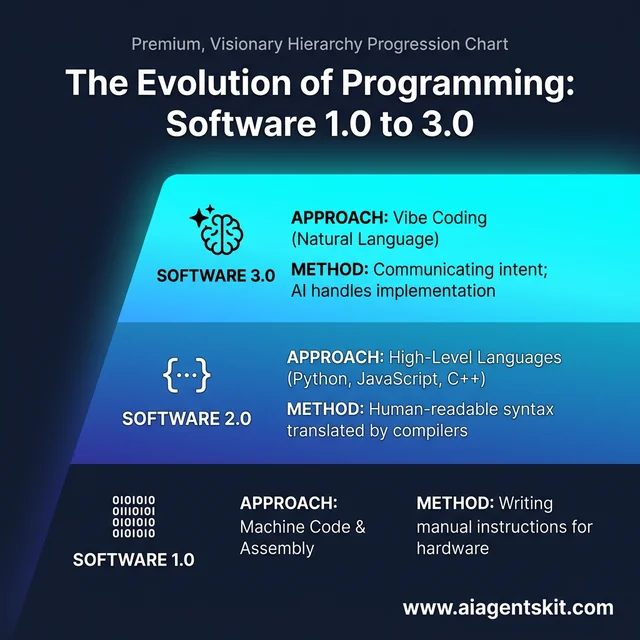 The evolution of programming through three major eras: Software 1.0 (Machine Code), Software 2.0 (High-Level Languages), and Software 3.0 (Vibe Coding). This transition shifts the developer’s role from writing syntax to communicating intent through natural language, allowing AI to handle the underlying implementation details and complexity in 2026.
Vibe Coding vs Traditional Coding
Here’s how vibe coding fundamentally differs from traditional programming:
| Aspect | Traditional Coding | Vibe Coding |
|---|---|---|
| Primary tool | Text editor/IDE | AI assistant with chat interface |
| Input | Specific syntax and commands | Natural language descriptions |
| Focus | How to implement | What to achieve |
| Learning curve | High (syntax, frameworks, tools) | Lower (prompting, iteration) |
| Error handling | Debug line by line | Describe problem, iterate on solution |
| Best for | Complex systems, precise control | Rapid prototyping, MVPs |
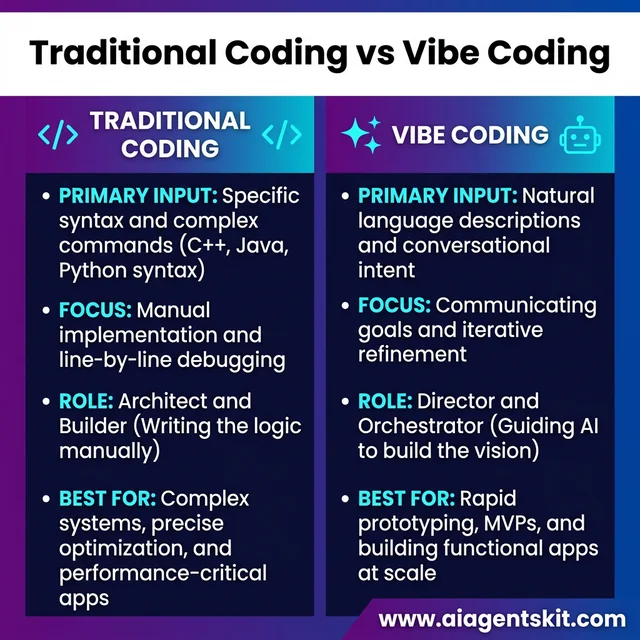 A direct comparison between Traditional Coding and Vibe Coding paradigms. Traditional development focuses on manual syntax and line-by-line debugging while Vibe Coding prioritizes rapid prototyping and conversational intent. This shift empowers a new class of “AI Orchestrators” to build functional applications significantly faster than traditional methods allowed just a few years ago.
The mindset shift is significant. In traditional coding, you’re the architect and the builder—you design the solution and manually construct every piece. In vibe coding, you’re more like a director working with an incredibly capable assistant. You focus on what you want to create; the AI handles how to make it happen.
That said, I want to be clear about something: vibe coding doesn’t mean blindly accepting whatever the AI produces. The most effective vibe coders I’ve observed still review the output, understand the logic, and guide the AI toward better solutions through iteration.
How Vibe Coding Works (Step by Step)
Let me walk you through how vibe coding actually works in practice.
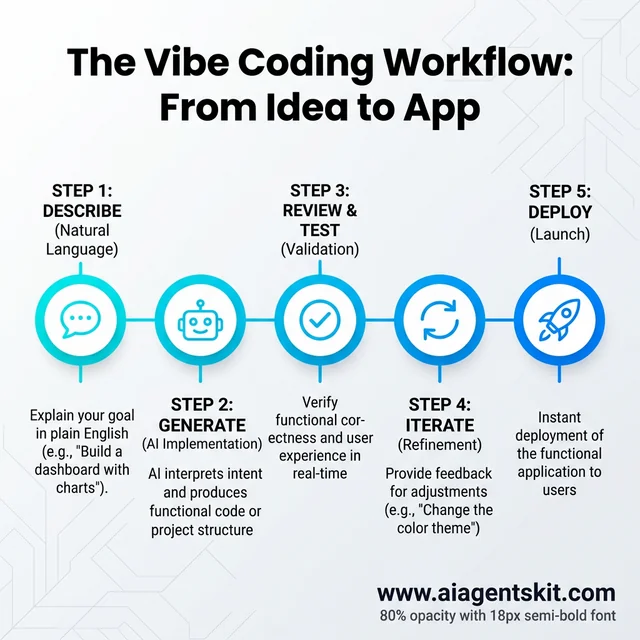 The iterative Vibe Coding workflow: Describe your goal, generate code via AI, review results, iterate through feedback, and deploy. This loop allows for rapid development cycles where the focus remains on the “vibe” and user experience rather than technical boilerplate, making it the preferred method for MVPs and modern prototypes.
The Basic Workflow
Step 1: Describe what you want in plain English. You start by explaining your goal conversationally. This could be as simple as “Build me a todo list app with dark mode” or as detailed as “Create a landing page for a SaaS product with a hero section, pricing table, and email signup form using a blue and white color scheme.”
Step 2: AI generates code based on your description. The AI interprets your intent and produces functional code—often complete files or even entire project structures. Depending on the tool, this might happen in seconds.
Step 3: Review and test the output. Here’s where you verify that the AI understood your intent. Does the app do what you asked? Are there obvious issues?
Step 4: Iterate by refining your prompts. You provide feedback: “Make the buttons larger,” “Add form validation,” or “The pricing table should have three tiers.” The AI adjusts the code based on your instructions.
Step 5: Deploy or continue building. Once satisfied, you deploy your application or use it as a foundation for further development.
The Role of Large Language Models
If you’re wondering how AI can possibly write working code from a simple description, the answer lies in large language models (LLMs).
Modern LLMs like GPT-5, Claude 4, and Gemini 3 have been trained on billions of lines of code alongside natural language text. This training enables them to:
- Understand what you’re asking for in conversational language
- Translate that understanding into appropriate code patterns
- Apply best practices they’ve learned from millions of examples
- Generate syntactically correct, often functional code
Current models are particularly strong with popular languages like Python, JavaScript, and TypeScript—partly because these languages have extensive documentation and examples in the training data.
Real Example: Building a Simple App
Let me show you what vibe coding looks like in action.
First prompt:
“Build me a simple expense tracker. I want to add expenses with a description and amount, see a list of all expenses, and view the total spent.”
The AI might generate a complete React application with:
- An input form for adding expenses
- A list component displaying all entries
- A total calculator at the bottom
- Basic styling to make it look presentable
Iteration prompt:
“Great, but can you add categories for expenses like ‘Food’, ‘Transport’, and ‘Entertainment’? Also add a button to delete expenses.”
The AI updates the code to include:
- A dropdown selector for categories
- Color-coding by category
- Delete functionality for each entry
In a few minutes and two conversational exchanges, you have a functional application that would traditionally take hours to prototype.
Who Invented Vibe Coding? The Andrej Karpathy Story
Understanding vibe coding requires knowing the mind behind the concept.
Andrej Karpathy is one of the most respected figures in AI. His credentials are remarkable:
- Co-founder of OpenAI (the company behind GPT and ChatGPT)
- Former Senior Director of AI at Tesla (leading the Autopilot team)
- PhD from Stanford, where he pioneered work in deep learning for computer vision
- Renowned educator whose Stanford lectures have millions of views
In February 2025, Karpathy shared his observations about a new way of programming he’d been practicing. He described how he would simply describe what he wanted to an LLM, run the code, watch what happens, and iterate—often without reading or fully understanding the generated code.
What made his observation so impactful wasn’t just the practice itself (many developers were already experimenting with AI assistants), but his framing of it as a fundamental shift in how humans and computers will interact. He positioned vibe coding as the natural evolution of programming, not just a productivity hack.
The term “vibe coding” spread rapidly from there, resonating with developers who recognized this experience in their own work. Within months, it had entered mainstream vocabulary and was being discussed in academic papers, tech publications, and eventually, the Collins Dictionary.
Benefits of Vibe Coding: Why It’s Gaining Popularity
Let’s examine why vibe coding has captured so much attention—and real adoption.
Speed and Productivity
The productivity gains are substantial. Research indicates that AI coding tools can boost coding speed by up to 55% and reduce documentation search time by 62%. In my experience, the time savings are most dramatic for:
- Boilerplate code: Setting up projects, creating basic components
- Standard patterns: Authentication flows, CRUD operations, API integrations
- Exploration: Quickly testing ideas to see if they’re viable
Instead of spending an hour writing setup code, you can describe what you need and have it generated in seconds.
Accessibility for Non-Programmers
This is perhaps vibe coding’s most democratizing aspect. Domain experts—designers, product managers, entrepreneurs, researchers—can now build functional prototypes without years of coding education.
Someone with a business idea can describe their vision and have a working MVP to test with users. A researcher can build a data visualization tool by describing what they want to see. A designer can generate functional interfaces that match their mockups.
If you’ve ever wanted to learn AI without a tech background, vibe coding represents one of the most accessible entry points.
Reduced Cognitive Load
Traditional programming demands holding a lot in your head simultaneously: syntax rules, framework conventions, API documentation, debugging patterns. It’s mentally taxing.
Vibe coding lets you offload much of this cognitive burden. You stay focused on:
- What problem you’re solving
- How the user experience should feel
- The logic and flow of your application
The AI handles the syntax, the import statements, the boilerplate—the stuff that’s necessary but not where you add unique value.
Better Developer Experience
Many developers report that vibe coding helps them stay in a creative “flow state” longer. Instead of breaking concentration to look up documentation or remember syntax, they maintain momentum by simply describing what they need next.
There’s also something genuinely enjoyable about it. Having a capable partner who can instantly implement your ideas makes the creative process more fluid and collaborative.
Vibe Coding Challenges and Limitations
Now for the parts enthusiasts don’t always mention. Vibe coding has real limitations, and understanding them is crucial.
The “Black Box” Problem
When AI generates your code, you may not fully understand what it produced or why it works. This creates several issues:
- Debugging becomes harder: When something breaks, you’re troubleshooting code you didn’t write and may not understand
- Maintenance challenges: Six months later, can you modify AI-generated code effectively?
- Learning impediment: If you never write code yourself, do you truly understand programming?
Karpathy himself described AI as “alien tools” that lack manuals, highlighting the opacity of LLM reasoning.
Quality and Security Concerns
The statistics here are sobering. One survey found that 96% of developers believe AI-generated code isn’t functionally correct, yet only 48% always check it before committing.
Uncritically accepting AI output can introduce:
- Bugs: Logic errors, edge cases the AI didn’t consider
- Security vulnerabilities: Insecure patterns, exposed credentials, injection risks
- Technical debt: Code that works now but creates problems later
In 2026, we’re seeing AI-generated code sections appear in security audits, and for good reason.
The Trust Gap
Despite high adoption, many developers have reservations. Approximately 46% of developers distrust AI accuracy, and 68% report reliability issues with AI-generated output.
This trust gap reflects real experience. AI produces impressive code most of the time, but it also:
- Hallucinates APIs that don’t exist
- Generates plausible-looking code that fails on edge cases
- Makes subtle errors that are hard to spot
The right response isn’t to avoid AI tools entirely, but to develop appropriate review practices.
Not Suitable for Everything
Vibe coding excels at certain tasks but isn’t appropriate for:
- Mission-critical systems: Medical devices, financial transactions, infrastructure
- Complex business logic: Nuanced rules that require deep domain understanding
- Regulatory compliance: Where every line of code may need auditing
- Performance-sensitive applications: Where optimization matters
For these cases, traditional development with careful engineering practices remains essential. If you prefer to keep AI development local for security reasons, see our guide on building offline AI. For running AI models on edge devices, our complete guide to running AI models on Raspberry Pi provides step-by-step instructions for deploying models on low-power hardware.
Best Tools for Vibe Coding in 2026
The vibe coding ecosystem has matured significantly. Here are the leading tools:
Cursor AI
What it is: An AI-first integrated development environment (IDE) built on Visual Studio Code.
Best for: Professional developers working on complex projects who want AI assistance without leaving their familiar environment.
Key features:
- Deep codebase awareness—Cursor understands your entire project, not just the current file
- Integrated AI chat for real-time coding assistance and debugging
- Proprietary AI model optimized for programming tasks
- Seamless integration with existing VS Code extensions
Pricing: Free tier available, Pro plan around $20/month
When I compare AI coding tools, Cursor stands out for its contextual understanding. It knows about your project structure, dependencies, and coding patterns, making suggestions much more relevant than generic completions.
Bolt.new
What it is: A browser-based tool from StackBlitz that generates full-stack applications from natural language prompts.
Best for: Rapid prototyping, creative sprints, and building MVPs quickly.
Key features:
- Generate complete applications from a single prompt
- Full-stack scaffolding including frontend and backend
- Built-in integrations with services like Stripe, Supabase, and authentication providers
- Instant preview and deployment
Pricing: Free tier with limited usage, paid plans starting around $20/month
Bolt.new’s strength is going from zero to deployed application incredibly fast. You describe your app, it builds the structure, and you’re iterating on a live version within minutes.
Replit Agent
What it is: An AI agent integrated into Replit’s browser-based development environment.
Best for: Beginners, educators, and anyone who wants the simplest path from idea to working application.
Key features:
- Autonomous code generation—the agent can write, debug, and iterate
- Real-time collaboration similar to Google Docs
- Built-in deployment and hosting
- Huge template library to start from
Pricing: Free tier available, Pro plans for heavier usage
Replit has evolved from a browser code editor into a complete AI-powered development platform. It’s particularly popular in educational settings because there’s no setup required—you just start building.
v0 by Vercel
What it is: An AI tool specifically for generating user interface components.
Best for: Frontend developers building with React, Next.js, and modern component libraries.
Key features:
- Chat-based interface—describe your UI and get instant components
- Clean, modern code output using Tailwind CSS and shadcn/ui
- Exportable to your existing projects
- Design-to-code workflow
Pricing: Free tier, premium features with subscription
If you’re building interfaces, v0 is remarkably good at understanding design intent and producing production-quality React components.
Quick Comparison
| Tool | Best For | Skill Level | Starting Price |
|---|---|---|---|
| Cursor | Complex projects | Intermediate-Advanced | Free, $20/mo Pro |
| Bolt.new | Rapid MVPs | Beginner-Intermediate | Free, ~$20/mo Pro |
| Replit | Education, beginners | Beginner | Free, ~$7/mo Pro |
| v0 | UI components | Beginner-Advanced | Free, subscription |
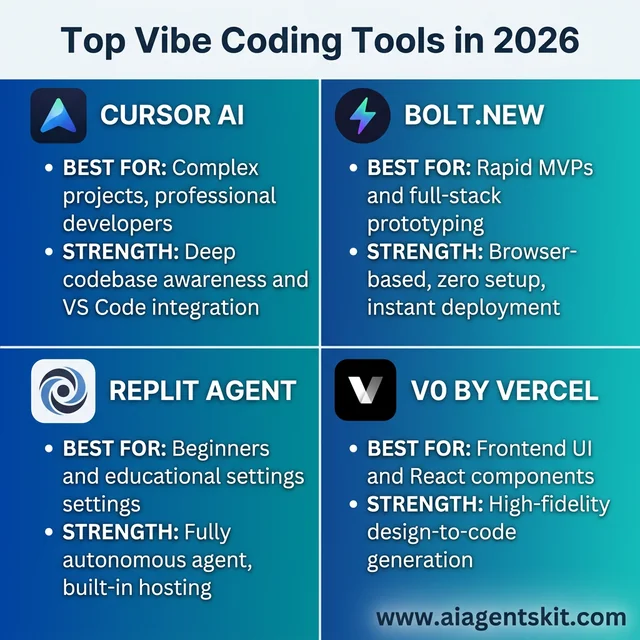 Comparing the top Vibe Coding tools of 2026: Cursor AI for professional IDE integration, Bolt.new for instant full-stack deployment, Replit Agent for autonomous builds, and v0 for high-fidelity UI components. Each tool serves different skill levels and project requirements, providing a comprehensive ecosystem for the natural language programming revolution.
How to Get Started with Vibe Coding
Ready to try it yourself? Here’s a practical path forward.
Step 1: Choose Your First Tool
For complete beginners, start with Replit or Bolt.new—they require zero setup and you can build something functional within your first session.
If you’re already a developer, try Cursor. It integrates into workflows you already know while adding powerful AI capabilities.
For frontend focus, experiment with v0—describe a component and watch it materialize.
All of these offer free tiers, so you can explore without commitment.
Step 2: Start with Simple Projects
Don’t attempt to build your magnum opus on day one. Begin with small projects where the stakes are low:
- A personal portfolio page
- A simple to-do or note-taking app
- A calculator or conversion tool
- A dashboard that displays data
These projects teach you how to communicate with AI tools effectively without overwhelming complexity.
Step 3: Learn to Write Better Prompts
Your results depend heavily on how you communicate your intent. Some principles:
- Be specific: “A button” is vague; “a blue rounded button with white text that says ‘Submit’” is clear
- Provide context: Explain what the component is for and how it fits into the larger application
- Iterate incrementally: Instead of one giant prompt, build up through conversation
- Include constraints: Mention technologies, styles, or limitations upfront
If you want to go deeper, our prompt engineering guide covers these principles in detail. For SEO-optimized content, our complete SEO Prompt Toolkit provides copy-paste prompts for keyword research and content optimization.
Step 4: Develop Review Habits
This is critical: always test and review AI-generated code.
- Run the code and verify it does what you intended
- Read through the output to understand the approach
- Look for obvious security issues (exposed keys, user input not validated)
- Consider edge cases the AI might have missed
The goal isn’t to distrust AI tools, but to use them as capable assistants rather than infallible authorities.
Will Vibe Coding Replace Programmers?
This is the question everyone asks, so let me address it directly: No, vibe coding will not replace programmers—but it will change what programming means.
Here’s my honest take:
What becomes more valuable:
- System design and architecture skills
- Understanding business requirements and user needs
- Quality assurance and testing expertise
- Security awareness and code review
- The ability to guide and correct AI output
What becomes less important:
- Memorizing syntax and language-specific details
- Writing boilerplate code from scratch
- Basic implementation of standard patterns
The role is shifting from “person who writes code” to something more like “AI orchestrator” or “technical director.” You’ll need to understand enough about code to evaluate and guide AI output, but you’ll spend less time on mechanical implementation.
For a deeper exploration of how AI affects different careers, check out our piece on whether AI will take your job.
The Future of Vibe Coding
Where is this heading? Based on current trends, here’s what I expect:
By late 2026: The share of code written with significant AI assistance could reach 65%, up from around 42% in early 2026. Vibe coding tools will become standard in many development workflows.
Agentic AI development: We’re already seeing AI tools that don’t just generate code but can autonomously debug, run tests, and iterate on their own output. This “agentic” approach will become more sophisticated.
Enterprise adoption: Large organizations are developing governance frameworks for AI-generated code, with security certifications and audit trails becoming standard.
Beyond text: Multimodal vibe coding is emerging—using voice, sketches, and visual references alongside text to communicate intent.
The underlying direction is clear: the barrier between idea and implementation continues to lower. Whether that’s exciting or concerning (or both) depends largely on how we adapt. For ongoing predictions, see our future of vibe coding analysis.
Frequently Asked Questions
Is vibe coding the same as no-code?
No, they’re related but different approaches:
- No-code platforms (like Webflow, Bubble) provide visual builders with pre-made components. You’re limited to what the platform supports.
- Vibe coding generates actual code that you can inspect, modify, and deploy anywhere. You have full flexibility but are working with real programming languages behind the scenes.
Vibe coding is closer to traditional development in output, but closer to no-code in accessibility.
Can I learn vibe coding without programming experience?
Yes, you can build functional applications without prior coding knowledge. However, having basic programming literacy helps you:
- Understand when AI output is wrong
- Make manual adjustments when needed
- Debug issues more effectively
I’d recommend learning programming fundamentals alongside vibe coding rather than treating them as alternatives.
Is vibe coding safe for production apps?
It depends on the use case:
- Suitable for: Internal tools, MVPs, prototypes, personal projects
- Requires extra caution: User-facing applications, anything handling sensitive data
- Not recommended without expert review: Financial systems, healthcare, critical infrastructure
The key is appropriate human oversight based on the risk level.
What programming languages work best with vibe coding?
Current AI tools are strongest with:
- Python: Largest training data, versatile language
- JavaScript/TypeScript: Web development focus, lots of examples
- HTML/CSS: UI generation is particularly strong
Less common languages may have less reliable results.
How much does vibe coding cost?
Many tools offer free tiers sufficient for learning and small projects. Paid plans typically range from $7-25/month and provide:
- More AI queries
- Faster response times
- Advanced features
- Priority support
For serious use, budget around $20-40/month for your primary tool.
Conclusion
Vibe coding represents a genuine shift in how we create software. The ability to describe what you want in plain language and have AI generate functional code was science fiction a few years ago—now it’s a practical tool millions of developers use daily.
Is it the death of programming? No. Is it the future of programming? In significant part, yes.
The wise approach is neither blind enthusiasm nor dismissive skepticism. Learn these tools, understand their limitations, develop good review practices, and stay curious about where they’re heading.
If you’re ready to explore further, I’d encourage you to:
- Try one of the tools mentioned above (Cursor, Bolt.new, Replit, v0)
- Start with a simple project to build intuition
- Check out our vibe coding starter kit for a complete setup guide including tool recommendations, essential prompts, configuration tips, and your first project walkthrough
The vibe coding revolution is here. The question isn’t whether to engage with it, but how.
Last updated: January 2026