How to Build Your First AI Agent with Python (2026)
Learn to build your first AI agent with Python step-by-step. Complete code examples for tools, memory, and the agent loop. No ML experience needed.
I spent weeks reading AI agent tutorials. Most were either too simple (just a chatbot) or way too complicated (enterprise-grade stuff I didn’t need). Here’s what I wish someone had told me from the start: a working AI agent can be about 50 lines of Python.
That’s it. Fifty lines to build something that can reason, use tools, and actually do things on its own.
In this tutorial, you’ll build three progressively more powerful AI agents with Python—from a simple conversational agent to one with tools and memory. By the end, you’ll have complete, working code you can copy, modify, and make your own. No machine learning experience required.
According to G2’s 2025 research, 57% of companies now have AI agents running in production. They’re not some future technology—they’re here, and they’re surprisingly accessible to build. Before diving in, you may want to review our generative AI vs agentic AI comparison to understand where agentic systems fit in the broader AI landscape. Let’s get started.
What You’ll Need
Before we write any code, let’s make sure you have everything set up. This should take about 5 minutes.
Prerequisites
You’ll need:
- Python 3.10+ — Download from python.org if you don’t have it
- An OpenAI API key — Get one at platform.openai.com
- Basic Python knowledge — If you understand functions, dictionaries, and f-strings, you’re good
- A code editor — VS Code works great, but use whatever you like
- About 30 minutes — And maybe $1-2 in API costs for testing
Setting Up Your Environment
Open your terminal and run these commands:
# Create a project folder
mkdir my-first-agent
cd my-first-agent

# Create a virtual environment
python -m venv agent-env

# Activate it (Linux/Mac)
source agent-env/bin/activate

# Or on Windows
# agent-env\Scripts\activate

# Install the packages we need
pip install openai python-dotenv
Now create a .env file to store your API key:
# .env file
OPENAI_API_KEY=sk-your-api-key-here
The first time I ran an AI agent, I forgot to set the API key and spent 20 minutes debugging a “connection error.” Don’t be me. Double-check this step. Once you have your first agent running, consider exploring domain-specific implementations like AI agents for customer support ticketing to see how these concepts apply to real-world automation scenarios.
Cost Expectations
Here’s the good news: development testing is cheap. We’ll use GPT-4o-mini for most examples, which costs about $0.15 per million input tokens. In practice, a development session of 50-100 agent conversations might cost you $0.50 to $2.00 total.
If you want to use Claude instead of OpenAI, the setup is similar—just install anthropic instead and swap the API calls. I’ll focus on OpenAI since it’s more accessible, but Claude tends to follow tool schemas more reliably in my testing.
Understanding AI Agent Components
Before we build anything, let’s understand what an AI agent actually is. This will make everything else click into place.
The 5 Core Components of an AI Agent
Every AI agent—whether it’s a simple assistant or a complex system—has these five components:
- LLM (The Brain) — A large language model like GPT-4, Claude, or Gemini that does the actual reasoning and decision-making
- Instructions (System Prompt) — Tells the agent who it is, how to behave, and what rules to follow
- Tools — External functions the agent can call: calculators, APIs, databases, web search, anything
- Memory — How the agent remembers past interactions and maintains context
- Agent Loop — The control flow that orchestrates: Reason → Decide → Act → Observe → Repeat
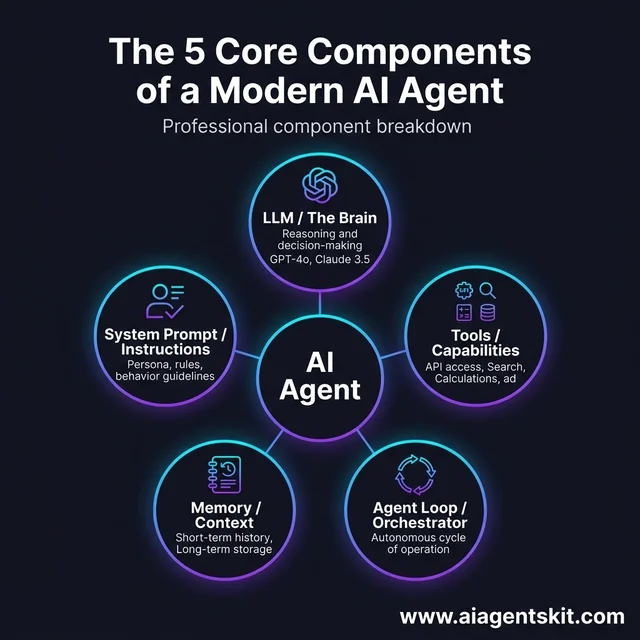 AI Agent Architecture: A modern AI agent is built on five pillars. The LLM acts as the central reasoning engine (“the brain”), while the System Prompt defines personality and rules. Tools provide external capabilities like web search or calculators. Memory stores both short-term conversational context and long-term persistent data. Finally, the Agent Loop orchestrates these components into a continuous autonomous cycle of execution.
For Claude users who want these configurations to persist across conversations, Claude Agent Skills let you create reusable, filesystem-based bundles.
That’s it. Every AI agent framework—LangChain, CrewAI, AutoGen—is just an abstraction over these five things.
What Makes an Agent Different from a Chatbot?
This confused me at first. Here’s the simple distinction:
| Chatbot | AI Agent | |
|---|---|---|
| Flow | Input → Output (one step) | Reason → Act → Observe → Repeat (loop) |
| Tools | None or very limited | Can use external functions |
| Autonomy | Follows script | Makes decisions |
| Complexity | Single response | Multi-step tasks |
A chatbot responds to what you say. An agent figures out what to do, does it, and checks if it worked—potentially multiple times until the task is complete.
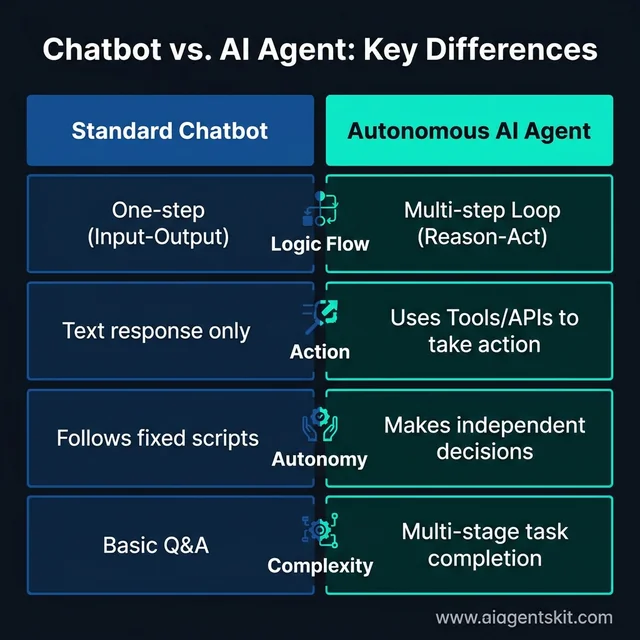 Chatbot vs. AI Agent Comparison: While chatbots are reactive (“Input-Output”), agents are proactive and goal-oriented. This infographic highlights the fundamental shift from simple text exchanges to complex, tool-enabled autonomous loops. An agent can make independent decisions, call external APIs, and execute multi-stage tasks that a standard chatbot cannot handle. Understanding this distinction is key to building advanced AI systems in 2026.
If you want a deep dive into what AI agents are and how they fit into the bigger picture, check out our complete guide. But for now, this is enough to start building.
Part 1: Building a Simple Conversational Agent
Let’s start with the simplest possible agent—one that can have a conversation. This gives us a foundation to build on.
Create a file called simple_agent.py:
import os
from openai import OpenAI
from dotenv import load_dotenv

# Load your API key from .env
load_dotenv()
client = OpenAI()

def simple_agent(user_message: str) -> str:
    """A simple conversational agent."""

    response = client.chat.completions.create(
        model="gpt-4o-mini",
        messages=[
            {
                "role": "system",
                "content": "You are a helpful assistant. Be concise and friendly."
            },
            {
                "role": "user",
                "content": user_message
            }
        ],
        temperature=0.7
    )

    return response.choices[0].message.content

# Test it out
if __name__ == "__main__":
    while True:
        user_input = input("You: ")
        if user_input.lower() in ['quit', 'exit']:
            break
        response = simple_agent(user_input)
        print(f"Agent: {response}\n")
Run it:
python simple_agent.pyYou should see something like:
You: What's the capital of France?
Agent: The capital of France is Paris. It's known for the Eiffel Tower, the Louvre, and incredible food!

You: quit
That’s a working agent! Well, kind of. It’s more of a chatbot at this point—it responds but doesn’t do anything. Let’s fix that.
Understanding the Message Format
Notice the messages list has two objects: one with role: "system" and one with role: "user". The system message sets the agent’s personality and rules. The user message is what you send.
This pattern—system prompt plus conversation—is the foundation of every agent. The system prompt is where you define who your agent is.
Part 2: Adding Tools (Function Calling)
Here’s where agents get interesting. Tools let your agent do things—perform calculations, look up information, call APIs, whatever you can write a Python function for.
What Are Tools and Why They Matter
Tools are just Python functions with a schema that tells the LLM how to use them. When the agent decides it needs to use a tool, it returns a special “tool call” response instead of a regular message. You then execute the function and feed the result back to the agent.
This is the core pattern that separates agents from chatbots.
Defining Your First Tools
Let’s create two simple tools: a calculator and a (mock) weather lookup.
import json

# Define the tools the agent can use
tools = [
    {
        "type": "function",
        "function": {
            "name": "calculate",
            "description": "Perform a mathematical calculation. Use this for any math that needs precision.",
            "parameters": {
                "type": "object",
                "properties": {
                    "expression": {
                        "type": "string",
                        "description": "The mathematical expression to evaluate, e.g., '2 + 2' or '15 * 7.5'"
                    }
                },
                "required": ["expression"]
            }
        }
    },
    {
        "type": "function",
        "function": {
            "name": "get_weather",
            "description": "Get the current weather for a specific city. Use this when users ask about weather.",
            "parameters": {
                "type": "object",
                "properties": {
                    "city": {
                        "type": "string",
                        "description": "The city name, e.g., 'New York' or 'London'"
                    }
                },
                "required": ["city"]
            }
        }
    }
]

# Implement the actual functions
def calculate(expression: str) -> str:
    """Safely evaluate a math expression."""
    try:
        # Only allow safe math operations
        allowed_chars = set('0123456789+-*/.() ')
        if not all(c in allowed_chars for c in expression):
            return "Error: Invalid characters in expression"
        result = eval(expression)
        return str(result)
    except Exception as e:
        return f"Error: {str(e)}"

def get_weather(city: str) -> str:
    """Mock weather function - replace with real API."""
    # In a real agent, you'd call a weather API here
    weather_data = {
        "new york": "Sunny, 72°F (22°C)",
        "london": "Cloudy, 55°F (13°C)",
        "tokyo": "Rainy, 65°F (18°C)",
        "paris": "Partly cloudy, 68°F (20°C)"
    }
    city_lower = city.lower()
    if city_lower in weather_data:
        return f"Weather in {city}: {weather_data[city_lower]}"
    return f"Weather data not available for {city}"

# Function dispatcher
def execute_tool(name: str, arguments: dict) -> str:
    """Execute a tool by name with given arguments."""
    if name == "calculate":
        return calculate(arguments["expression"])
    elif name == "get_weather":
        return get_weather(arguments["city"])
    return f"Unknown tool: {name}"
See those description fields? They’re crucial. The LLM reads them to decide which tool to use. My first tool-enabled agent kept trying to use a calculator for questions like “What’s the weather?”—because my descriptions were vague. Be specific.
Integrating Tools with the Agent Loop
Now let’s create an agent that can use these tools. This is where the “agent loop” comes in:
import os
import json
from openai import OpenAI
from dotenv import load_dotenv

load_dotenv()
client = OpenAI()

def agent_with_tools(user_message: str, max_iterations: int = 5) -> str:
    """An agent that can use tools to answer questions."""

    messages = [
        {
            "role": "system",
            "content": """You are a helpful assistant with access to tools.
Use the calculate tool for any math operations.
Use the get_weather tool when users ask about weather.
Always explain your reasoning briefly."""
        },
        {
            "role": "user",
            "content": user_message
        }
    ]

    for iteration in range(max_iterations):
        response = client.chat.completions.create(
            model="gpt-4o-mini",
            messages=messages,
            tools=tools,
            tool_choice="auto"  # Let the model decide when to use tools
        )

        message = response.choices[0].message

        # If no tool calls, we have our final answer
        if not message.tool_calls:
            return message.content

        # Process each tool call
        messages.append(message)  # Add assistant's response (with tool calls)

        for tool_call in message.tool_calls:
            function_name = tool_call.function.name
            arguments = json.loads(tool_call.function.arguments)

            print(f"  [Using tool: {function_name}({arguments})]")

            # Execute the tool
            result = execute_tool(function_name, arguments)

            # Add the tool result to the conversation
            messages.append({
                "role": "tool",
                "tool_call_id": tool_call.id,
                "content": result
            })

    return "Max iterations reached without final answer"

# Test it
if __name__ == "__main__":
    print("Agent with Tools")
    print("-" * 40)

    questions = [
        "What's 15% of 847?",
        "What's the weather like in Tokyo?",
        "If I have $500 and spend 23%, how much is left?"
    ]

    for q in questions:
        print(f"\nYou: {q}")
        answer = agent_with_tools(q)
        print(f"Agent: {answer}")
Run it, and you’ll see something like:
You: What's 15% of 847?
[Using tool: calculate({'expression': '847 * 0.15'})]
Agent: 15% of 847 is 127.05.
You: If I have $500 and spend 23%, how much is left?
[Using tool: calculate({'expression': '500 * 0.23'})]
[Using tool: calculate({'expression': '500 - 115'})]
Agent: If you spend 23% of $500, that's $115, leaving you with $385.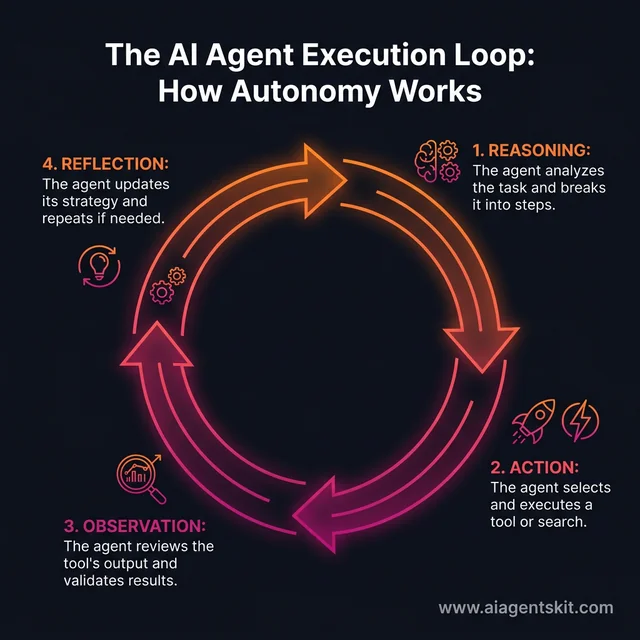 The AI Agent Execution Loop: This continuous four-step cycle distinguishes agents from simple automation. First, the agent reasons about the user’s goal. Second, it takes action by calling a tool or API. Third, it observes the outcome and validates if the tool’s result moves the process forward. Finally, it reflects on its overall progress and updates its strategy before starting the next loop. This self-correcting cycle enables true task autonomy.
Notice how the agent broke down the second question into two calculations on its own? That’s the agent loop in action—reason, act, observe, repeat.
Part 3: Implementing Memory
So far, our agent forgets everything after each response. That’s fine for simple Q&A, but most real applications need context. Let’s add memory.
Short-Term Memory (Conversation History)
The simplest form of memory is just keeping track of the conversation. This is called “short-term” or “working” memory.
class AgentMemory:
    """Simple conversation memory for an AI agent."""

    def __init__(self, max_messages: int = 20):
        self.messages = []
        self.max_messages = max_messages
        self.system_prompt = None

    def set_system_prompt(self, prompt: str):
        """Set the agent's system prompt."""
        self.system_prompt = {"role": "system", "content": prompt}

    def add_user_message(self, content: str):
        """Add a user message to memory."""
        self.messages.append({"role": "user", "content": content})
        self._trim_if_needed()

    def add_assistant_message(self, content: str):
        """Add an assistant message to memory."""
        self.messages.append({"role": "assistant", "content": content})
        self._trim_if_needed()

    def add_tool_message(self, tool_call_id: str, content: str):
        """Add a tool result to memory."""
        self.messages.append({
            "role": "tool",
            "tool_call_id": tool_call_id,
            "content": content
        })

    def get_messages(self) -> list:
        """Get all messages including system prompt."""
        if self.system_prompt:
            return [self.system_prompt] + self.messages
        return self.messages

    def _trim_if_needed(self):
        """Remove old messages if we exceed the limit."""
        # Keep system prompt, but trim conversation history
        if len(self.messages) > self.max_messages:
            # Keep the most recent messages
            self.messages = self.messages[-self.max_messages:]

    def clear(self):
        """Clear conversation history but keep system prompt."""
        self.messages = []
The _trim_if_needed method is important. LLMs have a context window limit (GPT-4o-mini is 128k tokens), and you don’t want to blow through it on long conversations. Trimming old messages keeps things manageable.
Long-Term Memory (Persistent Storage)
Sometimes you need the agent to remember things across sessions—user preferences, past facts, etc. Here’s a simple file-based approach:
import json
from pathlib import Path

class PersistentMemory:
    """Simple file-based long-term memory."""

    def __init__(self, filepath: str = "agent_memory.json"):
        self.filepath = Path(filepath)
        self.data = self._load()

    def _load(self) -> dict:
        """Load memory from file."""
        if self.filepath.exists():
            with open(self.filepath, 'r') as f:
                return json.load(f)
        return {"facts": [], "preferences": {}}

    def _save(self):
        """Save memory to file."""
        with open(self.filepath, 'w') as f:
            json.dump(self.data, f, indent=2)

    def remember_fact(self, fact: str):
        """Store a fact for later recall."""
        if fact not in self.data["facts"]:
            self.data["facts"].append(fact)
            self._save()

    def remember_preference(self, key: str, value: str):
        """Store a user preference."""
        self.data["preferences"][key] = value
        self._save()

    def get_context(self) -> str:
        """Get a summary of remembered info for the agent."""
        context_parts = []
        if self.data["facts"]:
            context_parts.append("Known facts: " + "; ".join(self.data["facts"][-5:]))
        if self.data["preferences"]:
            prefs = [f"{k}: {v}" for k, v in self.data["preferences"].items()]
            context_parts.append("User preferences: " + "; ".join(prefs))
        return "\n".join(context_parts) if context_parts else ""
I still don’t have a perfect answer for when to use short-term vs. long-term memory—it really depends on your use case. Short-term is usually enough for task-focused agents. Long-term matters when you need personalization or recall across sessions.
For more sophisticated memory (embeddings, vector databases), check out our guide on AI agent memory systems or explore vector database code snippets. Simple file storage works fine for many use cases, but these are essential for scaling.
Part 4: The Complete Agent (Putting It All Together)
Let’s combine everything into one complete, production-ready agent. This is the code you can actually use as a starting point for real projects.
import os
import json
from openai import OpenAI
from dotenv import load_dotenv
from datetime import datetime

load_dotenv()
client = OpenAI()

# ============ TOOLS ============

tools = [
    {
        "type": "function",
        "function": {
            "name": "calculate",
            "description": "Perform mathematical calculations. Use for any math that needs precision.",
            "parameters": {
                "type": "object",
                "properties": {
                    "expression": {
                        "type": "string",
                        "description": "Math expression to evaluate, e.g., '2 + 2' or '100 * 0.15'"
                    }
                },
                "required": ["expression"]
            }
        }
    },
    {
        "type": "function",
        "function": {
            "name": "get_current_time",
            "description": "Get the current date and time.",
            "parameters": {
                "type": "object",
                "properties": {},
                "required": []
            }
        }
    },
    {
        "type": "function",
        "function": {
            "name": "save_note",
            "description": "Save a note or reminder for later. Use when user wants to remember something.",
            "parameters": {
                "type": "object",
                "properties": {
                    "note": {
                        "type": "string",
                        "description": "The note to save"
                    }
                },
                "required": ["note"]
            }
        }
    }
]

def calculate(expression: str) -> str:
    try:
        allowed = set('0123456789+-*/.() ')
        if not all(c in allowed for c in expression):
            return "Error: Invalid characters"
        return str(eval(expression))
    except Exception as e:
        return f"Error: {e}"

def get_current_time() -> str:
    return datetime.now().strftime("%Y-%m-%d %H:%M:%S")

notes = []  # Simple in-memory storage
def save_note(note: str) -> str:
    notes.append({"time": get_current_time(), "note": note})
    return f"Note saved: {note}"

def execute_tool(name: str, args: dict) -> str:
    tools_map = {
        "calculate": lambda: calculate(args.get("expression", "")),
        "get_current_time": lambda: get_current_time(),
        "save_note": lambda: save_note(args.get("note", ""))
    }
    return tools_map.get(name, lambda: f"Unknown tool: {name}")()

# ============ MEMORY ============

class ConversationMemory:
    def __init__(self, max_messages=30):
        self.messages = []
        self.max = max_messages
        self.system = {
            "role": "system",
            "content": """You are a helpful AI assistant with access to tools.
You can do calculations, check the time, and save notes.
Be friendly, concise, and use tools when they help.
Always explain what you're doing briefly."""
        }

    def add(self, message):
        self.messages.append(message)
        if len(self.messages) > self.max:
            self.messages = self.messages[-self.max:]

    def get_all(self):
        return [self.system] + self.messages

# ============ AGENT ============

class CompleteAgent:
    def __init__(self):
        self.memory = ConversationMemory()
        self.max_iterations = 10

    def chat(self, user_input: str) -> str:
        """Process user input and return agent response."""
        self.memory.add({"role": "user", "content": user_input})

        for i in range(self.max_iterations):
            try:
                response = client.chat.completions.create(
                    model="gpt-4o-mini",
                    messages=self.memory.get_all(),
                    tools=tools,
                    tool_choice="auto",
                    temperature=0.7
                )

                message = response.choices[0].message

                # No tool calls = final answer
                if not message.tool_calls:
                    self.memory.add({"role": "assistant", "content": message.content})
                    return message.content

                # Handle tool calls
                self.memory.add({
                    "role": "assistant",
                    "content": message.content,
                    "tool_calls": [
                        {
                            "id": tc.id,
                            "type": "function",
                            "function": {
                                "name": tc.function.name,
                                "arguments": tc.function.arguments
                            }
                        } for tc in message.tool_calls
                    ]
                })

                for tool_call in message.tool_calls:
                    func_name = tool_call.function.name
                    func_args = json.loads(tool_call.function.arguments)

                    print(f"  → Using {func_name}: {func_args}")
                    result = execute_tool(func_name, func_args)

                    self.memory.add({
                        "role": "tool",
                        "tool_call_id": tool_call.id,
                        "content": result
                    })

            except Exception as e:
                return f"Error: {e}"

        return "I'm having trouble completing this task. Could you try rephrasing?"

# ============ MAIN ============

def main():
    print("=" * 50)
    print("Complete AI Agent - Ready!")
    print("Type 'quit' to exit, 'clear' to reset memory")
    print("=" * 50 + "\n")

    agent = CompleteAgent()

    while True:
        user_input = input("You: ").strip()

        if not user_input:
            continue
        if user_input.lower() == 'quit':
            print("Goodbye!")
            break
        if user_input.lower() == 'clear':
            agent = CompleteAgent()
            print("Memory cleared!\n")
            continue

        response = agent.chat(user_input)
        print(f"Agent: {response}\n")

if __name__ == "__main__":
    main()
This is about 150 lines of code, but it’s a real agent with:
- ✅ Conversation memory that persists across messages
- ✅ Tool usage with proper error handling
- ✅ Iteration limits (I once ran up a $50 API bill by forgetting this)
- ✅ Graceful error handling
- ✅ Clear structure you can extend
Save this as complete_agent.py and run it:
python complete_agent.pyTry conversations like:
You: What's 15% tip on a $67.50 bill?
  → Using calculate: {'expression': '67.50 * 0.15'}
Agent: A 15% tip on $67.50 would be $10.13.

You: Save a note to remember to pay that amount
  → Using save_note: {'note': 'Pay $10.13 tip'}
Agent: I've saved a note for you: "Pay $10.13 tip"

You: What time is it?
  → Using get_current_time: {}
Agent: It's currently 2026-01-07 14:32:15.
Beyond the Basics: When to Use Frameworks
Now that you understand how agents work under the hood, let’s talk about frameworks. Should you use one?
Popular AI Agent Frameworks
The main options in 2026:
- LangChain — The most popular. Tons of integrations, great for complex chains
- CrewAI — Focuses on multi-agent teams. Good for workflows needing collaboration
- AutoGen — Microsoft’s approach. Strong on multi-agent conversations
- PydanticAI — Type-safe, Python-native agents with structured output validation
- OpenAI Agents SDK — Lightweight official option, still maturing
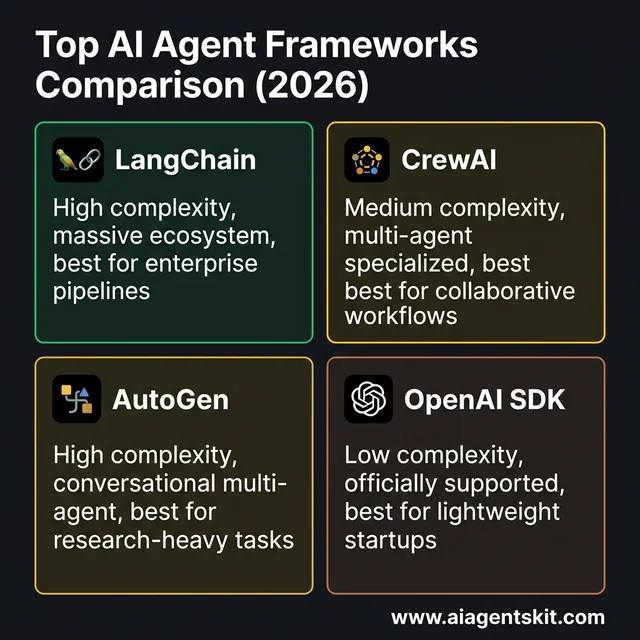 Top AI Agent Frameworks Comparison (2026): Choosing the right tool depends on your project’s complexity and team requirements. LangChain remains the leader for enterprise pipelines, while CrewAI excels at multi-agent collaborative workflows. AutoGen is the go-to for research-heavy conversational agents, and the OpenAI SDK provides a streamlined, official starting point for lightweight applications. Building from scratch (as we do in this tutorial) remains the best way to master these underlying principles before scaling.
Each has strengths. For a detailed comparison of AI agent frameworks, we break down exactly when to use each. If you’re specifically deciding between PydanticAI, LangChain, and LangGraph — the three most popular Python-native options — PydanticAI vs LangChain vs LangGraph compares them on type safety, state management, and production readiness. To understand where agent technology is heading and emerging capabilities, explore the future of AI agents.
My (Honest) Take on Frameworks
Here’s my unpopular opinion: skip LangChain for your first agent.
I know, I know. It’s the standard recommendation. But here’s the thing—frameworks abstract away exactly the parts you need to understand. When something goes wrong (and it will), you’ll have no idea why if you don’t understand the underlying mechanics.
Build a few agents from scratch first. Get confused. Debug weird tool-calling behavior. Then use a framework, because you’ll understand what it’s doing under the hood.
When frameworks make sense:
- Building for production (you need reliability and monitoring)
- Complex multi-agent systems
- Integrating with many tools simultaneously
- Team projects where abstractions help everyone work faster
For a quick prototype or learning project? Stick with vanilla Python and the OpenAI API.
Common Mistakes and Debugging Tips
I’ve made a lot of mistakes building agents. Here’s what I’ve learned so you don’t have to repeat my errors.
The Biggest Mistakes to Avoid
-
Forgetting the API key — Check your
.envfile and environment variables first. I’ve wasted so many debugging sessions on this. -
Vague tool descriptions — The LLM reads your descriptions to decide which tool to use. “Calculate stuff” is bad. “Perform mathematical calculations with precision, use for any math operations” is good.
-
No iteration limits — Always set
max_iterations. My agent once got stuck in a loop of calling the same tool repeatedly. $50 later, I learned my lesson. -
Ignoring error handling — APIs fail. Tool calls return garbage sometimes. Wrap everything in try/except and have sensible fallbacks. For comprehensive security considerations when deploying agents to production, including input validation and secure architecture patterns, refer to our guide on AI agent security best practices.
-
Over-engineering early — Start simple. Add complexity only when you need it. My first agent was way too complicated and I spent more time debugging architecture than building features.
-
Not testing edge cases — What happens if the user says something completely nonsensical? What if they ask your calculator about the weather? Test the weird stuff.
Quick Debugging Checklist
When your agent isn’t working:
- Is the API key set correctly?
- Are tool descriptions specific enough?
- Are you hitting the context window limit?
- Is the response format what you expect? (Print raw responses)
- Are tool arguments parsing correctly? (Check JSON)
- Is there an iteration limit to prevent runaway loops?
My agent once confidently told a user that 2 + 2 = Paris. That was… well, that was a good day to learn about input validation.
Frequently Asked Questions
Do I need machine learning experience to build an AI agent?
No. AI agents use LLMs (like GPT-4 or Claude) as their “brain”—you don’t train anything or write ML code. If you can write basic Python and make API calls, you can build agents. The LLM handles the reasoning; you just orchestrate it.
How much does it cost to run an AI agent?
Development testing is cheap: $1-5 total for a full project. In production, it depends on usage. GPT-4o-mini costs about $0.15 per million input tokens and $0.60 per million output tokens. A typical conversation might cost $0.001-0.01. The key is setting iteration limits and monitoring usage.
Can I build an AI agent without an API key (locally)?
Yes! Use Ollama to run models like Llama 3 locally. The code is similar—you just swap the API client. Local LLMs are slower and less capable than GPT-4, but they’re free and private. Good for experimentation and privacy-sensitive applications.
What’s the difference between an AI agent and a chatbot?
Automy and tool usage. A chatbot follows a script: input → output. An agent reasons about what to do, uses tools to take action, observes results, and repeats until the task is done. Chatbots react; agents act. For more detail, see our guide on what AI agents are.
Which is better for building agents: OpenAI or Claude?
Both work well. In my testing, Claude (Anthropic) follows tool schemas more reliably—fewer weird parsing errors. GPT-4o-mini is cheaper for experiments. For production, it often comes down to specific features: Claude has larger context windows; GPT has more integrations. Try both and see what works for your use case.
How long does it take to build a working AI agent?
Following this tutorial? 30-60 minutes for the basics. A production-ready agent with multiple tools, robust error handling, and proper testing? Days to weeks, depending on complexity. The core loop is simple; the polish takes time.
Conclusion
You just built your first AI agent with Python. Not a chatbot—a real agent that can reason, use tools, and maintain memory. The code is about 150 lines, and you understand every piece of it.
Here’s what you learned:
- The five components — LLM, instructions, tools, memory, agent loop
- Tool calling — How to extend your agent’s capabilities
- Memory management — Keeping context across conversations
- The complete pattern — Something you can extend for real projects
The AI agent market is projected to grow from $7.8 billion to over $50 billion by 2030. This isn’t a fad—it’s a fundamental shift in how software gets built. And now you have the foundational skills to be part of it.
What’s Next?
Here’s my suggestion: take the code from this tutorial and make it your own. Some ideas to try:
- Add a new tool — Maybe a web search function using DuckDuckGo’s API, or a tool that reads files from your computer
- Connect to a real API — Replace the mock weather function with a real weather API, or add a stock price lookup
- Experiment with system prompts — See how different personalities change the agent’s behavior
- Build something useful — A personal assistant that manages your calendar, a research helper that summarizes articles, or a coding buddy that helps debug
The best way to learn is to break things and fix them. You’ll discover edge cases and quirks that no tutorial can teach you.
When you’re ready to level up, check out our comparison of AI agent frameworks to see which one fits your needs. For insights into where autonomous AI is heading, explore the future of AI agents which examines emerging trends, capabilities, and real-world applications. And if you want to understand the theory better, our guide on AI agent architectures goes deeper into cognitive architectures, planning systems, and the future of autonomous AI.
Now go build something cool. And seriously—double-check that API key.