10 Best AI Agent Frameworks Compared (2026)
Compare the 10 best AI agent frameworks for 2026: LangChain, CrewAI, AutoGen & more. Honest pros/cons, code examples, and clear recommendations for your use.
Last month, I spent an entire week going in circles trying to pick an AI agent framework. LangChain? AutoGen? CrewAI? Every comparison I found was either outdated, suspiciously promotional, or so technical it assumed I already knew the answer.
Here’s what I wish someone had told me upfront: there’s no single “best” AI agent framework. The right choice depends entirely on what you’re building, your team’s experience, and how much flexibility you actually need.
But that doesn’t mean you can’t make an informed decision. After testing these frameworks, reading way too much documentation, and talking to developers who’ve shipped production agents—I’ve put together the comparison I wish I’d found from the start.
Whether you’re building your first agent or evaluating options for your team’s next project, this guide will save you the trial-and-error phase. No fluff. No affiliate bias. Just honest breakdowns of what each framework does well—and where it falls short.
We’ll also look at local LLM support (Ollama), JavaScript/TypeScript alternatives, and low-code AI agent builders for those who prefer visual orchestration over raw code.
If you need a refresher on what AI agents actually are, that’s a good place to start. You may also want to understand the key differences between generative AI and agentic AI before selecting a framework. Otherwise, let’s dive into the frameworks.
Quick Comparison: AI Agent Frameworks at a Glance
Before we go deep on each framework, here’s the summary view. This table is designed to help you narrow your options quickly—then you can read the detailed sections for the ones that fit your use case.
| Framework | Best For | Learning Curve | Multi-Agent | Languages |
|---|---|---|---|---|
| LangChain | Complex integrations, RAG | Steep | With LangGraph | Py, JS/TS |
| LangGraph | Stateful orchestration | Steep | ✅ Excellent | Py, JS/TS |
| AutoGen | Multi-agent conversations | Steep | ✅ Core strength | Py, .NET |
| CrewAI | Agentic workflows, teams | Gentle | ✅ Role-based | Python |
| LlamaIndex | Knowledge retrieval, RAG | Moderate | ✅ Good | Py, JS/TS |
| Semantic Kernel | Enterprise .NET/Java | Moderate | ✅ Good | .NET, Py, JS |
| Pydantic AI | Structured outputs | Low | Limited | Python |
| SmolAgents | Minimal overhead | Low | Basic | Python |
| Phidata | Multi-modal agents | Low | ✅ Good | Python |
| n8n / Flowise | Low-code automation | Very Low | ✅ Visual | No-Code |
Quick wins:
- New to agents? Start with CrewAI or n8n
- Need stateful orchestration? LangGraph
- Building RAG applications? LlamaIndex
- Running agents locally? Ollama + LangChain or CrewAI
- JavaScript developer? LangChain.js or LlamaIndex.TS
Now let’s break these down properly.
How to Choose the Right AI Agent Framework
Before comparing features, ask yourself these questions. They’ll narrow your options faster than any feature matrix.
1. What’s Your Use Case?
Different frameworks excel at different things:
- Simple automation with one agent? Almost any framework works. Optimize for learning curve.
- Complex workflows with branching logic? LangGraph or AutoGen. These are best for stateful AI agent orchestration.
- Multi-agent teams working together? CrewAI, AutoGen, or LangGraph. Perfect for building collaborative AI agent teams.
- Heavy retrieval/RAG? LlamaIndex, possibly combined with LangChain. Ideal for data-aware AI agents.
- Strict output validation? Pydantic AI as core or supplement.
2. What’s Your Team’s Experience Level?
This matters more than features:
- First-time agent builders: CrewAI’s intuitive role-based approach gets you to a working prototype fast. Or try low-code AI workflow automation with n8n.
- Python developers: Most frameworks (LangChain, CrewAI, AutoGen) are Python-first.
- JavaScript/TypeScript developers: LangChain.js and LlamaIndex.TS are the most mature options.
- Enterprise .NET or Java teams: Semantic Kernel offers the best multi-language support.
3. What Are Your Production Requirements?
Prototyping and production aren’t the same:
- Need Human-in-the-Loop (HITL)? LangGraph and AutoGen have the most robust human-in-the-loop agent development features.
- Need battle-tested reliability? LangChain and Semantic Kernel have the longest track records.
- Prioritizing speed-to-market? CrewAI’s structured approach reduces debugging cycles.
- Microsoft/Azure integration? AutoGen and Semantic Kernel are designed for that ecosystem.
4. What Ecosystem Are You In?
- OpenAI-only? OpenAI SDK is the simplest path.
- Multi-model flexibility? LangChain and CrewAI support the widest range.
- Local LLMs (Ollama)? Most frameworks now support local AI agent development via Ollama or LocalAI.
- Open-source models? SmolAgents and Phidata integrate well with Hugging Face.
With those questions answered, let’s look at each framework in detail.
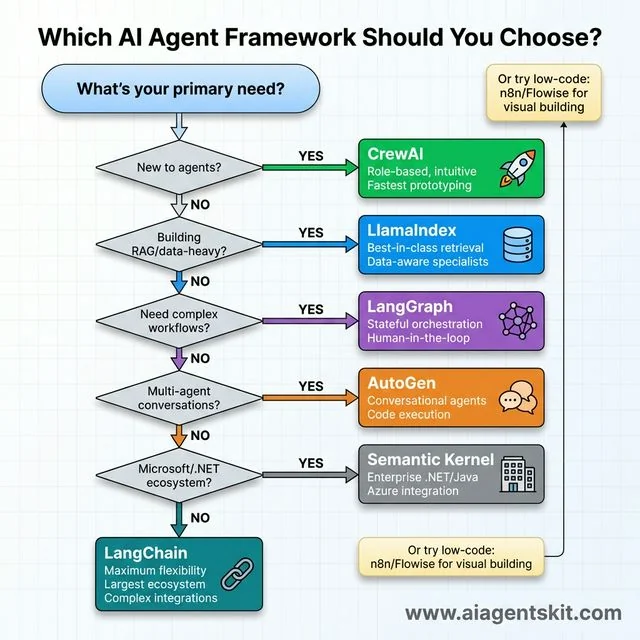 Which AI Agent Framework Should You Choose? A practical decision tree guiding framework selection through six key questions. Start with “New to agents?” → yes leads to CrewAI (green, rocket icon) for role-based intuitive prototyping. No routes to “Building RAG/data-heavy?” → yes selects LlamaIndex (blue, database icon) for best-in-class retrieval. Continue to “Need complex workflows?” → yes chooses LangGraph (purple, network graph) for stateful orchestration and human-in-the-loop. Next “Multi-agent conversations?” → yes picks AutoGen (orange, chat bubbles) for conversational agents with code execution. Then “Microsoft/.NET ecosystem?” → yes recommends Semantic Kernel (gray, building icon) for enterprise .NET/Java and Azure integration. Final default: LangChain (teal, chain links) for maximum flexibility and largest ecosystem. Side note suggests n8n/Flowise for low-code visual building.
#1 LangChain – The Ecosystem Giant
LangChain is the 800-pound gorilla of AI agent frameworks. If you’ve searched for anything related to LLM applications, you’ve seen it. And for good reason—it’s currently the most comprehensive toolkit for building custom LLM applications.
What Makes LangChain Stand Out
LangChain’s core philosophy is modularity. It provides building blocks—models, prompts, retrievers, memory, tools, agents—that you can chain together however you want.
The documentation is extensive (sometimes overwhelming), and the community is the largest in the space. According to market research, LangChain has recorded over 130 million total downloads across Python and JavaScript, with over 4,000 open-source contributors as of late 2024. This established ecosystem makes it the go-to for Node.js AI agent development and enterprise-scale Python apps.
LangChain Pros and Cons
Pros:
- Most extensive integration ecosystem (1,000+)
- Highly flexible—customize almost everything
- Strong RAG (Retrieval-Augmented Generation) toolkit
- Mature, production-tested at scale
- Active development and community
Cons:
- Can get verbose fast—developers joke about “LangChain soup”
- APIs evolve quickly, breaking changes aren’t rare
- Steeper learning curve than role-based frameworks
- Sometimes feels over-engineered for simple tasks
When to Use LangChain
LangChain is your choice when:
- You’re building complex custom workflows
- You need to integrate many external services
- RAG is central to your application
- You’re developing in JavaScript or TypeScript
- You’re planning production deployment at scale
Here’s a basic example of a LangChain agent with a tool:
from langchain.agents import create_react_agent, AgentExecutor
from langchain_openai import ChatOpenAI
from langchain_core.tools import tool

@tool
def search_database(query: str) -> str:
    """Search the internal database for information."""
    # Your database search logic here
    return f"Results for: {query}"

llm = ChatOpenAI(model="gpt-4o")
tools = [search_database]

agent = create_react_agent(llm, tools, prompt)
executor = AgentExecutor(agent=agent, tools=tools)

result = executor.invoke({"input": "Find sales data for Q4"})
The flexibility is powerful. But I’ll be honest—my first LangChain project took three times longer than expected because I kept getting lost in configuration options. Once you internalize the patterns, it speeds up. But expect a learning curve.
#2 LangGraph – Stateful Orchestration Specialists
LangGraph isn’t a replacement for LangChain—it’s an extension built specifically for complex, stateful AI agent orchestration. If you’ve outgrown simple chains but find vanilla LangChain unwieldy for branching logic, LangGraph is the answer.
How LangGraph Works
The core concept: your agent workflow is a graph. Nodes are functions or actions. Edges define how state flows between them. This makes complex workflows—with loops, conditionals, and parallel paths—much easier to visualize and debug.
It is particularly strong for human-in-the-loop workflows, allowing you to “pause” an agent’s execution, wait for a human to approve or edit a state, and then resume.
LangGraph Pros and Cons
Pros:
- Visual clarity for complex workflows
- Built-in state management and “time travel” debugging
- Deterministic control over agent flow
- Best-in-class human-in-the-loop support
- Tight integration with LangChain ecosystem
Cons:
- Requires understanding LangChain first
- Additional abstraction layer to learn
- Can feel like overkill for simple agents
- Steeper learning curve overall
When to Use LangGraph
LangGraph shines when:
- Your agent has complex, branching decision trees
- You need precise control over state and transitions
- You require human approval at specific steps
- Debugging agent behavior is critical
- You’re already using LangChain and need more structure
#3 AutoGen – Microsoft’s Multi-Agent Powerhouse
AutoGen comes from Microsoft Research, and it shows. This framework is built from the ground up for multi-agent conversational AI—multiple AI agents talking to each other (and humans) to solve problems collaboratively.
What Makes AutoGen Unique
AutoGen’s architecture centers on “conversable agents” that exchange messages, debate, and collaborate. Unlike role-based frameworks where you define what each agent does, AutoGen lets agents negotiate and iterate through conversation.
What really sets it apart: built-in code execution. AutoGen agents can write code, run it in secure sandboxes (like Docker), debug errors, and iterate—automatically. For developer productivity tools and code-heavy workflows, this is powerful. Teams looking to embed autonomous coding capability across the full development lifecycle should also review the top AI coding agents and autonomous systems comparison, which covers how AutoGen’s approach fits within the broader landscape of Level 2 and Level 3 coding agents.
AutoGen 0.4 and the Microsoft Agent Framework
January 2025 brought AutoGen 0.4 with a redesigned event-driven architecture, better debugging tools, and AutoGen Studio—a no-code GUI for prototyping. The update features asynchronous messaging, modular components, and improved scalability for distributed agentic applications.
Even bigger: Microsoft is consolidating AutoGen and Semantic Kernel into a unified “Microsoft Agent Framework,” with General Availability planned for Q1 2026. This aims to be enterprise-ready with multi-language support (.NET, Python, Java) and deep Azure integration.
AutoGen Pros and Cons
Pros:
- Excellent multi-agent orchestration
- Built-in code writing and execution
- Human-in-the-loop design from the start
- AutoGen Studio for visual prototyping
- Deep Microsoft/Azure ecosystem integration
Cons:
- Can feel like a research project at times
- Steeper learning curve than role-based options
- Complex configuration for advanced use cases
- Documentation sometimes lags features
When to Use AutoGen
AutoGen is your choice when:
- Multi-agent collaboration is core to your application
- Agents need to generate and execute code autonomously
- You want detailed control over agent-to-agent messaging
- You’re building human-in-the-loop AI agents
- You’re in the Microsoft/Azure ecosystem
#4 CrewAI – Role-Based Agentic Workflows
CrewAI is the framework I recommend most often to developers building their first agent system. It excels at creating agentic workflows for SEO automation, content generation, and business processes.
The CrewAI Philosophy
The core idea: you’re building a crew of agents, each with a clear role, goal, and backstory. Agents take on personas—“Research Analyst,” “Content Writer,” “Quality Reviewer”—and hand off work to each other.
This mirrors how human teams work, which makes building collaborative AI agent teams more intuitive. You’re not debugging message-passing protocols; you’re assigning roles and defining handoffs.
CrewAI Pros and Cons
Pros:
- Intuitive role-based architecture
- Fastest time-to-prototype in my testing
- Built-in memory systems for agent context
- Reported 5.76x faster execution than LangGraph in certain QA benchmarks.
- Supports local LLMs via Ollama seamlessly
- Growing quickly with good documentation
Cons:
- Less flexibility for unconventional architectures
- Structured approach can feel limiting
- Smaller community than LangChain (but growing fast)
- Less battle-tested in enterprise (though that’s getting better)
When to Use CrewAI
CrewAI excels when:
- You’re new to agent development
- You want to prototype quickly
- Your workflow maps to distinct roles/specialists
- You’re building business process automation
- You want to run your agents locally with Ollama
I had a working multi-agent content generation pipeline running in CrewAI within an afternoon. For most real-world use cases? That speed advantage matters.
#5 LlamaIndex Agents – Data-Aware Specialists
If your agent’s primary job is retrieving and reasoning over data, LlamaIndex should be on your shortlist. While other frameworks are generalists, LlamaIndex is laser-focused on building data-aware AI agents.
What Sets LlamaIndex Apart
LlamaIndex provides advanced indexing techniques (like hybrid search and keyword tables) that are crucial for high-quality RAG pipeline optimization.
For JavaScript developers: LlamaIndex.TS is a very strong alternative to LangChain.js, specifically optimized for data-heavy applications.
LlamaIndex Pros and Cons
Pros:
- Best-in-class RAG and retrieval
- LlamaParse for complex document processing
- Multiple agent types (ReAct, Function, CodeAct)
- Strong support for knowledge graphs
- Comprehensive observability tools
Cons:
- Less suited for general-purpose agents
- Learning curve for non-RAG use cases
- Often works best paired with other frameworks
When to Use LlamaIndex
LlamaIndex is ideal when:
- Your agent needs to query knowledge bases or large document sets
- Document QA is a core feature
- You’re connecting LLMs to proprietary data
- RAG quality is your primary concern
- You want specialized retrieval primitives for Node.js or Python
#6 Semantic Kernel – Enterprise AI Development
Semantic Kernel is Microsoft’s production-grade SDK for enterprise AI agent development. It’s the framework of choice for organizations building on the Microsoft ecosystem.
Key Features
- Multi-language SDK: .NET, Python, and Java (and growing JS support)
- Plugin architecture: Connect LLMs to existing C# or Java codebases
- Enterprise security: Built-in guardrails and compliance
- Planner system: Automatically orchestrates “skills” to achieve a goal
When to Use Semantic Kernel
Semantic Kernel fits when:
- You’re in a .NET or Java-heavy organization
- You need to integrate LLMs with existing C# applications
- Enterprise compliance is non-negotiable
- You’re building production-ready AI solutions for Azure
#7 Pydantic AI – Type-Safe Agents
Pydantic AI takes a different angle: structured, validated outputs. Built by the Pydantic team, this framework ensures your LLM outputs conform to defined schemas using Python’s native type annotations.
Key Features
- Schema-first design for LLM interactions
- Automatic validation of structured outputs
- Reduces parsing errors and unexpected formats
- Supports OpenAI, Anthropic, Gemini providers
Pydantic AI Pros and Cons
Pros:
- Dramatically reduces output parsing errors
- Familiar to Python developers using Pydantic
- Clean integration with existing APIs
- Type hints provide IDE support
Cons:
- Narrower focus than full agent frameworks
- Best combined with other tools
- Less comprehensive for complex orchestration
- Specialized rather than general-purpose
When to Use Pydantic AI
Pydantic AI shines when:
- Output structure is critical to your application
- You’re building API-driven agents
- Your team already uses Pydantic extensively
- Reliability matters more than flexibility
- You want to combine it with another framework
Think of Pydantic AI as a “layer” rather than a complete solution. Use it alongside LangChain or CrewAI when you need guaranteed output formats.
#8 SmolAgents – Lightweight and Code-Centric
SmolAgents, from Hugging Face, takes the opposite approach from heavyweight frameworks. The entire core library is about 1,000 lines of code. Minimal abstraction, maximum clarity.
Key Features
- Agents write and execute their own code
- Minimal overhead and abstraction
- Up to 30% fewer API calls reported
- Open-source model support via Hugging Face Hub
- Secure sandboxed execution
SmolAgents Pros and Cons
Pros:
- Truly lightweight—easy to understand internals
- Efficient API usage
- Great for code generation tasks
- Hugging Face ecosystem integration
- Easy to extend and modify
Cons:
- Less full-featured than major frameworks
- Smaller community
- Code-heavy approach may not suit all projects
- Limited built-in orchestration
When to Use SmolAgents
SmolAgents works well when:
- You want minimal framework overhead
- Code generation/execution is central
- You prefer to understand the entire codebase
- You’re using open-source models
- Simplicity matters more than features
#9 Phidata (Agno) – Multi-Modal Agents
Phidata, recently rebranded to Agno, focuses on building multi-modal AI agents—agents that work with text, images, audio, and more.
Key Features
- Multi-modal agent support out of the box
- Built-in monitoring and debugging dashboard
- Structured outputs via Pydantic integration
- Model-agnostic (OpenAI, Anthropic, local models)
- Memory and knowledge systems included
Phidata Pros and Cons
Pros:
- Good for multi-modal applications
- User-friendly interface
- Built-in observability
- Clean API design
- Growing documentation
Cons:
- Smaller community than leaders
- Newer, less battle-tested
- May lack advanced features of mature frameworks
- Less ecosystem integration
When to Use Phidata
Phidata fits when:
- You’re building multi-modal agents
- Built-in monitoring is valuable
- You want quick experimentation
- Model-agnostic deployment matters
- You appreciate clean, simple APIs
#10 OpenAI Agents SDK – Native OpenAI Solution
OpenAI’s official Agents SDK (evolved from the experimental Swarm project) offers the simplest path if you’re fully committed to the OpenAI ecosystem.
Key Features
- Native integration with GPT-4o, GPT-5
- Simplified tool calling syntax
- First-party documentation and support
- Optimized for Assistants API
OpenAI SDK Pros and Cons
Pros:
- Seamless OpenAI model integration
- Official support from OpenAI
- Simplest setup for OpenAI-only projects
- Optimized for function calling
Cons:
- Vendor lock-in to OpenAI
- Less flexible for multi-provider setups
- Newer, still evolving
- Limited multi-agent features currently
When to Use OpenAI SDK
Consider OpenAI SDK when:
- You’re exclusively using OpenAI models
- Simplicity is more important than flexibility
- You want guaranteed compatibility with OpenAI features
- Multi-provider isn’t a requirement
For OpenAI-native apps, this simplifies a lot of boilerplate. But you’re trading flexibility for convenience.
#11 Low-Code AI Agent Frameworks (n8n & Flowise)
Not everyone wants to write 500 lines of Python. In 2026, low-code AI workflow automation has reached maturity.
n8n – The Workflow Powerhouse
n8n is a visual automation tool that has added powerful AI agent nodes. It allows you to build complex agentic workflows by dragging and dropping components. It’s excellent for SEO keyword research automation and connecting agents to 400+ apps without writing code.
Want to learn n8n? Check out our complete n8n AI automation tutorial for beginners, or dive into our advanced guide on building AI agents with n8n workflows for production-ready implementations with memory, tools, and intelligent decision-making.
Flowise / LangFlow
These are visual wrappers for LangChain. They allow you to prototype LangChain graphs visually and then export them or call them via API. Perfect for “visual-first” developers.
Pros of Low-Code:
- Extremely fast prototyping
- Visual debugging of agent logic
- Accessible to non-developers
Cons:
- Less flexibility for complex custom logic
- Can be harder to version control than raw code
Beyond the Framework: The AI Agent Tech Stack
Choosing a framework is only 50% of the battle. To build production-ready agents in 2026, you need a robust supporting stack for observability, security, and evaluation.
1. AI Agent Observability & Monitoring
As agents become more autonomous, “black box” execution is no longer acceptable. You need distributed tracing to see every step your agent takes.
- Langfuse: An open-source LLM engineering platform that provides tracing, evaluations, and prompt management. It tracks traces, latency, and costs across complex multi-step agents.
- Maxim AI: A full-stack platform for simulation and AI agent observability. It excels at visualizing execution paths and decision-making logic.
- Arize AI (Phoenix): Essential for RAG observability and detecting “drift” in agent performance over time.
2. Agentic Security & Governance
Autonomous agents introduce new risks, like indirect prompt injection and unauthorized tool misuse. These are now classified as critical vulnerabilities in the OWASP Top 10 for LLM Applications.
- XBOW: Provides AI-powered autonomous penetration testing to find vulnerabilities in your agent’s logic before attackers do.
- Aikido Security: Automates code reviews and triages vulnerabilities specifically for AI-driven applications.
- Guardrails (NeMo Guardrails): Essential for enforcing PII leakage protection and ensuring your agent stays within its defined permission boundaries.
3. AI Agent Evaluation (Eval-as-a-Service)
How do you know if your agent is actually improving? Static benchmarks are dead. In 2026, we use adaptive evaluations.
- RAGAS: The go-to framework for evaluating Agentic RAG pipelines (measuring faithfulness, relevance, and context precision).
- Braintrust: Offers an “evaluation-first” architecture that integrates scoring directly into your CI/CD pipeline.
- Deepchecks: Useful for system-level evaluation and detecting behavioral decay in long-running agents.
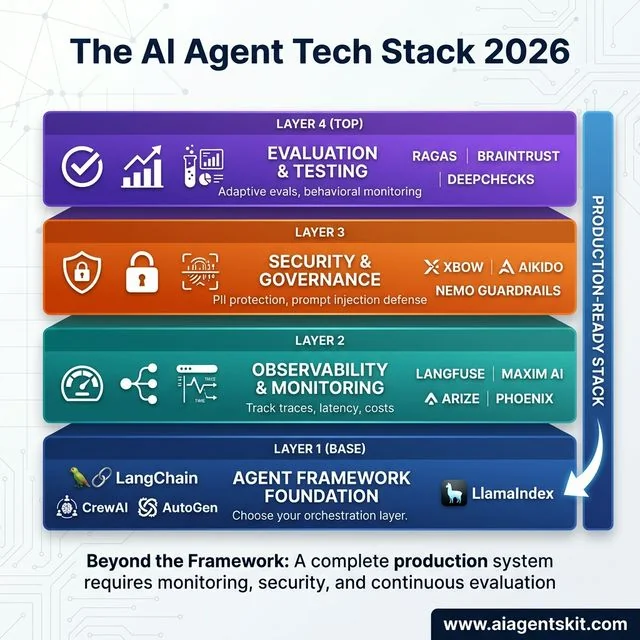 The AI Agent Tech Stack 2026: A production-ready pyramid showing essential layers beyond framework selection. Layer 1 (base, dark blue) provides Framework Foundation with LangChain, CrewAI, AutoGen, and LlamaIndex as orchestration options. Layer 2 (teal) delivers Observability & Monitoring through Langfuse, Maxim AI, and Arize Phoenix for tracking traces, latency, and costs. Layer 3 (orange) ensures Security & Governance via XBOW, Aikido, and NeMo Guardrails for PII protection and prompt injection defense. Layer 4 (purple, top) handles Evaluation & Testing using RAGAS, Braintrust, and Deepchecks for adaptive evals and behavioral monitoring. Complete production systems require all four layers working together.
Common AI Agent Orchestration Patterns
When building with these frameworks, you’ll likely use one of these three architectural patterns:
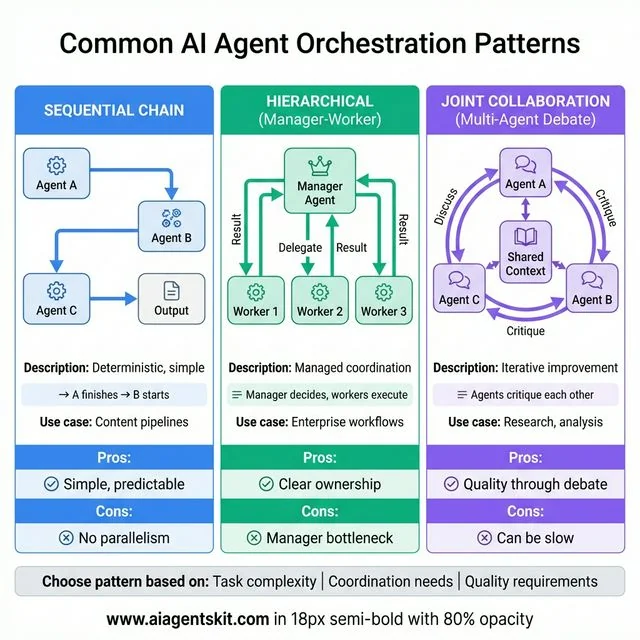 Common AI Agent Orchestration Patterns: Three fundamental approaches for coordinating AI agents. Sequential Chain (blue) uses simple linear flow where Agent A finishes before B starts, producing deterministic and predictable results ideal for content pipelines, though lacking parallelism. Hierarchical Manager-Worker (green) employs central manager agent delegating tasks to three worker agents with clear ownership, perfect for enterprise workflows but vulnerable to manager bottlenecks. Joint Collaboration Multi-Agent Debate (purple) enables three agents to critique each other in circular discussion around shared context, delivering quality through iterative improvement for research and analysis tasks, though potentially slower. Choose based on task complexity, coordination requirements, and quality needs.
- Sequential Chain: Agent A finishes → Agent B starts. Simple and deterministic.
- Hierarchical (Manager-Worker): A “Manager” agent decides which specialized “Worker” agent should handle a task. (Best in AutoGen and CrewAI).
- Joint Collaboration (Multi-Agent Debate): Multiple agents work on the same task and critique each other’s work to improve the final output.
Local AI Agent Development (Ollama & LocalAI)
Privacy and cost are driving more developers toward running AI agents locally.
- Ollama: The gold standard for running models like Llama 3.3 or Mistral locally.
- Local Integration: Most frameworks mentioned above (LangChain, CrewAI, AutoGen) can connect to a local Ollama instance via a simple base URL change.
Why go local?
- Zero latency/cost for development
- Data privacy (no data leaves your machine)
- Experimentation without hitting API rate limits
Head-to-Head: LangChain vs AutoGen vs CrewAI
These three are the most commonly compared, so let’s put them side-by-side.
| Criteria | LangChain | AutoGen | CrewAI |
|---|---|---|---|
| Philosophy | Modular toolkit | Conversational agents | Role-based teams |
| Best For | Complex integrations | Multi-agent collaboration | Rapid prototyping |
| Learning Curve | Steep | Steep | Gentle |
| Flexibility | Very high | High | Medium |
| Production Maturity | Most mature | Growing | Growing fast |
| Multi-Agent | Via LangGraph | Core strength | Role-based |
| Community Size | Largest | Strong | Fast-growing |
| Code Execution | Possible | Built-in | Limited |
| Documentation | Extensive | Good | Growing |
| Typical Project | Enterprise workflows | Research/dev tools | Business automation |
Here’s my honest take: For most developers just getting started with agents, CrewAI is the right choice. The role-based mental model is intuitive, prototyping is fast, and you can always migrate to something more complex later.
If you need maximum flexibility or have complex integration requirements, LangChain (with LangGraph for workflows) is the mature choice.
If multi-agent conversations with code execution are core to your use case—developer tools, code review systems, research automation—AutoGen is purpose-built for that.
I’m not paid to recommend any of these. This is just what I’ve seen work.
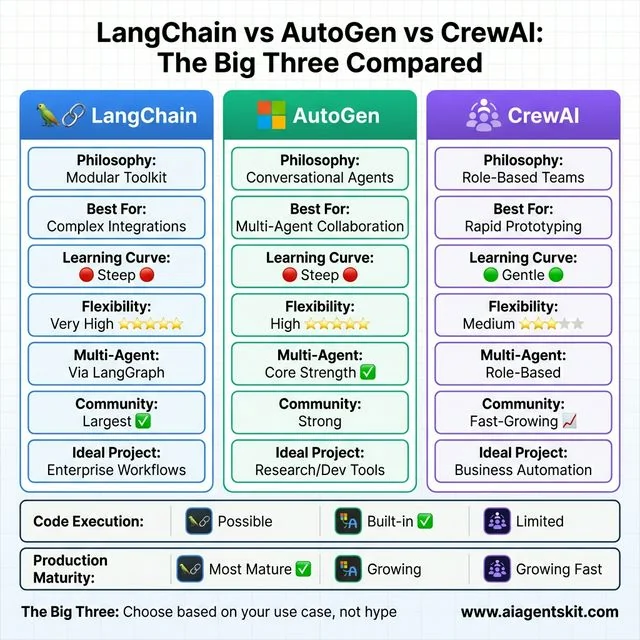 LangChain vs AutoGen vs CrewAI: The Big Three head-to-head comparison. LangChain (blue) offers modular toolkit philosophy with very high flexibility (5/5 stars) and the largest community, ideal for complex enterprise integrations but faces steep learning curve. AutoGen (green) focuses on conversational multi-agent collaboration with built-in code execution as core strength, best for research and developer tools within Microsoft ecosystem. CrewAI (purple) uses intuitive role-based teams approach with gentle learning curve (only framework rated green), medium flexibility (3/5 stars), and fast-growing community, perfect for rapid prototyping and business automation. Bottom rows compare code execution (AutoGen built-in advantage) and production maturity (LangChain most battle-tested). Choose based on use case, not hype.
What About Combining Frameworks?
Here’s something the “vs” comparisons often miss: many production systems use multiple frameworks together.
Common combinations:
- LlamaIndex + LangChain: LlamaIndex handles retrieval; LangChain orchestrates the agent
- Pydantic AI + anything: Use Pydantic AI’s structured outputs with any framework
- CrewAI + LlamaIndex: CrewAI’s role-based agents, LlamaIndex for the research/retrieval role
- LangGraph + specialized tools: LangGraph for workflow, specialized libraries for specific capabilities
For Claude users specifically, Claude Agent Skills offer an alternative approach—packaging persistent configurations as filesystem-based bundles that work across conversations without framework overhead.
The frameworks aren’t mutually exclusive. Don’t feel locked into choosing just one.
The Future of AI Agent Frameworks
Where is this heading? The honest answer: I don’t know with certainty. The space moves too fast for confident predictions.
But here’s what seems likely:
Market Consolidation
Microsoft merging AutoGen with Semantic Kernel is probably a preview of what’s coming. Maintaining multiple competing frameworks is expensive. Expect more consolidation.
Interoperability as a Feature
LangChain’s push for OpenAPI-based tool calls suggests a trend: frameworks that play well with others will win. Vendor lock-in is becoming a harder sell.
No-Code Options Expanding
AutoGen Studio, CrewAI’s visual builders—we’re seeing more GUI-based agent creation. This will democratize agent building beyond developers.
Observability Maturity
As agents get more autonomous, monitoring and debugging become critical. Expect major investment in “what the heck is my agent actually doing” tools.
The Market Is Growing Fast
According to Grand View Research, the global AI agents market was valued at approximately $7.63 billion in 2025, and is projected to reach over $182 billion by 2033. Furthermore, Gartner predicts that 40% of enterprise applications will incorporate task-specific AI agents by the end of 2026, up from less than 5% in 2025. This isn’t a niche tooling debate—it’s a fundamental shift in how software gets built.
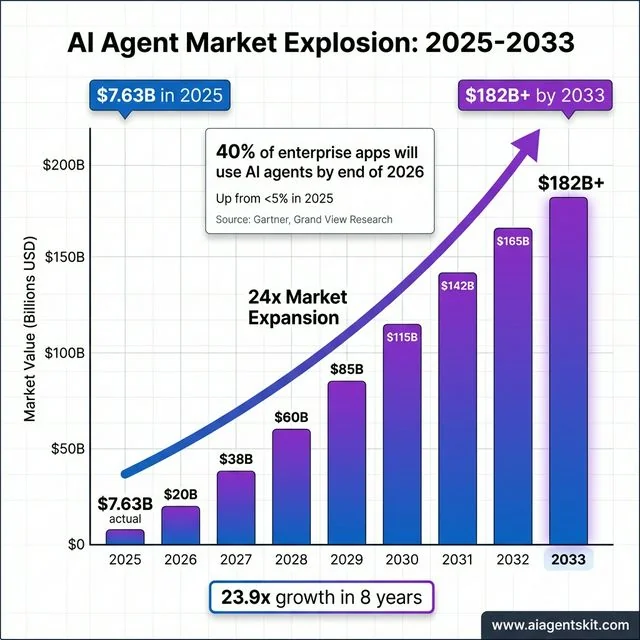 AI Agent Market Explosion 2025-2033: Exponential growth from $7.63B (2025 actual) to $182B+ by 2033, representing 23.9x market expansion in 8 years. Bar chart shows year-over-year progression with gradient coloring from blue to purple and exponential trend line overlay. Key milestones include $20B (2026), $60B (2028), $115B (2030), and $182B+ (2033 projected). Stat box highlights Gartner prediction: 40% of enterprise applications will use AI agents by end of 2026, up from under 5% in 2025. Source: Grand View Research, Gartner. This explosive growth validates AI agent frameworks as critical infrastructure, not experimental tools, fundamentally transforming how software gets built and deployed across industries.
Summary Recommendation
| If you are… | Use this framework | Why? |
|---|---|---|
| A Python Beginner | CrewAI | Role-based model is the easiest to learn. |
| A JS/TS Developer | LangChain.js | Most mature ecosystem for Node.js. |
| Building for Enterprise | Semantic Kernel | .NET support and enterprise security. |
| Focused on RAG | LlamaIndex | Best-in-class data retrieval and indexing. |
| Building Complex Logic | LangGraph | Stateful orchestration and human-in-the-loop. |
| A Non-Coder | n8n | Powerful visual builder with 400+ integrations. |
Frequently Asked Questions
What is the best AI agent framework in 2026?
There’s no single “best”—it depends on your use case. For most beginners, CrewAI offers the fastest path to a working prototype. For complex enterprise integrations, LangChain has the most mature ecosystem. For multi-agent conversations and code tasks, AutoGen is purpose-built. Evaluate based on your specific needs, not general rankings.
Is LangChain still relevant in 2026?
Yes. LangChain remains the most comprehensive ecosystem with 1,000+ integrations and the largest community. While newer frameworks like CrewAI are gaining ground for specific use cases, LangChain’s flexibility and maturity keep it as the default choice for complex production systems.
What’s the difference between LangChain and LangGraph?
LangChain is the core library—a modular toolkit for building LLM applications with components for prompts, models, tools, and memory. LangGraph is an extension that adds graph-based workflow orchestration for complex, stateful, multi-step agent processes. Think of LangChain as the foundation and LangGraph as specialized architecture on top.
Which AI agent framework is best for beginners?
CrewAI is my recommendation for beginners. Its role-based design (agents with roles, goals, backstories) maps intuitively to how people think about teamwork. You can have a working multi-agent system in an afternoon. Once you understand the concepts, you can explore more flexible options like LangChain if needed.
Can I use multiple AI agent frameworks together?
Absolutely, and many production systems do. Common patterns include using LlamaIndex for retrieval with LangChain for orchestration, or adding Pydantic AI for structured outputs on top of any framework. Don’t feel locked into a single choice—mix tools based on what each does best.
Conclusion
Here’s what I hope you take away: pick based on your actual needs, not hype.
- New to agents? Start with CrewAI. Get something working. Learn by doing.
- Need maximum flexibility? LangChain (plus LangGraph for workflows).
- Building multi-agent systems? AutoGen or CrewAI, depending on style preference.
- RAG is central? LlamaIndex, possibly combined with another framework.
- Microsoft ecosystem? Look at the AutoGen/Semantic Kernel unification.
The best framework is the one that lets you ship. Spend no more than a day evaluating—then build something real. You’ll learn more from one working prototype than from reading ten more comparison articles.
If you’re still fuzzy on the fundamentals, check out our guide on what AI agents are and how they work. Then come back and pick your framework.
The space is moving fast. Whatever you choose today, stay curious about what’s getting better. And when in doubt? Start simple, iterate, and don’t over-engineer until you need to.
Now go build something.