How to Build a Telegram AI Bot: Complete 2026 Guide
Learn how to build a Telegram AI bot with Python, no-code tools, and multiple AI providers. Step-by-step tutorial with code examples for 2026.
I still remember the first time a Telegram bot actually surprised me. It was 3 AM, I was debugging some code, and I messaged a bot I’d built earlier that week. Instead of the usual “command not recognized” error, it actually understood my garbled, caffeine-fueled question and pointed me to the exact line causing the issue. That’s when I realized: AI-powered Telegram bots aren’t just fancy chatbots—they’re genuinely useful assistants that can live right in your pocket.
Here’s the thing. Telegram now has over 1 billion monthly active users, and more than 10 million active bots are running on the platform right now. Those bots handle over 15 billion messages every single month (Business of Apps, 2026; Backlinko, 2026). But most of them are still using old-school command-based interactions. The ones that stand out? They’ve integrated modern AI models like GPT-5, Claude 4, and Gemini 3 to have actual conversations.
In this guide, I’ll show you exactly how to build your own Telegram AI bot. We’ll cover everything from no-code solutions you can set up in an hour to full custom development with Python. Whether you’re a developer looking to add a new skill or a business owner wanting to automate customer support, there’s a path here for you.
What Is a Telegram AI Bot?
A Telegram AI bot is an automated account that uses artificial intelligence to understand and respond to natural language messages. Unlike traditional bots that rely on preset commands like /start or /help, AI bots can have contextual conversations, answer open-ended questions, generate content, and perform complex tasks based on what users actually mean—not just what they type.
Think about the difference between a vending machine and a barista. Traditional bots are like vending machines: you press button A, you get item A. AI bots are like skilled baristas who can handle “I’d like something warm and not too sweet” without you needing to know the exact menu item name.
If you’re wondering how this relates to the broader world of AI agents, you’re on the right track. Understanding what AI agents are helps clarify why these bots represent a shift from simple automation to intelligent assistance. AI agents can make decisions, take actions, and adapt to context—exactly what we’re building here.
Already, several major AI companies have launched official bots on Telegram:
- @askplexbot (Perplexity) — 307K monthly users, free to all
- @CopilotOfficialBot (Microsoft) — 72K monthly users
- @Grok (xAI) — 95K monthly users, but requires Telegram Premium
These aren’t just experiments. They’re production services handling real user queries every day. And you can build something similar.
Why Build an AI Bot on Telegram?
I know what you might be thinking: “Why Telegram? Why not just build a web app or use WhatsApp?”
Fair questions. Here’s why Telegram stands out:
The numbers are ridiculous. With 1 billion monthly active users and 450 million daily active users, Telegram is now the 4th largest messaging platform globally. India alone has 104 million users. That’s a massive built-in audience.
The Bot API is completely free. No per-message fees. No monthly subscriptions for basic functionality. You can send messages, handle updates, and manage groups without paying Telegram a dime. (You will pay for AI model usage, but more on that later.)
Privacy-focused users actually trust it. In an era where data breaches make headlines weekly, Telegram’s reputation for encryption and privacy attracts users who are often early adopters of new tech—including AI bots.
Development is surprisingly easy. The Bot API is well-documented, there’s a thriving community, and libraries exist for every major programming language. I’ve built bots in an afternoon that would have taken weeks on other platforms.
And here’s something that doesn’t get mentioned enough: Telegram users are engaged. The average user spends over 4 hours per month in the app. When someone messages your bot, they’re actually paying attention.
Choosing Your Approach: No-Code vs Custom Development
Before we dive into code (or no-code tools), let’s figure out which path makes sense for your situation. I’ve built bots both ways, and honestly, each has its place.
| Factor | No-Code Tools | Custom Python Code |
|---|---|---|
| Setup time | 1-4 hours | 1-3 days |
| Technical skill needed | Basic logic understanding | Python programming |
| Flexibility | Limited to tool features | Unlimited customization |
| Monthly cost | $0-50 | $5-100 (hosting + AI) |
| Best for | MVPs, simple automations | Complex bots, scaling |
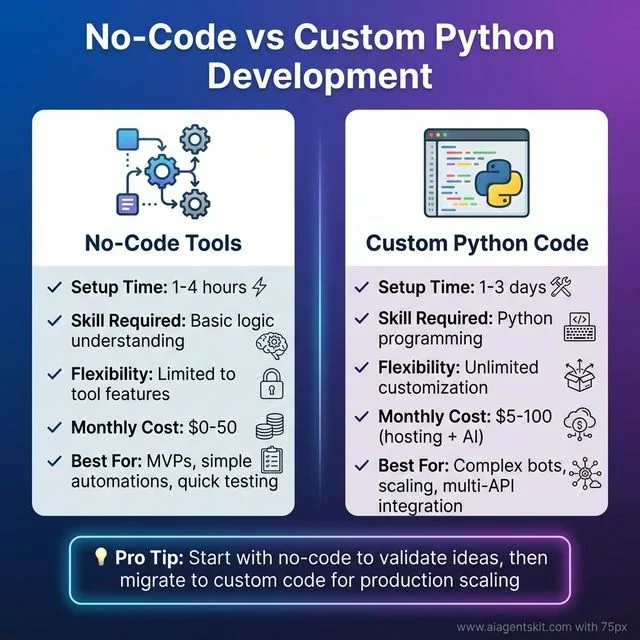 No-Code vs Custom Python Development: Visual comparison of the two main approaches to building Telegram AI bots. No-code tools like n8n offer 1-4 hour setup with basic logic understanding, ideal for MVPs and quick testing. Custom Python code requires 1-3 days setup with programming skills but provides unlimited customization for complex, scalable production bots. Most developers start with no-code to validate ideas, then migrate to Python for production scaling.
Choose no-code if: You’re testing an idea, need something running today, or your bot logic is straightforward (responding to keywords, simple Q&A, basic integrations).
Choose custom code if: You need complex conversation flows, want to integrate with multiple APIs, plan to scale beyond a few hundred users, or just enjoy coding (no shame in that!).
The good news? You can start with no-code and migrate to custom code later. I’ve done exactly that—started with n8n to validate an idea, then rebuilt in Python once I knew what users actually wanted.
Method 1: Building with No-Code Tools
Let’s start with the fastest path to a working bot. No-code tools have come a long way, and for many use cases, they’re more than sufficient.
Option A: Using n8n for Telegram AI Bots
n8n is my go-to recommendation for no-code automation. It’s open-source (self-hostable), has a generous free cloud tier, and connects to everything—including Telegram and all major AI providers.
If you’re new to n8n, I’d recommend checking out a dedicated AI automation tutorial first. But here’s the quick version for Telegram bots:
Step 1: Set up your n8n instance
- Sign up for n8n Cloud (free tier) or self-host
- Create a new workflow
Step 2: Add the Telegram trigger
- Search for “Telegram” in the nodes panel
- Add “Telegram Trigger” node
- Connect your bot using the token from BotFather (we’ll cover BotFather in the custom code section)
- Set trigger to “Message”
Step 3: Add AI processing
- Add an OpenAI, Anthropic, or Google AI node
- Connect it to the Telegram trigger
- Configure your system prompt (e.g., “You are a helpful assistant”)
- Set the message content to use the text from the Telegram trigger
Step 4: Send the response back
- Add a “Telegram” node (regular, not trigger)
- Set operation to “Send Message”
- Use the chat ID from the trigger
- Use the AI response as the message text
Step 5: Activate and test
- Save the workflow
- Toggle it to “Active”
- Message your bot on Telegram
That’s it. You’ve got an AI bot running without writing a single line of code.
The limitations? You’re constrained by what n8n nodes offer. Complex conversation memory, custom commands, or advanced features will require workarounds or switching to code.
Option B: Using OpenClaw with Telegram
OpenClaw has become incredibly popular recently (171K GitHub stars and counting). It’s essentially a personal AI assistant that runs locally and can connect to Telegram.
What makes OpenClaw interesting:
- Supports multiple AI models: GPT-5, Claude 4, Gemini 3
- Runs entirely on your machine (privacy win)
- Connects to Telegram so you can chat with AI from any device
- Setup takes about 15 minutes
The trade-off is that it’s designed for personal use, not for building public-facing bots. But if you want your own private AI assistant accessible via Telegram, it’s hard to beat.
To set it up:
- Install OpenClaw locally (requires Python 3.9+)
- Configure your AI provider API keys
- Enable the Telegram integration in settings
- Connect your bot token
- Start chatting
Method 2: Building a Custom Python Telegram AI Bot
Now we’re getting to the fun stuff. Custom development gives you complete control, and honestly, it’s not as complicated as it sounds. If you’ve done any Python before, you can handle this.
Prerequisites and Setup
Before we write any bot code, let’s get our environment ready:
What you’ll need:
- Python 3.9 or higher installed
- A Telegram account
- API keys from at least one AI provider (OpenAI, Anthropic, or Google)
- About 2 hours of uninterrupted time
Libraries we’ll use:
python-telegram-bot>=20.0
openai>=1.0.0
anthropic>=0.18.0
python-dotenv>=1.0.0
Create a new project directory and set up a virtual environment:
mkdir telegram-ai-bot
cd telegram-ai-bot
python -m venv venv

# On macOS/Linux:
source venv/bin/activate

# On Windows:
venv\Scripts\activate
Install the dependencies:
pip install python-telegram-bot openai anthropic python-dotenvStep 1: Creating Your Bot with BotFather
Every Telegram bot starts with BotFather. It’s the official bot for creating bots (very meta).
Here’s exactly what to do:
- Open Telegram and search for “@BotFather”
- Make sure it’s the verified account (blue checkmark)
- Click “Start” or send
/start - Send
/newbot - Give your bot a name (this is what users see, can contain spaces)
- Create a username (must end in “bot”, no spaces, must be unique)
- Save the token BotFather sends you — this is your bot’s password
The token looks like this: 123456789:ABCdefGHIjklMNOpqrSTUvwxyz
Source: Telegram Bot API Documentation - Official documentation for the HTTP-based interface created for developers keen on building bots for Telegram.
Store it in a .env file (never commit this to git):
TELEGRAM_BOT_TOKEN=your_token_here
OPENAI_API_KEY=your_openai_key_here
ANTHROPIC_API_KEY=your_anthropic_key_here
I learned the hard way: if you accidentally post this token anywhere public, immediately message BotFather with /revoke and generate a new one. Anyone with your token can control your bot.
Step 2: Setting Up the Python Environment
Let’s create a proper project structure:
telegram-ai-bot/
├── .env              # Your secrets (gitignored)
├── .env.example      # Template showing what variables are needed
├── requirements.txt  # Dependencies
├── bot.py           # Main bot code
└── README.md        # Documentation
Create requirements.txt:
python-telegram-bot>=20.0
openai>=1.0.0
anthropic>=0.18.0
python-dotenv>=1.0.0
Note: The
python-telegram-botlibrary is the most popular Python wrapper for the Telegram Bot API, with over 28,000 stars on GitHub and comprehensive documentation. It provides a pure Python, asynchronous interface that supports all Bot API 9.3 methods.
Create .env.example:
TELEGRAM_BOT_TOKEN=your_telegram_bot_token
OPENAI_API_KEY=your_openai_api_key
ANTHROPIC_API_KEY=your_anthropic_api_key
And a .gitignore file:
.env
__pycache__/
venv/
*.pyc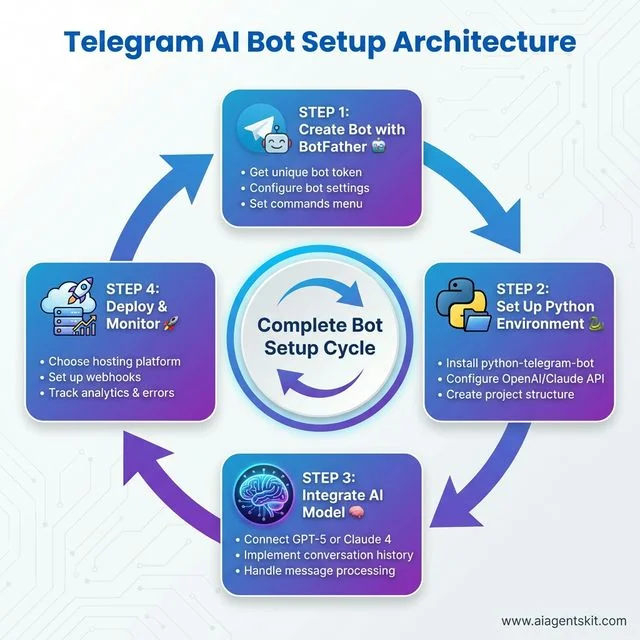 Telegram AI Bot Setup Architecture: The complete development cycle visualized as a continuous 4-step process. Step 1: Create Bot with BotFather to get your unique token and configure settings. Step 2: Set up Python environment with python-telegram-bot library and AI provider APIs. Step 3: Integrate AI models (GPT-5 or Claude 4) with conversation history and message processing. Step 4: Deploy to hosting platform with webhooks and implement analytics monitoring. This circular flow emphasizes the iterative nature of bot development—continuous improvement based on user feedback and performance metrics.
Step 3: Basic Bot Structure
Let’s start with a simple bot that echoes messages back. This verifies everything is working before we add AI.
Create bot.py:
import os
import logging
from dotenv import load_dotenv
from telegram import Update
from telegram.ext import Application, CommandHandler, MessageHandler, filters, ContextTypes

# Load environment variables
load_dotenv()

# Enable logging
logging.basicConfig(
    format='%(asctime)s - %(name)s - %(levelname)s - %(message)s',
    level=logging.INFO
)
logger = logging.getLogger(__name__)

# Command handlers
async def start_command(update: Update, context: ContextTypes.DEFAULT_TYPE):
    """Send a message when the command /start is issued."""
    await update.message.reply_text(
        'Hi! I am your AI assistant. Send me any message and I will respond using AI.'
    )

async def help_command(update: Update, context: ContextTypes.DEFAULT_TYPE):
    """Send a message when the command /help is issued."""
    await update.message.reply_text(
        'Just send me a message! I use AI to understand and respond to your questions.'
    )

async def handle_message(update: Update, context: ContextTypes.DEFAULT_TYPE):
    """Echo the user message."""
    user_message = update.message.text
    logger.info(f"Received message: {user_message}")

    await update.message.reply_text(f"You said: {user_message}")

async def error_handler(update: Update, context: ContextTypes.DEFAULT_TYPE):
    """Log Errors caused by Updates."""
    logger.error(f"Update {update} caused error {context.error}")

# Main function
def main():
    """Start the bot."""
    # Get token from environment
    token = os.getenv('TELEGRAM_BOT_TOKEN')
    if not token:
        raise ValueError("No TELEGRAM_BOT_TOKEN found in environment variables!")

    # Create the Application
    application = Application.builder().token(token).build()

    # Add handlers
    application.add_handler(CommandHandler("start", start_command))
    application.add_handler(CommandHandler("help", help_command))
    application.add_handler(MessageHandler(filters.TEXT & ~filters.COMMAND, handle_message))

    # Add error handler
    application.add_error_handler(error_handler)

    # Run the bot until Ctrl-C is pressed
    logger.info("Starting bot...")
    application.run_polling(allowed_updates=Update.ALL_TYPES)

if __name__ == '__main__':
    main()
Run it:
python bot.pyIf everything is set up correctly, you’ll see “Starting bot…” in your console. Now go to Telegram, find your bot, and send /start. You should get a welcome message. Send any text, and the bot will echo it back.
This isn’t AI yet, but we’ve got the foundation. The bot can receive messages and respond. Now let’s add the intelligence.
Step 4: Integrating OpenAI GPT-5
Here’s where things get interesting. We’ll modify our bot to send user messages to GPT-5 and return the AI’s response.
First, make sure you have an OpenAI API key. If you don’t, head to platform.openai.com and create one. Note: you’ll need to add a payment method, but GPT-5 usage is quite affordable (around $0.01 per 1,000 tokens of input).
For a deeper dive into the OpenAI API specifically, check out our OpenAI API tutorial.
Now, update your bot.py:
import os
import logging
from dotenv import load_dotenv
from telegram import Update
from telegram.ext import Application, CommandHandler, MessageHandler, filters, ContextTypes
from openai import AsyncOpenAI

# Load environment variables
load_dotenv()

# Enable logging
logging.basicConfig(
    format='%(asctime)s - %(name)s - %(levelname)s - %(message)s',
    level=logging.INFO
)
logger = logging.getLogger(__name__)

# Initialize OpenAI client
openai_client = AsyncOpenAI(api_key=os.getenv('OPENAI_API_KEY'))

# Store conversation history (in production, use a database)
conversation_history = {}

async def start_command(update: Update, context: ContextTypes.DEFAULT_TYPE):
    """Send a message when the command /start is issued."""
    user_id = update.effective_user.id
    conversation_history[user_id] = []

    await update.message.reply_text(
        "👋 Hi! I'm your AI assistant powered by GPT-5.\n\n"
        "Just send me a message and I'll help you out!\n"
        "Use /clear to reset our conversation."
    )

async def clear_command(update: Update, context: ContextTypes.DEFAULT_TYPE):
    """Clear conversation history."""
    user_id = update.effective_user.id
    conversation_history[user_id] = []
    await update.message.reply_text("🗑️ Conversation history cleared!")

async def handle_message(update: Update, context: ContextTypes.DEFAULT_TYPE):
    """Process user message with GPT-5."""
    user_id = update.effective_user.id
    user_message = update.message.text

    # Show "typing" indicator
    await context.bot.send_chat_action(
        chat_id=update.effective_chat.id,
        action="typing"
    )

    # Initialize history for new users
    if user_id not in conversation_history:
        conversation_history[user_id] = []

    # Add user message to history
    conversation_history[user_id].append({
        "role": "user",
        "content": user_message
    })

    try:
        # Call OpenAI API
        response = await openai_client.chat.completions.create(
            model="gpt-5",
            messages=[
                {
                    "role": "system",
                    "content": "You are a helpful assistant in a Telegram bot. Be concise but friendly."
                },
                *conversation_history[user_id][-10:]  # Keep last 10 messages for context
            ],
            max_tokens=1000,
            temperature=0.7
        )

        ai_response = response.choices[0].message.content

        # Add AI response to history
        conversation_history[user_id].append({
            "role": "assistant",
            "content": ai_response
        })

        # Send response back to user
        await update.message.reply_text(ai_response)

    except Exception as e:
        logger.error(f"Error calling OpenAI: {e}")
        await update.message.reply_text(
            "Sorry, I encountered an error processing your message. Please try again!"
        )

async def error_handler(update: Update, context: ContextTypes.DEFAULT_TYPE):
    """Log Errors caused by Updates."""
    logger.error(f"Update {update} caused error {context.error}")

# Main function
def main():
    """Start the bot."""
    token = os.getenv('TELEGRAM_BOT_TOKEN')
    if not token:
        raise ValueError("No TELEGRAM_BOT_TOKEN found!")

    application = Application.builder().token(token).build()

    # Add handlers
    application.add_handler(CommandHandler("start", start_command))
    application.add_handler(CommandHandler("clear", clear_command))
    application.add_handler(MessageHandler(filters.TEXT & ~filters.COMMAND, handle_message))
    application.add_error_handler(error_handler)

    logger.info("Starting bot with GPT-5...")
    application.run_polling(allowed_updates=Update.ALL_TYPES)

if __name__ == '__main__':
    main()
What’s happening here:
- We initialize the OpenAI client with your API key
- We maintain conversation history per user (using a dictionary—swap for a database in production)
- When a message comes in, we show a “typing” indicator
- We send the conversation history to GPT-5
- We return the AI’s response to the user
- We store the response so the AI remembers context
The key line is *conversation_history[user_id][-10:]. This sends the last 10 messages to GPT-5 so it has context. Without this, the AI would treat every message as a brand new conversation.
Important: In the code above, we’re storing conversation history in memory. This means if you restart the bot, all history is lost. For a production bot, you’d want to use Redis, PostgreSQL, or another database.
Step 5: Alternative - Integrating Claude 4
Maybe you prefer Claude 4 over GPT-5. Claude has some advantages: a 200K token context window (compared to GPT-5’s 128K) and many developers find it better at following instructions precisely.
If you’re specifically interested in Claude integration, our Claude API tutorial covers the API in more depth.
Here’s how to swap Claude for OpenAI in your bot:
import os
import logging
from dotenv import load_dotenv
from telegram import Update
from telegram.ext import Application, CommandHandler, MessageHandler, filters, ContextTypes
from anthropic import AsyncAnthropic

load_dotenv()

logging.basicConfig(
    format='%(asctime)s - %(name)s - %(levelname)s - %(message)s',
    level=logging.INFO
)
logger = logging.getLogger(__name__)

# Initialize Anthropic client
anthropic_client = AsyncAnthropic(api_key=os.getenv('ANTHROPIC_API_KEY'))

conversation_history = {}

async def start_command(update: Update, context: ContextTypes.DEFAULT_TYPE):
    user_id = update.effective_user.id
    conversation_history[user_id] = []

    await update.message.reply_text(
        "👋 Hi! I'm your AI assistant powered by Claude 4.\n\n"
        "Send me any message and I'll help you out!"
    )

async def handle_message(update: Update, context: ContextTypes.DEFAULT_TYPE):
    user_id = update.effective_user.id
    user_message = update.message.text

    await context.bot.send_chat_action(
        chat_id=update.effective_chat.id,
        action="typing"
    )

    if user_id not in conversation_history:
        conversation_history[user_id] = []

    conversation_history[user_id].append({
        "role": "user",
        "content": user_message
    })

    try:
        # Call Anthropic API
        response = await anthropic_client.messages.create(
            model="claude-4-sonnet-20251022",
            max_tokens=1000,
            system="You are a helpful assistant in a Telegram bot. Be concise but friendly.",
            messages=conversation_history[user_id][-10:]
        )

        ai_response = response.content[0].text

        conversation_history[user_id].append({
            "role": "assistant",
            "content": ai_response
        })

        await update.message.reply_text(ai_response)

    except Exception as e:
        logger.error(f"Error calling Claude: {e}")
        await update.message.reply_text(
            "Sorry, I encountered an error. Please try again!"
        )

async def error_handler(update: Update, context: ContextTypes.DEFAULT_TYPE):
    logger.error(f"Update {update} caused error {context.error}")

def main():
    token = os.getenv('TELEGRAM_BOT_TOKEN')
    if not token:
        raise ValueError("No TELEGRAM_BOT_TOKEN found!")

    application = Application.builder().token(token).build()

    application.add_handler(CommandHandler("start", start_command))
    application.add_handler(MessageHandler(filters.TEXT & ~filters.COMMAND, handle_message))
    application.add_error_handler(error_handler)

    logger.info("Starting bot with Claude 4...")
    application.run_polling(allowed_updates=Update.ALL_TYPES)

if __name__ == '__main__':
    main()
The structure is nearly identical, just using Claude’s API format instead of OpenAI’s.
When to use which?
- GPT-5: Better all-rounder, more “creative” responses, larger ecosystem
- Claude 4: Better at following instructions, larger context window, often better for technical tasks
Honestly? I run both and let users choose. Some people swear by Claude for coding help, others prefer GPT-5 for general conversation.
Step 6: Webhook vs Polling for Production
Right now, your bot uses polling. Every few seconds, it asks Telegram “any new messages?” This is fine for development and small bots, but it’s not ideal for production.
Polling pros: Simple, works behind firewalls, no SSL required Polling cons: Delayed responses (up to polling interval), unnecessary API calls, doesn’t scale well
For production, you want webhooks. With webhooks, Telegram actively sends your server a notification whenever someone messages your bot. It’s faster and more efficient.
Here’s how to set up webhooks:
from telegram.ext import Application
import os

# ... your other imports and code ...

def main():
    token = os.getenv('TELEGRAM_BOT_TOKEN')
    application = Application.builder().token(token).build()

    # Add your handlers here...

    # For webhooks (production):
    PORT = int(os.environ.get('PORT', 8443))
    WEBHOOK_URL = os.environ.get('WEBHOOK_URL')  # e.g., https://yourdomain.com/webhook

    application.run_webhook(
        listen="0.0.0.0",
        port=PORT,
        webhook_url=WEBHOOK_URL
    )

    # For polling (development):
    # application.run_polling()

if __name__ == '__main__':
    main()
Requirements for webhooks:
- Your server must have a public IP/domain
- Must use HTTPS (Telegram requirement)
- Port 443, 80, 88, or 8443
Most cloud hosting platforms (Heroku, Railway, Fly.io) handle this automatically.
AI Provider Comparison for Telegram Bots
Let’s talk numbers. You’re probably wondering: “How much will this cost me?”
| Model | Context Window | Input Cost | Output Cost | Best For |
|---|---|---|---|---|
| GPT-5 | 128K tokens | $0.01/1K tokens | $0.03/1K tokens | General purpose, creative tasks |
| GPT-5-Turbo | 128K tokens | $0.005/1K tokens | $0.015/1K tokens | Cost-conscious production |
| Claude 4 Sonnet | 200K tokens† | $0.003/1K tokens | $0.015/1K tokens | Long conversations, technical tasks |
† Claude 4.6 Opus features a 1M token context window in beta (Anthropic, 2026). | Claude 4 Haiku | 200K tokens | $0.00025/1K tokens | $0.00125/1K tokens | High-volume, simple responses | | Gemini 3 Pro | 2M tokens | Variable | Variable | Massive context needs |
Sources: Pricing data from OpenAI API Pricing and Anthropic Claude Pricing. GPT-5 offers input at $1.75/1M tokens and output at $14/1M tokens. Claude 4 Sonnet offers input at $3/1M and output at $15/1M tokens (Anthropic, 2026).
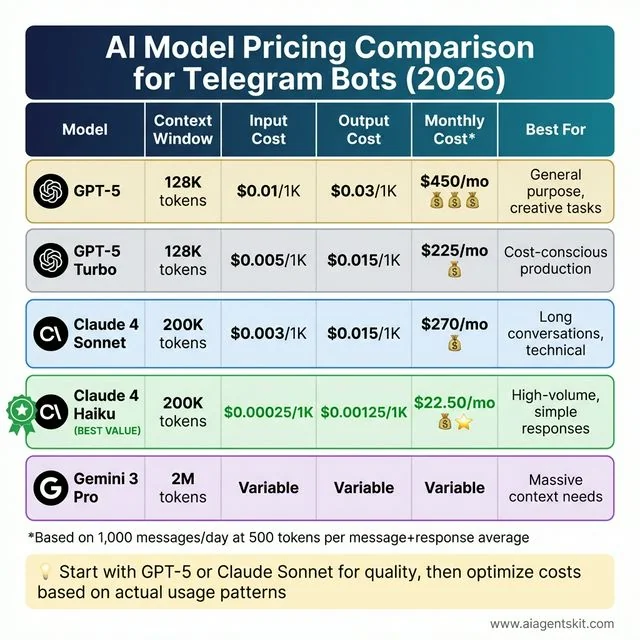 AI Model Pricing Comparison for Telegram Bots (2026): Comprehensive cost analysis of five leading AI models. GPT-5 offers 128K context at $450/month for 1,000 daily messages, best for general-purpose and creative tasks. GPT-5 Turbo provides the same context at $225/month for cost-conscious production. Claude 4 Sonnet delivers 200K context at $270/month, ideal for long conversations and technical tasks. Claude 4 Haiku (BEST VALUE) offers 200K context at just $22.50/month, perfect for high-volume simple responses. Gemini 3 Pro provides massive 2M context with variable pricing for specialized needs. Based on 1,000 messages per day averaging 500 tokens per exchange.
Real-world example: If your bot handles 1,000 messages per day, with each message + response averaging 500 tokens total:
- GPT-5: ~$15/day ($450/month)
- Claude 4 Sonnet: ~$9/day ($270/month)
- Claude 4 Haiku: ~$0.75/day ($22.50/month)
Most developers start with GPT-5 or Claude 4 Sonnet for quality, then optimize costs based on actual usage patterns.
Advanced Features and Enhancements
Once you have the basics working, the possibilities open up. Here are some features worth considering:
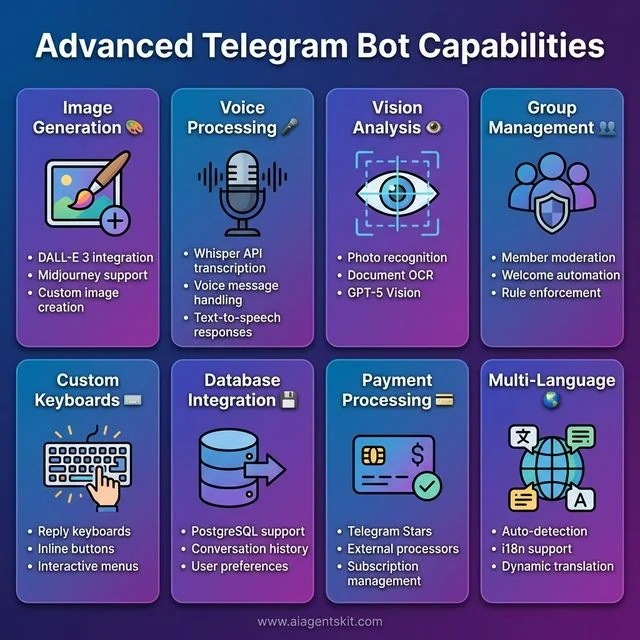 Advanced Telegram Bot Capabilities: Eight powerful features that transform basic chatbots into sophisticated AI assistants. Image Generation integrates DALL-E 3 and Midjourney for custom visuals. Voice Processing uses Whisper API for transcription and text-to-speech responses. Vision Analysis enables photo recognition and OCR with GPT-5 Vision. Group Management provides member moderation, welcome automation, and rule enforcement. Custom Keyboards create reply keyboards, inline buttons, and interactive menus. Database Integration supports PostgreSQL for conversation history and user preferences. Payment Processing handles Telegram Stars and external payment processors. Multi-Language support offers auto-detection, i18n integration, and dynamic translation for global audiences.
Image Generation: Integrate DALL-E 3 or Midjourney so users can generate images:
if "/image" in user_message:
    prompt = user_message.replace("/image", "").strip()
    # Call DALL-E API
    # Send image back to user
Voice Messages: Use Whisper API to transcribe voice messages, then respond:
async def handle_voice(update: Update, context: ContextTypes.DEFAULT_TYPE):
    voice_file = await update.message.voice.get_file()
    # Download and transcribe with Whisper
    # Process transcription with GPT/Claude
    # Send text response
Group Management: Bots can moderate groups, welcome new members, or answer questions:
# In your handlers, check if it's a group
if update.effective_chat.type in ['group', 'supergroup']:
    # Handle group-specific logic
Database Integration: Store user preferences, conversation history, or analytics:
# Using SQLite example
import sqlite3

def save_message(user_id, message, response):
    conn = sqlite3.connect('bot.db')
    c = conn.cursor()
    c.execute("INSERT INTO messages VALUES (?, ?, ?, ?)",
              (user_id, message, response, datetime.now()))
    conn.commit()
    conn.close()
If you’re looking to build an AI agent with more sophisticated capabilities—like tool use, memory systems, or autonomous actions—check out our dedicated tutorial on Python AI agents.
Telegram Bot Commands and Reply Keyboards
Custom commands and keyboards are what separate amateur bots from professional ones. They make your bot discoverable and user-friendly.
Setting Up Bot Commands
When users type / in your bot, they’ll see a menu of available commands. Set these up via BotFather:
- Message @BotFather
- Select your bot
- Choose “Edit Commands”
- Enter commands in this format:
start - Start the bot and see welcome message
help - Get help and usage instructions
settings - Configure your preferences
stats - View your usage statistics
reset - Clear conversation history
Pro tip: Keep command names intuitive and descriptions under 30 characters for mobile users.
Reply Keyboards
Reply keyboards provide a menu of options that stays at the bottom of the chat:
from telegram import ReplyKeyboardMarkup, KeyboardButton

# Create a custom keyboard
keyboard = [
    ["💬 Chat with AI", "📊 My Stats"],
    ["⚙️ Settings", "❓ Help"]
]

reply_markup = ReplyKeyboardMarkup(
    keyboard,
    resize_keyboard=True,  # Fits the screen
    one_time_keyboard=False  # Stays after use
)

await update.message.reply_text(
    "Choose an option:",
    reply_markup=reply_markup
)
Best practices for reply keyboards:
- Use emoji icons for visual recognition
- Group related actions in the same row
- Keep text short (1-2 words max)
- Provide a way to hide the keyboard:
ReplyKeyboardRemove()
Requesting User Information
You can request contact info or location through specialized keyboards:
from telegram import KeyboardButton

# Request user's phone number
contact_keyboard = [[KeyboardButton("📱 Share Contact", request_contact=True)]]

# Request user's location
location_keyboard = [[KeyboardButton("📍 Share Location", request_location=True)]]
This is incredibly useful for telegram bot customer support automation where you need to identify users or provide location-based services.
Handling Different Message Types
Telegram bots aren’t limited to text. Users send photos, documents, voice messages, and more. Here’s how to handle them all.
Voice Messages and Audio
With speech recognition APIs, you can create voice-enabled bots:
async def handle_voice(update: Update, context: ContextTypes.DEFAULT_TYPE):
    """Handle voice messages with Whisper API."""
    voice_file = await update.message.voice.get_file()

    # Download the voice file
    voice_bytes = await voice_file.download_as_bytearray()

    # Send to Whisper for transcription
    transcript = openai_client.audio.transcriptions.create(
        model="whisper-1",
        file=("voice.ogg", voice_bytes)
    )

    # Now process the transcribed text with your AI
    user_message = transcript.text
    # ... (same as text handler)
Use case: Voice-enabled customer support bots for accessibility or users on the go.
Photos and Images
Process images for OCR, analysis, or generation:
async def handle_photo(update: Update, context: ContextTypes.DEFAULT_TYPE):
    """Handle photos with vision-capable models."""
    photo = update.message.photo[-1]  # Get highest resolution
    photo_file = await photo.get_file()

    # Download and encode as base64
    photo_bytes = await photo_file.download_as_bytearray()
    import base64
    encoded = base64.b64encode(photo_bytes).decode()

    # Send to GPT-5 Vision or Claude
    response = await openai_client.chat.completions.create(
        model="gpt-5",
        messages=[{
            "role": "user",
            "content": [
                {"type": "text", "text": "What's in this image?"},
                {"type": "image_url", "image_url": {"url": f"data:image/jpeg;base64,{encoded}"}}
            ]
        }]
    )

    await update.message.reply_text(response.choices[0].message.content)
Documents and Files
Handle PDFs, spreadsheets, and other documents:
async def handle_document(update: Update, context: ContextTypes.DEFAULT_TYPE):
    """Handle document uploads."""
    document = update.message.document

    # Check file size (Telegram limit is 20MB)
    if document.file_size > 20 * 1024 * 1024:
        await update.message.reply_text("File too large! Max 20MB.")
        return

    # Download and process
    file = await document.get_file()
    file_bytes = await file.download_as_bytearray()

    # Process based on file type
    if document.mime_type == 'application/pdf':
        # Extract text from PDF
        pass
    elif document.mime_type.startswith('text/'):
        # Process text file
        text = file_bytes.decode('utf-8')
        # Summarize with AI...
Group and Channel Management
Telegram bots shine in group environments. They can moderate, welcome members, and facilitate community interaction.
Detecting Chat Type
async def handle_message(update: Update, context: ContextTypes.DEFAULT_TYPE):
    chat_type = update.effective_chat.type

    if chat_type == 'private':
        # One-on-one conversation
        await handle_private_message(update, context)
    elif chat_type in ['group', 'supergroup']:
        # Group chat - check if bot was mentioned
        if update.message.text and f'@{context.bot.username}' in update.message.text:
            await handle_group_mention(update, context)
    elif chat_type == 'channel':
        # Channel post - read-only for bots usually
        pass
Welcome New Members
async def welcome_new_members(update: Update, context: ContextTypes.DEFAULT_TYPE):
    """Welcome message for new group members."""
    for member in update.message.new_chat_members:
        if not member.is_bot:  # Don't welcome bots
            welcome_text = f"👋 Welcome {member.first_name}!\n\n"
            welcome_text += "I'm the group AI assistant. Mention me with @botname to ask questions, "
            welcome_text += "or reply to my messages to continue the conversation."

            await update.message.reply_text(welcome_text)

# Add handler
application.add_handler(ChatMemberHandler(welcome_new_members, ChatMemberHandler.CHAT_MEMBER))
Group Moderation Features
async def moderate_message(update: Update, context: ContextTypes.DEFAULT_TYPE):
    """Basic moderation using AI to detect inappropriate content."""
    message_text = update.message.text

    # Use AI to check content
    moderation = await openai_client.moderations.create(input=message_text)

    if moderation.results[0].flagged:
        # Delete the message
        await update.message.delete()

        # Warn the user
        await context.bot.send_message(
            chat_id=update.effective_chat.id,
            text=f"⚠️ {update.message.from_user.first_name}, your message was removed for violating community guidelines."
        )
Real-world application: Community managers use these features to maintain healthy group environments at scale.
Inline Keyboards and Callback Queries
Inline keyboards appear within messages and provide interactive buttons that don’t clutter the chat history.
Creating Interactive Buttons
from telegram import InlineKeyboardButton, InlineKeyboardMarkup

async def show_menu(update: Update, context: ContextTypes.DEFAULT_TYPE):
    """Show inline keyboard menu."""
    keyboard = [
        [
            InlineKeyboardButton("🤖 GPT-5", callback_data='model_gpt5'),
            InlineKeyboardButton("🧠 Claude 4", callback_data='model_claude4')
        ],
        [
            InlineKeyboardButton("⚙️ Settings", callback_data='settings'),
            InlineKeyboardButton("📊 Usage Stats", callback_data='stats')
        ]
    ]

    reply_markup = InlineKeyboardMarkup(keyboard)

    await update.message.reply_text(
        "Choose your AI model:",
        reply_markup=reply_markup
    )

async def handle_callback(update: Update, context: ContextTypes.DEFAULT_TYPE):
    """Handle button clicks."""
    query = update.callback_query
    await query.answer()  # Remove loading state

    if query.data == 'model_gpt5':
        context.user_data['model'] = 'gpt-5'
        await query.edit_message_text("✅ Switched to GPT-5")
    elif query.data == 'model_claude4':
        context.user_data['model'] = 'claude-4-sonnet'
        await query.edit_message_text("✅ Switched to Claude 4")
    elif query.data == 'settings':
        await query.edit_message_text("Settings menu here...")

# Add handlers
application.add_handler(CommandHandler("menu", show_menu))
application.add_handler(CallbackQueryHandler(handle_callback))
Pagination with Inline Keyboards
For long lists (like search results), implement pagination:
async def show_paginated_results(update: Update, context: ContextTypes.DEFAULT_TYPE, page=0):
    """Show paginated list with Previous/Next buttons."""
    items_per_page = 5
    items = context.user_data.get('search_results', [])

    start = page * items_per_page
    end = start + items_per_page
    page_items = items[start:end]

    text = f"Results (page {page + 1}):\n\n"
    for i, item in enumerate(page_items, 1):
        text += f"{start + i}. {item}\n"

    # Build pagination buttons
    buttons = []
    if page > 0:
        buttons.append(InlineKeyboardButton("⬅️ Previous", callback_data=f'page_{page-1}'))
    if end < len(items):
        buttons.append(InlineKeyboardButton("Next ➡️", callback_data=f'page_{page+1}'))

    keyboard = [buttons]
    reply_markup = InlineKeyboardMarkup(keyboard)

    await update.message.reply_text(text, reply_markup=reply_markup)
Conversation State Management (FSM)
For multi-step interactions (like booking a meeting or filling out a form), you need finite state machines to track where users are in the flow.
Implementing State Machines
from enum import Enum

class BookingState(Enum):
    IDLE = 0
    ASKING_DATE = 1
    ASKING_TIME = 2
    ASKING_SERVICE = 3
    CONFIRMING = 4

# Store user states
user_states = {}
booking_data = {}

async def start_booking(update: Update, context: ContextTypes.DEFAULT_TYPE):
    """Start the booking flow."""
    user_id = update.effective_user.id
    user_states[user_id] = BookingState.ASKING_DATE
    booking_data[user_id] = {}

    await update.message.reply_text(
        "📅 Let's book an appointment!\n\nWhat date would you prefer? (Format: YYYY-MM-DD)"
    )

async def handle_booking_message(update: Update, context: ContextTypes.DEFAULT_TYPE):
    """Handle messages based on current state."""
    user_id = update.effective_user.id
    current_state = user_states.get(user_id, BookingState.IDLE)
    text = update.message.text

    if current_state == BookingState.ASKING_DATE:
        # Validate date
        try:
            from datetime import datetime
            date = datetime.strptime(text, '%Y-%m-%d')
            booking_data[user_id]['date'] = text
            user_states[user_id] = BookingState.ASKING_TIME
            await update.message.reply_text("✅ Date saved! What time? (Format: HH:MM)")
        except ValueError:
            await update.message.reply_text("❌ Invalid date format. Please use YYYY-MM-DD")

    elif current_state == BookingState.ASKING_TIME:
        booking_data[user_id]['time'] = text
        user_states[user_id] = BookingState.ASKING_SERVICE

        # Show service options
        keyboard = [
            [InlineKeyboardButton("💇 Haircut", callback_data='service_haircut')],
            [InlineKeyboardButton("💅 Manicure", callback_data='service_manicure')],
            [InlineKeyboardButton("💆 Massage", callback_data='service_massage')]
        ]
        await update.message.reply_text(
            "✅ Time saved! Choose a service:",
            reply_markup=InlineKeyboardMarkup(keyboard)
        )
This pattern is essential for telegram bot business automation workflows like order processing, surveys, or guided setup wizards.
Security Best Practices
Security breaches can expose user data and API keys. Follow these guidelines to keep your bot safe.
Token Security
Critical rules:
-
Never commit tokens to version control
# Add to .gitignore .env *.token config.py -
Rotate tokens immediately if exposed
# Message @BotFather → /revoke # Then update your environment variables -
Use different tokens for development and production
import os

# Development
TOKEN = os.getenv('DEV_BOT_TOKEN') if os.getenv('ENV') == 'development' else os.getenv('PROD_BOT_TOKEN')
HTTPS and Webhook Security
# Verify webhook requests are from Telegram
async def webhook_handler(request):
    # In production, validate the request origin
    secret_token = request.headers.get('X-Telegram-Bot-Api-Secret-Token')

    if secret_token != os.getenv('WEBHOOK_SECRET'):
        return web.Response(status=403)

    # Process the update...
Rate Limiting and Abuse Prevention
from collections import defaultdict
import time

# Simple rate limiting
user_last_message = defaultdict(float)
RATE_LIMIT_SECONDS = 1  # 1 message per second

async def check_rate_limit(user_id: int) -> bool:
    """Return True if user is rate limited."""
    now = time.time()
    if now - user_last_message[user_id] < RATE_LIMIT_SECONDS:
        return True
    user_last_message[user_id] = now
    return False

# In your message handler:
if await check_rate_limit(user_id):
    await update.message.reply_text("⏱️ Please slow down! One message per second.")
    return
Input Validation
Always validate user inputs before processing:
import re

async def validate_input(update: Update, context: ContextTypes.DEFAULT_TYPE):
    text = update.message.text

    # Sanitize input (remove potentially dangerous characters)
    sanitized = re.sub(r'[<>&"\']', '', text)

    # Check length (prevent token abuse)
    if len(sanitized) > 4000:
        await update.message.reply_text("❌ Message too long! Max 4000 characters.")
        return

    return sanitized
Bot Analytics and Monitoring
Understanding how users interact with your bot helps you improve it over time.
Basic Analytics Tracking
import sqlite3
from datetime import datetime

class BotAnalytics:
    def __init__(self, db_path='analytics.db'):
        self.db_path = db_path
        self._init_db()

    def _init_db(self):
        conn = sqlite3.connect(self.db_path)
        c = conn.cursor()
        c.execute('''CREATE TABLE IF NOT EXISTS events (
            id INTEGER PRIMARY KEY,
            user_id INTEGER,
            event_type TEXT,
            event_data TEXT,
            timestamp DATETIME
        )''')
        conn.commit()
        conn.close()

    def log_event(self, user_id, event_type, event_data=None):
        conn = sqlite3.connect(self.db_path)
        c = conn.cursor()
        c.execute(
            'INSERT INTO events (user_id, event_type, event_data, timestamp) VALUES (?, ?, ?, ?)',
            (user_id, event_type, str(event_data), datetime.now())
        )
        conn.commit()
        conn.close()

# Usage
analytics = BotAnalytics()

async def handle_message(update: Update, context: ContextTypes.DEFAULT_TYPE):
    # Log the interaction
    analytics.log_event(
        update.effective_user.id,
        'message_received',
        {'length': len(update.message.text)}
    )
    # ... rest of handler
Key Metrics to Track
async def get_stats(update: Update, context: ContextTypes.DEFAULT_TYPE):
    """Admin command to view bot statistics."""
    conn = sqlite3.connect('analytics.db')
    c = conn.cursor()

    # Daily active users
    c.execute('''SELECT COUNT(DISTINCT user_id) FROM events
                 WHERE timestamp > datetime('now', '-1 day')''')
    dau = c.fetchone()[0]

    # Total messages today
    c.execute('''SELECT COUNT(*) FROM events
                 WHERE event_type='message_received'
                 AND timestamp > datetime('now', '-1 day')''')
    messages_today = c.fetchone()[0]

    # Most active hour
    c.execute('''SELECT strftime('%H', timestamp) as hour, COUNT(*) as count
                 FROM events GROUP BY hour ORDER BY count DESC LIMIT 1''')
    peak_hour = c.fetchone()

    stats_text = f"""📊 Bot Statistics (Last 24h)

👥 Daily Active Users: {dau}
💬 Messages Processed: {messages_today}
🔥 Peak Activity Hour: {peak_hour[0]}:00 ({peak_hour[1]} events)
"""

    await update.message.reply_text(stats_text)
Real-World Use Cases and Examples
Let’s explore how businesses are actually using telegram ai bot customer support and automation.
Use Case 1: E-commerce Order Tracking
async def track_order(update: Update, context: ContextTypes.DEFAULT_TYPE):
    """Track e-commerce order status."""
    order_id = context.args[0] if context.args else None

    if not order_id:
        await update.message.reply_text("Please provide an order ID: /track ORDER123")
        return

    # Query your database
    order_status = await get_order_from_database(order_id)

    if order_status:
        response = f"""📦 Order {order_id}

Status: {order_status['status']}
Estimated Delivery: {order_status['delivery_date']}
Last Update: {order_status['last_update']}

Need help? Reply to this message!"""
    else:
        response = "❌ Order not found. Please check the order ID."

    await update.message.reply_text(response)
Use Case 2: Appointment Booking
Perfect for salons, clinics, and consultants:
async def book_appointment(update: Update, context: ContextTypes.DEFAULT_TYPE):
    """Multi-step booking flow with AI assistance."""
    # Uses the FSM pattern from earlier
    # Guides user through selecting service → date → time → confirmation
    # Stores booking in database
    # Sends confirmation with calendar invite
    pass
Use Case 3: FAQ and Knowledge Base
async def handle_faq(update: Update, context: ContextTypes.DEFAULT_TYPE):
    """AI-powered FAQ with fallback to human support."""
    question = update.message.text

    # Try to answer with AI using knowledge base
    context_chunks = await search_knowledge_base(question)

    if context_chunks:
        # Have AI answer using retrieved context
        answer = await generate_answer_with_context(question, context_chunks)
        await update.message.reply_text(answer)
    else:
        # Escalate to human
        await update.message.reply_text(
            "I'm not sure about that. Let me connect you with a human agent..."
        )
        await create_support_ticket(update.effective_user.id, question)
Use Case 4: Community Management
Telegram bot group management features help moderators:
async def auto_moderate(update: Update, context: ContextTypes.DEFAULT_TYPE):
    """AI-powered content moderation for groups."""
    # Check for spam patterns
    # Detect inappropriate content
    # Welcome new members with group rules
    # Automated daily digests of important messages
    pass
Academic Research and Real-World Deployments
Research published in arXiv demonstrates the effectiveness of deploying AI assistants via Telegram. A 2025 study by Tel-Zur at Ben-Gurion University of the Negev developed a GPU-accelerated RAG-based Telegram assistant for parallel processing education, using a quantized Mistral-7B model deployed entirely on consumer hardware (Tel-Zur, 2025). The research showed that Telegram bots can deliver real-time, personalized academic assistance while maintaining privacy through local deployment.
Similarly, researchers at Tufts University deployed WaLLM, an LLM-powered chatbot via WhatsApp (a comparable messaging platform), which processed over 14.7K queries from approximately 100 users over six months, with 55% of queries seeking factual information (Eltigani et al., 2025). These studies confirm that messaging platforms like Telegram are viable channels for deploying sophisticated AI systems at scale.
Performance Optimization Tips
As your bot scales, these optimizations become critical:
Connection Pooling
# Reuse HTTP connections for API calls
import aiohttp

# Create session once, reuse for all requests
session = aiohttp.ClientSession()

# In your handlers, use the shared session
async def api_call():
    async with session.post(url, json=data) as response:
        return await response.json()
Async Database Operations
import asyncpg  # For PostgreSQL

# Use async database drivers to avoid blocking
async def get_user_data(user_id):
    conn = await asyncpg.connect(DATABASE_URL)
    row = await conn.fetchrow('SELECT * FROM users WHERE id = $1', user_id)
    await conn.close()
    return row
Caching Frequently Accessed Data
from functools import lru_cache
import time

# Simple in-memory cache
_cache = {}
_cache_ttl = {}

async def get_cached_user_settings(user_id):
    """Cache user settings to reduce database calls."""
    now = time.time()

    if user_id in _cache and now - _cache_ttl[user_id] < 300:  # 5 min cache
        return _cache[user_id]

    # Fetch from database
    settings = await fetch_user_settings(user_id)
    _cache[user_id] = settings
    _cache_ttl[user_id] = now

    return settings
Deployment and Hosting Options
Your bot works locally. Now let’s get it running 24/7.
Free Tier Options:
-
Railway (railway.app)
- Generous free tier
- Easy deployment from GitHub
- Automatic HTTPS
- Good for testing and small bots
-
Render (render.com)
- Free tier with some limitations
- Web services sleep after inactivity
- Good for development
-
Fly.io
- Free tier with $5/month credit
- Closer to production-grade
- Requires some DevOps knowledge
Paid Options (Worth It for Production):
-
DigitalOcean ($5-10/month)
- VPS with full control
- Reliable and fast
- My go-to for serious bots
-
Hetzner (€3-5/month)
- Cheapest option
- European datacenters
- Great performance
-
AWS Lambda (pay per use)
- Serverless
- Scales automatically
- Complex setup initially
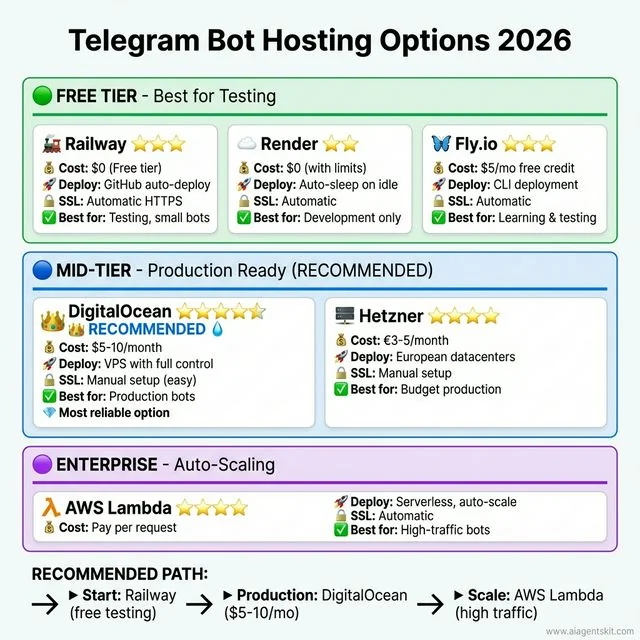 Telegram Bot Hosting Options 2026: Comprehensive comparison across three deployment tiers. Free Tier includes Railway (free tier, GitHub integration, 3-star rating), Render (free with limits, services sleep, 2-star rating), and Fly.io ($5/mo credit, requires DevOps, 3-star rating). Mid-Tier features DigitalOcean (RECOMMENDED, $5-10/month VPS with full control, 5-star rating) and Hetzner (€3-5/month European datacenter, 4-star rating). Production Scale offers AWS Lambda (pay-per-use serverless auto-scaling, 4-star rating). The recommended path: start with Railway for testing, then move to DigitalOcean for production reliability at $5-10/month.
My recommendation: Start with Railway for testing. Once you’re ready for production, move to DigitalOcean or Hetzner. The $5-10/month is worth the reliability.
Common Issues and Troubleshooting
Let me save you some headaches. Here are the most common issues I’ve run into:
“Bot not responding”
- Check that your token is correct
- Verify the bot is running (check logs)
- Make sure you’re messaging the right bot (easy mistake!)
- Check if you’re using polling while webhook is configured (or vice versa)
“Rate limit exceeded”
- Telegram limits: 30 messages/second to same chat, 20 messages/minute to same group
- OpenAI/Anthropic have their own rate limits
- Add retry logic with exponential backoff
“Context too long”
- Conversation history grows indefinitely
- Truncate or summarize old messages
- Use a database with pagination
“Bot randomly stops”
- Polling can hang on network issues
- Use a process manager like PM2 or systemd
- Add health checks and auto-restart
“Memory growing over time”
- The conversation_history dict keeps growing
- Implement message limits or TTL
- Use Redis with expiration
Frequently Asked Questions
Is the Telegram Bot API free to use?
Yes, completely free. Telegram doesn’t charge for bot API usage. Your only costs are hosting (if self-hosting) and AI model API calls. You can send unlimited messages without paying Telegram anything.
Can I create a Telegram bot without coding?
Absolutely. Tools like n8n, Make (formerly Integromat), and Botpress let you create functional AI bots using visual workflows. You’ll trade some flexibility for speed, but for many use cases, no-code tools are sufficient.
Which AI model is best for Telegram bots?
It depends on your use case. GPT-5 is the safest default—versatile, well-documented, and great for general conversation. Claude 4 Sonnet excels at technical tasks and has a larger context window (200K vs 128K). For high-volume, cost-sensitive applications, Claude 4 Haiku is incredibly affordable while still being capable.
How do I keep my bot running 24/7?
You need to deploy to a server that stays online. Options include Railway, Render, or a VPS like DigitalOcean. Avoid running bots from your laptop—they’ll go offline when you close the lid. Use webhooks instead of polling for better efficiency.
Are there official AI bots on Telegram?
Yes. As of 2026, you can use @askplexbot (Perplexity AI), @CopilotOfficialBot (Microsoft Copilot), and @Grok (xAI, requires Telegram Premium). These are maintained by the companies themselves and offer a preview of what’s possible.
How much does it cost to run an AI bot?
Hosting: $0-10/month depending on provider. AI costs: varies by usage. A bot handling 1,000 messages/day costs roughly $20-450/month depending on which AI model you use (Haiku being cheapest, GPT-5 most expensive). Start small and monitor costs.
Can I monetize my Telegram bot?
Yes, several ways. Telegram has “Stars” for in-bot payments. You can also use external payment processors, offer premium features, or use the bot to drive sales of other products. Just ensure you comply with Telegram’s terms of service.
How do I handle webhook vs polling for my Telegram bot?
Polling is easier for development—your bot checks Telegram’s servers every few seconds for new messages. Webhooks are better for production—Telegram pushes messages to your server instantly. Use polling when testing locally or behind firewalls. Use webhooks for production to get faster responses and reduce server load.
How can I maintain conversation history in my Telegram bot?
Store conversation history in a database like PostgreSQL, MongoDB, or Redis. Map each message to the user’s ID so you can retrieve context later. Keep only the last 10-20 messages to stay within AI model context limits. For production, implement TTL (time-to-live) to automatically delete old conversations and manage storage costs.
Can Telegram bots manage groups and channels?
Yes, bots can be powerful group administrators. They can welcome new members, delete inappropriate messages, pin announcements, restrict users, and enforce group rules. Add your bot as an admin with appropriate permissions, then use handlers like ChatMemberHandler to respond to group events.
How do I secure my Telegram bot token?
Never commit tokens to version control—add them to .gitignore. Store tokens in environment variables, not hardcoded in your code. Use different tokens for development and production. If a token is ever exposed, immediately revoke it via @BotFather and generate a new one. Rotate tokens periodically as a security best practice.
What are Telegram’s rate limits for bots?
Telegram limits bots to 30 messages per second to the same chat and 20 messages per minute to the same group. AI providers have their own limits too—OpenAI typically allows 60-100 requests per minute depending on your tier. Implement exponential backoff and request queuing to handle rate limits gracefully.
Can my bot handle voice messages and images?
Yes, bots can process voice messages using the Whisper API for transcription, then respond to the text. For images, use GPT-5 Vision or Claude to analyze photos and documents. You can also generate images with DALL-E and send them back to users. Each media type has its own handler in the Bot API.
How do I add multi-language support to my bot?
Detect the user’s language from update.effective_user.language_code or ask them to select a language. Store their preference in your database. Use i18n libraries like python-i18n or maintain separate prompt templates for each language. Consider using AI to translate responses dynamically if you support many languages.
What are the best free hosting options for Telegram bots?
Railway offers a generous free tier perfect for small bots. Render has a free tier but services sleep after inactivity. Fly.io provides $5/month free credit. For learning, these work great. For production, consider upgrading to paid tiers ($5-10/month) for reliability and 24/7 uptime.
How can businesses use Telegram bots for customer support?
Businesses use AI bots to handle FAQs, track orders, book appointments, and qualify leads before human handoff. The bot can answer common questions instantly (24/7), escalate complex issues to human agents, and maintain conversation context. Integration with CRMs allows personalized responses based on customer history.
How do I handle errors in my Telegram bot?
Wrap API calls in try-except blocks to catch network errors and API failures. Log errors for debugging but send user-friendly messages like “Sorry, I encountered an issue. Please try again.” Implement retry logic with exponential backoff for transient failures. Set up monitoring (like Sentry) to track and alert on production errors.
Conclusion
Building a Telegram AI bot isn’t just about the technology—it’s about creating something genuinely useful that people want to use. Start simple. Get a basic bot responding with GPT-5 or Claude 4. Then add features based on what your users actually need.
The landscape is evolving fast. GPT-5 and Claude 4 will be replaced by newer models. New features will emerge. But the fundamentals—setting up BotFather, handling messages, integrating AI—will remain the same.
Don’t overthink it. Pick the approach that matches your skills (no-code if you’re testing an idea, Python if you want full control), deploy it, and start iterating. The best bots I’ve built came from real user feedback, not perfect planning.
Ready to dive deeper? Check out our guides on building your first AI agent in Python or explore specific AI automation workflows to expand what your bot can do.
Now go build something cool. And when your bot handles its first thousand messages, you’ll understand why I got hooked on this in the first place.
References and Further Reading
Official Documentation
- Telegram. (2026). Bot API Documentation. https://core.telegram.org/bots/api
- Telegram. (2026). Bot API Tutorial. https://core.telegram.org/bots/tutorial
- python-telegram-bot. (2026). Documentation. https://docs.python-telegram-bot.org/
- OpenAI. (2026). API Pricing. https://openai.com/api/pricing/
- Anthropic. (2026). Claude Pricing. https://platform.claude.com/docs/en/about-claude/pricing
Industry Statistics and Market Research
- Business of Apps. (2026). Telegram Revenue and Usage Statistics (2026). https://www.businessofapps.com/data/telegram-statistics/
- Backlinko. (2026). How Many People Use Telegram in 2026? 55 Telegram Stats. https://backlinko.com/telegram-users
- DemandSage. (2026). Telegram Users Statistics 2026 [Latest Worldwide Data]. https://www.demandsage.com/telegram-statistics/
Academic Research
- Tel-Zur, G. (2025). A GPU-Accelerated RAG-Based Telegram Assistant for Supporting Parallel Processing Students. arXiv preprint arXiv:2509.11947. https://arxiv.org/abs/2509.11947
- Eltigani, H., Haroon, R., Kocak, A., Faisal, A. B., Martin, N., & Dogar, F. (2025). WaLLM — Insights from an LLM-Powered Chatbot deployment via WhatsApp. arXiv preprint arXiv:2505.08894. https://arxiv.org/abs/2505.08894
Tools and Platforms
- n8n. (2026). Workflow Automation Documentation. https://docs.n8n.io/
- Railway. (2026). Platform Documentation. https://docs.railway.app/
- Render. (2026). Cloud Platform. https://render.com/
- Fly.io. (2026). Application Platform. https://fly.io/
Security Best Practices
- OWASP. (2026). API Security Best Practices. https://owasp.org/www-project-api-security/
- Telegram. (2026). Bot FAQ: Security. https://core.telegram.org/bots/faq