OpenClaw Use Cases: 40+ Practical Ways to Automate Your Work (With Real Examples)
Discover 40+ OpenClaw use cases with real-life examples and step-by-step setup guides. Learn how to deploy this local AI agent for productivity, DevOps, business, and more.
Organizations deploying local-first agents are discovering completely new OpenClaw use cases that operate securely without constant human supervision. The shift from conversational AI to autonomous tools is fundamentally changing how technical professionals approach daily tasks.
The biggest challenge remains understanding exactly what these highly capable tools can do when unleashed on local files and systems. Most teams still struggle to connect open-source models to tangible efficiency gains without exposing sensitive data.
This guide explores the most impactful applications for self-hosted AI, with real-life examples and practical setup steps for each use case, highlighting the difference between agents and chatbots. The resulting efficiency proves why dedicated local environments provide superior execution environments.
What Is OpenClaw and Why Run It Locally?
OpenClaw operates as a commanding gateway connecting large language models to raw operating systems. Unlike cloud-based chatbots that wait for conversational prompts and lack system-level access, OpenClaw installs directly onto a machine to execute terminal commands, browse the web, and control local files. According to McKinsey’s State of AI (2024), AI adoption by organizations jumped to 72%, indicating a massive shift toward environments that require secure, capable AI execution.
The distinction between self-hosted AI agents and standard conversational tools lies in autonomy and privacy. Chatbots summarize text locally or in a sandbox, while an agent like OpenClaw can actively identify a system error, search for the solution, install the required dependency, and restart the service autonomously. This local-first execution ensures that proprietary data, configuration files, and authentication keys never traverse public API gateways unencrypted.
Think of it this way: a standard chatbot is like calling a customer support line and asking questions. OpenClaw is like hiring a contractor who has keys to the office, knows where everything is stored, and can fix problems independently while sending progress updates to a phone.
Teams rapidly discover that the true cost of cloud automation isn’t just the subscription fee, but the potential data exposure during execution. Running automation natively eliminates the need to constantly sanitize data before passing it to an external endpoint. Many developers note that open source configurations allow for infinite customization without restrictive service terms. Because OpenClaw integrates directly with messaging channels like Telegram or Slack, it acts as a permanent daemon waiting for instructions or executing predefined cron jobs.
How to Install OpenClaw (Quick Start)
Before exploring specific use cases, here is the baseline setup process:
- Install Node.js (version 18 or higher) from nodejs.org.
- Install OpenClaw globally via npm:
npm install -g openclaw - Configure the model: Create a
.envfile in the project directory:
For a fully local setup, point it to an Ollama endpoint instead:OPENCLAW_MODEL=gpt-4o OPENAI_API_KEY=your_key_hereOPENCLAW_MODEL=ollama/llama3 OPENCLAW_BASE_URL=http://localhost:11434 - Start the agent:
openclaw start - Connect a messaging interface (optional but highly recommended): Link a Telegram bot token so commands can be sent remotely from any device.
From this point, the specific skills and configurations depend entirely on the chosen use case. Each section below includes exactly what to add or configure. For a detailed walkthrough covering every platform — including macOS, Linux, and Windows WSL2 — with Node.js setup, Telegram configuration, and troubleshooting, see the complete OpenClaw installation guide.
OpenClaw System Requirements
Before installing, confirm the machine meets the minimum specifications. OpenClaw is intentionally lightweight, but the underlying AI model—whether local or cloud—is the real resource consumer.
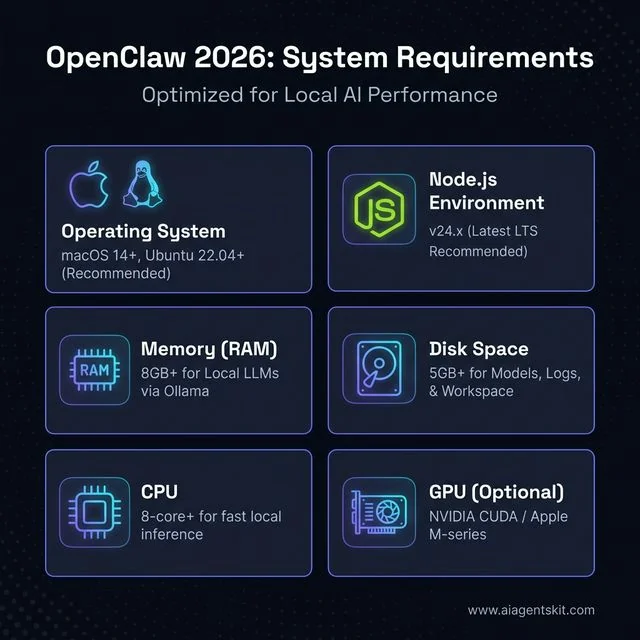
OpenClaw 2026: Minimum and recommended system requirements for local AI execution.
| Component | Minimum | Recommended |
|---|---|---|
| OS | macOS 12, Ubuntu 20.04, Windows 11 (WSL2) | macOS 14+, Ubuntu 22.04 |
| Node.js | v22.x | v24.x (latest LTS) |
| RAM | 2 GB (cloud models only) | 8 GB+ (for local LLMs via Ollama) |
| Disk Space | 1 GB | 5 GB+ (models, logs, workspace) |
| CPU | Any modern dual-core | 8-core+ for local inference |
| GPU | Not required | NVIDIA GPU (CUDA) for fast local inference |
| Internet | Required for cloud models | Optional if running Ollama locally |
Windows users: Native Windows is possible, but WSL2 (Ubuntu) is strongly recommended for a smoother terminal experience. All shell-command-based skills work natively inside WSL2 without compatibility issues.
Social Media Automation and Intelligence
Social media management frequently devolves into endless scrolling and manual data entry. OpenClaw radically transforms this dynamic by actively fetching, parsing, and publishing content automatically. When reviewing how individuals deploy these systems it becomes clear that autonomous AI agents fundamentally reshape content consumption.
Daily Reddit Digest
The Problem: A software engineer follows 15 subreddits covering machine learning, system design, and startup news. Every morning she spends 45 minutes scrolling Reddit before spotting two or three genuinely useful posts—the rest is noise.
How OpenClaw Solves It: The agent logs into Reddit’s API, fetches the top-voted threads from her subscribed subreddits, scores each post by keyword relevance (she cares about “distributed systems,” “LLM,” and “founding engineering”), and delivers a markdown summary via Telegram every day at 7 AM. Total reading time drops from 45 minutes to 5 minutes.
Setup Steps:
- Create a Reddit developer application at reddit.com/prefs/apps to obtain a client ID and secret.
- Add the credentials to the
.envfile:REDDIT_CLIENT_ID=your_client_id REDDIT_SECRET=your_secret REDDIT_USERNAME=your_username - Create a skill file named
reddit-digest.yamlwith the desired subreddits, minimum upvote threshold, and keyword filters. - Set a daily cron trigger inside the OpenClaw scheduler:
schedule: "0 7 * * *"
skill: reddit-digest
output: telegram
Daily YouTube Digest
The Problem: A marketing manager subscribes to 30 YouTube channels covering brand strategy and content marketing. New videos publish on unpredictable schedules and the recommendation algorithm constantly pulls attention toward unrelated viral videos.
How OpenClaw Solves It: The agent queries the YouTube Data API daily, checks for new uploads from a hardcoded list of subscribed channel IDs, fetches the auto-generated transcript of each video, summarizes it in three to five bullet points, and delivers the curated digest to a Slack DM every morning.
Setup Steps:
- Enable the YouTube Data API v3 in Google Cloud Console and generate an API key.
- Add
YOUTUBE_API_KEY=your_keyto the.envfile. - Create a
youtube-digest.yamlskill listing targetchannel_idsandmax_results_per_channel. - The skill instructs the agent to call the transcript endpoint and pass the raw text to the LLM for summarization.
- Route the output to Slack using the Slack webhook URL added to
.envasSLACK_WEBHOOK_URL.
X (Twitter) Account Analysis
The Problem: A startup founder posts consistently on X but has no idea which topics drive the most meaningful engagement versus hollow impressions. Generic analytics dashboards show numbers but no narrative.
How OpenClaw Solves It: The agent uses the X API to pull the last 200 posts from the account, groups them by theme using LLM-driven topic clustering, calculates engagement ratios per cluster, and outputs a plain-language strategy report: “Your threads about failed startup lessons get 4x more replies than product announces. Post more of those.”
Setup Steps:
- Apply for X API access at developer.twitter.com and generate Bearer Token credentials.
- Add
X_BEARER_TOKEN=your_tokento.env. - Create the
x-analysis.yamlskill specifying target handle, lookback period, and output format. - Run the skill on demand or schedule it weekly via the cron scheduler.
Multi-Source Tech News Digest
The Problem: A CTO needs to stay current across AI research, cloud infrastructure updates, security advisories, and competitor announcements. Following 100+ sources manually is impossible.
How OpenClaw Solves It: The agent scrapes RSS feeds, parses GitHub Trending, reads X timelines of curated accounts, and runs targeted web searches every morning. It deduplicates stories, scores them by relevance, and generates a priority-ranked morning briefing that lands in a Telegram channel before 8 AM.
Setup Steps:
- Create a
news-sources.yamlfile listing RSS URLs, target GitHub topics, and X handles to monitor. - Install the
rss-parsernpm package that OpenClaw’s skill system can invoke. - Configure the skill to deduplicate by headline fuzzy-matching and discard older than 24-hour stories.
- Route to Telegram: add
TELEGRAM_BOT_TOKENandTELEGRAM_CHAT_IDto.env.
X (Twitter) Complete Automation (TweetClaw)
The Problem: A content creator wants an active X presence without spending hours per day on the platform. Posting, replying, following relevant accounts, and running giveaways all demand constant manual input.
How OpenClaw Solves It: The TweetClaw plugin allows the agent to post drafted tweets, craft contextual replies to mentions, like posts matching specific keywords, send templated DMs to new followers, search trending hashtags in a niche, and run automated giveaway tracking—all from a single Telegram chat interface.
Setup Steps:
- Install TweetClaw:
npm install -g tweetclawand activate it inside OpenClaw’s skill registry. - Add X OAuth2 credentials (API key, API secret, Access token, Access token secret) to
.env. - Create a
tweet-schedule.yamlfile with content drafts and posting times. - Add a
reply-rules.yamlfile specifying which keywords in mentions should trigger automatic replies and what tone to use.
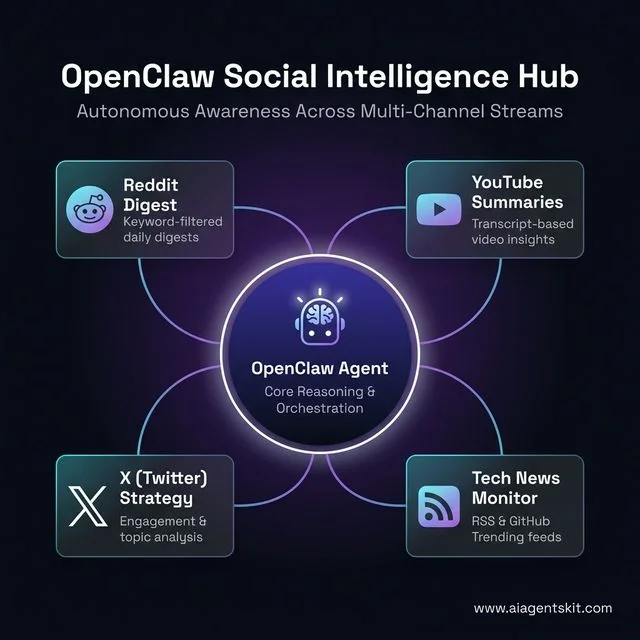
The Social Intelligence Hub: OpenClaw orchestrating awareness across Reddit, YouTube, X, and Tech News streams.
Creative and Building Workflows
The engineering and design environment requires an entirely different tier of open source LLMs integration. Modern creative workflows represent the vanguard of this automated transformation.
Goal-Driven Autonomous Tasks
The Problem: A freelance developer sets ambitious weekly goals on Sunday evenings but consistently fails to break them into daily, actionable tasks. By mid-week the goals feel overwhelming and get abandoned.
How OpenClaw Solves It: The user dictates a goal—“Ship MVP of the invoicing feature by Friday”—into a Telegram message. The agent decomposes it into numbered daily tasks, prioritizes them against existing calendar blocks, schedules them as reminders, and even builds surprise mini-apps or scripts overnight to accelerate the work.
Setup Steps:
- Enable the Todoist integration by adding
TODOIST_API_TOKENto.env. - Create a
goal-decomposer.yamlskill that instructs the agent to break input goals into SMART subtasks. - Configure the agent to check the current calendar via Google Calendar API before scheduling tasks.
- Run the skill each Sunday evening at 8 PM via the scheduler.
YouTube Content Pipeline
The Problem: A solo creator publishes educational programming tutorials but struggles to consistently find fresh video ideas that actually rank on YouTube search.
How OpenClaw Solves It: The agent monitors trending keywords in programming-related YouTube search via the YouTube Data API, cross-references them against the creator’s existing video library to find coverage gaps, generates five ranked video ideas with suggested titles and search volume estimates, and tracks the production pipeline stages in a local markdown file.
Setup Steps:
- Reuse the YouTube API key from the digest setup.
- Create a
content-pipeline.yamlskill that specifies the niche keywords and competitor channel IDs to benchmark against. - Configure the agent to update a local
pipeline.mdfile with idea backlog, script draft status, and publish date. - Integrate with Notion or Obsidian via their APIs for richer project tracking if preferred.
Multi-Agent Content Factory
The Problem: A digital marketing agency produces 20 articles per month across five different client niches. Coordinating writers, researchers, and editors via email consumes as much time as the writing itself.
How OpenClaw Solves It: The team runs a multi-agent pipeline entirely within Discord. A research agent scrapes authoritative sources and builds a fact-checked brief. A writing agent drafts the article against a style guide. A thumbnail-generation agent produces OG images via a diffusion API. Each agent posts results to dedicated Discord channels, and a human editor simply reviews and approves.
Setup Steps:
- Create a Discord server with channels:
#research-queue,#draft-review,#thumbnails,#approved. - Add
DISCORD_BOT_TOKENand channel IDs to.env. - Define three separate skill files:
researcher.yaml,writer.yaml,thumbnail.yaml. - Configure the orchestrator skill to pass the output of each agent as input to the next using a handoff payload.
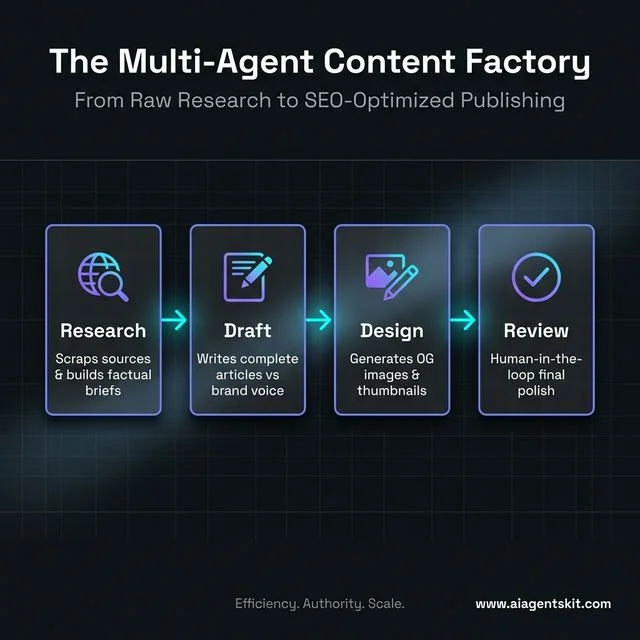
The Multi-Agent Content Factory: A collaborative pipeline where specialized agents handle research, drafting, design, and review.
Autonomous Game Development Pipeline
The Problem: An indie developer works on a side-project game on weekends but forgets context between sessions. Picking up where work left off, managing the bug backlog, and writing documentation all eat into the limited coding time.
How OpenClaw Solves It: At the start of each session, the agent reads the current STATE.yaml file that tracks the active feature backlog, open bugs, and last commit summary. It selects the highest-priority bug, writes the fix, runs unit tests, updates the inline documentation, and commits to Git—all before the developer has finished their morning coffee.
Setup Steps:
- Create a
STATE.yamlfile in the project root defining the backlog, current sprint, and “Bugs First” policy. - Add a
game-dev.yamlskill that reads STATE.yaml before starting any work session. - Configure Git credentials in
.envto allow autonomous commits. - Integrate with a local test runner (e.g., pytest or Jest) that the agent invokes after each fix.
Podcast Production Pipeline
The Problem: A podcast host records episodes regularly but the post-production workflow—research, show notes, transcript cleanup, and social clips—takes three to four hours per episode.
How OpenClaw Solves It: After recording, the audio file is dropped into a designated folder. The agent transcribes it using a local Whisper model, extracts key quotes, generates time-stamped show notes, drafts three tweet-length social clips, and formats the entire package as a publish-ready markdown file. Total manual effort drops to fifteen minutes of review.
Setup Steps:
- Install Whisper locally:
pip install openai-whisper. - Configure OpenClaw to monitor a
recordings/directory for new.mp3files. - Create a
podcast-pipeline.yamlskill that chains: transcribe → summarize → extract quotes → generate show notes. - Output all files to a
episodes/[episode-title]/folder automatically.
Infrastructure and DevOps Orchestration
System administrators constantly battle alert fatigue and repetitive maintenance chores. Modern enterprises looking to save time with AI must embrace these native infrastructure capabilities.
n8n Workflow Orchestration
The Problem: A backend engineer wants to use AI reasoning to power complex business logic, but does not want the AI agent to directly handle sensitive API credentials for payment processors, CRMs, or internal databases.
How OpenClaw Solves It: OpenClaw handles the reasoning and decision-making layers, then delegates execution to pre-built n8n workflows via webhook calls. The credentials live inside n8n’s encrypted vault—OpenClaw never sees them. Every integration remains visual, auditable by the security team, and can be modified without rewriting agent code.
Setup Steps:
- Install n8n locally:
npx n8nor via Docker. - Build workflows in the n8n visual editor that accept a JSON payload from a webhook trigger.
- Copy each workflow’s webhook URL and add them to OpenClaw’s
webhooks.yamlregistry. - Instruct the agent skill to call the relevant webhook when it needs to execute an external action rather than doing it directly.
Self-Healing Home Server
The Problem: A hobbyist runs a home lab with five Docker containers: a media server, a VPN, a local LLM endpoint, a Pi-hole, and a NAS. Any one of them can crash overnight, and alerts arrive as silent emails nobody reads at 3 AM.
How OpenClaw Solves It: The agent runs as a background cron job every 15 minutes, checking container status via the Docker API, available disk space, and memory headroom. If a container is down, it restarts it automatically, clears the relevant cache directory, and sends a Telegram message: “Pi-hole was down. Restarted at 03:14. Disk now at 67%. Cause: log file bloat.”
Setup Steps:
- Expose the Docker socket to OpenClaw’s environment (or run OpenClaw inside the same Docker network).
- Create a
server-watchdog.yamlskill listing monitored container names and health thresholds. - Configure a 15-minute cron schedule in OpenClaw’s scheduler.
- Add recovery actions per container: restart policy, cache clear command, and notification message template.
Everyday Productivity and Task Management
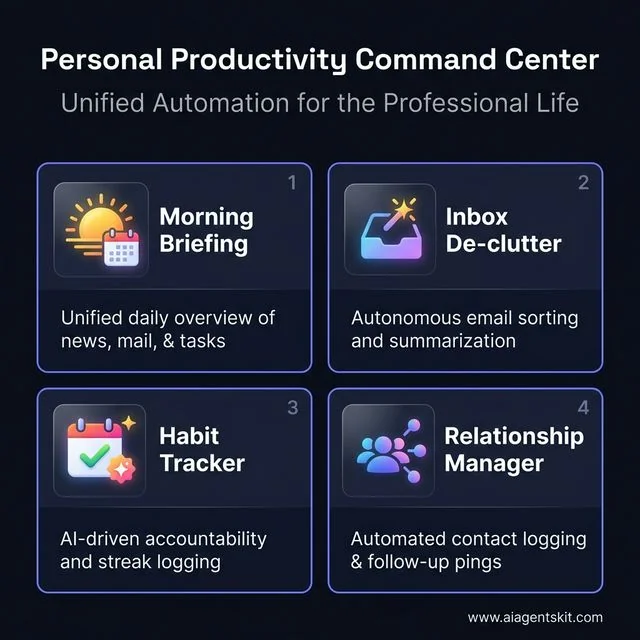
The Productivity Command Center: A unified view of your morning briefing, inbox triage, and habit tracking.
Implementing intelligent systems across enterprise functions provides measurable operational leverage. According to McKinsey’s research (2024), generative AI-enabled agents have increased issue resolution by 14 percent per hour and reduced handling time by 9 percent within customer service environments. To fully grasp AI agent use cases, administrators must study the following implementations.
Autonomous Project Management with STATE.yaml
The Problem: A solo developer manages three active client projects simultaneously. Keeping every project’s status, blockers, and next actions up to date across different tools (Jira, Notion, GitHub) creates constant context-switching overhead.
How OpenClaw Solves It: Each project has a STATE.yaml file that acts as the single source of truth. Sub-agents assigned to each project update their STATE.yaml with every commit and every resolved blocker. A manager agent reads all three STATE files every morning, compiles a cross-project summary, and sends it to Slack. The developer gets a unified view without opening a single project management tool.
Setup Steps:
- Create a
STATE.yamltemplate with fields:project_name,current_sprint,blockers,next_action,last_updated. - Configure each project’s agent to append to STATE.yaml after every meaningful action.
- Create a
daily-standup.yamlorchestrator skill that reads all STATE files and generates a summary. - Schedule the orchestrator at 8:30 AM daily.
Multi-Channel AI Customer Service
The Problem: A small e-commerce store receives customer questions via WhatsApp, Instagram DMs, email, and Google Reviews. The owner cannot monitor four platforms simultaneously, so responses are slow and inconsistent.
How OpenClaw Solves It: OpenClaw unifies all four channels through their respective APIs into one terminal. When a customer asks “Where is my order?”, the agent looks up the order ID in the store’s database, checks the shipping API, and replies with the tracking link—automatically, within seconds, across all platforms.
Setup Steps:
- Connect each platform:
- WhatsApp: Use the WhatsApp Business API via a provider like Twilio.
- Instagram: Use the Instagram Graph API with a business account.
- Email: Use Gmail API or IMAP credentials.
- Google Reviews: Use Google My Business API.
- Add all respective credentials to
.env. - Create a
customer-service.yamlskill with response templates keyed to detected intent (shipping, returns, product questions). - Build a fallback rule: if the agent cannot answer confidently above a set threshold, it forwards the message to the owner’s Telegram for manual reply.
Phone-Based Personal Assistant
The Problem: A sales professional spends four hours daily in the car between client meetings. Typing queries on a phone while driving is dangerous, and voice assistants like Siri are too limited for complex business questions.
How OpenClaw Solves It: The agent hooks into a telephony API (Twilio Voice) and presents as a personal phone number. The user calls the number, speaks a question, the agent transcribes it with Whisper, processes the request (checks CRM, reads email, queries calendar), and responds via text-to-speech. The entire interaction takes under 30 seconds.
Setup Steps:
- Create a Twilio account and buy a phone number.
- Add
TWILIO_ACCOUNT_SID,TWILIO_AUTH_TOKEN, andTWILIO_PHONE_NUMBERto.env. - Install a local Whisper model for transcription.
- Create a
voice-assistant.yamlskill that defines the query-answer loop and fallback behaviors. - Point Twilio’s incoming call webhook to the local OpenClaw endpoint (use ngrok for local development tunneling).
Inbox De-Clutter
The Problem: A product manager receives 200+ emails daily. About 15 are genuinely important. The remaining 185 are newsletters, automated notifications, and reply chains that require no action.
How OpenClaw Solves It: The agent monitors the inbox continuously, auto-archives any email matching “unsubscribe” or promotional category patterns, extracts the key point from newsletters into a single 6 PM digest email, and surfaces only action-required items as Telegram notifications. The inbox drops from 200 daily items to a manageable 15.
Setup Steps:
- Enable Gmail API access and add
GMAIL_CREDENTIALS_FILEpath to.env. - Define filter rules in
inbox-rules.yaml: patterns to archive, senders to prioritize, and newsletter domains to summarize. - Configure the digest output: collect newsletter summaries throughout the day and send a single digest at 6 PM.
- Set priority sender rules so messages from the manager’s boss or direct reports always trigger instant Telegram pings.
Personal CRM Integration
The Problem: A consultant meets 20–30 new people per month at conferences and client sites. Business cards get lost, follow-ups slip through the cracks, and relationships stagnate.
How OpenClaw Solves It: The agent reads the user’s email and calendar daily, automatically creates contact records for new people encountered, and logs every interaction. The user can ask in plain language: “When did I last speak with Sarah from Acme Corp? What did we discuss?” The agent searches its local database and returns a precise answer in seconds.
Setup Steps:
- Create a local SQLite database file:
contacts.dbwith tables for contacts, interactions, and follow-ups. - Configure the
personal-crm.yamlskill to parse new email threads and extract the sender’s name, company, and topic discussed. - Set a weekly reminder rule: the agent scans for contacts not interacted with in 30 days and sends a nudge via Telegram.
- Add a natural language query interface so the user can ask questions about contacts via chat.
Health and Symptom Tracker
The Problem: Someone managing a chronic condition needs to track food intake, sleep quality, stress levels, and symptoms across months to identify triggers. Current apps require tedious manual entry that users abandon after a week.
How OpenClaw Solves It: The user texts brief updates to the agent throughout the day: “Ate pasta for lunch, tired at 3 PM, headache.” The agent parses these casual messages, extracts structured data points, saves them to a local CSV, and runs a monthly correlation analysis to identify which inputs are statistically linked to specific symptoms.
Setup Steps:
- Set up the Telegram bot as the input interface.
- Create a
health-tracker.yamlskill that uses NLP entity extraction to pull food items, symptom names, times, and severity ratings from unstructured text. - Save extracted data to
health-log.csvwith columns: date, category (food/symptom/sleep), value, notes. - Schedule a monthly summary report that runs a simple correlation analysis using Python’s pandas library and emails the output.
Multi-Channel Personal Assistant
The Problem: A knowledge worker uses Telegram for personal messages, Slack for work, and email for formal communication. Switching between three apps constantly breaks concentration and causes important items to be missed.
How OpenClaw Solves It: The agent acts as a central hub. Tasks assigned via Telegram appear in the work calendar. Urgent Slack mentions trigger Telegram notifications so nothing is missed during personal time. Email summaries land in Slack for quick review before morning standup. One interface routes everything efficiently.
Setup Steps:
- Connect all three platforms using their official APIs and bot tokens.
- Define routing rules in
channel-router.yaml: which sources map to which destinations, and under what conditions. - Configure priority escalation: any message containing the words “urgent,” “ASAP,” or the user’s name in capitals triggers an immediate cross-channel notification.
Family Calendar and Household Assistant
The Problem: A family of four with two working parents and two kids in after-school activities uses three separate Google Calendar accounts. Nobody knows who needs to be where on any given day until a conflict appears at the last minute.
How OpenClaw Solves It: The agent reads all four calendar accounts every morning, generates a daily briefing (“Dad: dentist at 10 AM, Emma: swimming at 4 PM, dinner prep by 6 PM”), monitors the family’s shared iMessage group for spontaneous plan mentions, and automatically updates the household shopping list when low-stock items are mentioned in conversation.
Setup Steps:
- Add Google Calendar API credentials for each family member account to
.env. - Create a
family-briefing.yamlskill that reads all calendars and generates a unified daily summary. - Schedule the briefing to send via a family Telegram group at 7 AM.
- Connect to an iMessage monitoring script (macOS only) that watches for keywords like “we need milk” or “can you pick up” and adds them to a shared Apple Reminders list.
The Ultimate Second Brain
The Problem: A researcher bookmarks hundreds of articles, research papers, and web pages per month. Six months later, finding a specific piece of information requires searching through disorganized bookmarks for 20 minutes—or just Googling it again.
How OpenClaw Solves It: The user simply sends any idea, URL, or thought to the Telegram bot. The agent fetches the full content of URLs, extracts key information, builds a local vector index using embeddings, and makes everything searchable via conversational queries. Asking “What did I read about LLM memory management?” retrieves the most relevant saved resources ranked by semantic similarity.
Setup Steps:
- Install a local vector database. Chroma is a simple choice:
pip install chromadb. - Configure the
second-brain.yamlskill to embed all saved content using a local embedding model or OpenAI embeddings API. - Build a simple query flow: user sends a question via Telegram → agent embeds the query → searches Chroma → returns top 5 results with excerpts.
- Deploy a local Next.js dashboard (optional) for visual browsing of the knowledge base.
Custom Morning Briefing
The Problem: A busy executive starts every day by opening five different apps: news, email, calendar, weather, and task list. This fragmented morning routine takes 30 minutes and often causes important items to be skipped.
How OpenClaw Solves It: At 7:00 AM each weekday, the agent compiles a single, personalized briefing: the three most important calendar events, any unread emails from priority senders, the local weather, top industry headlines, the day’s priority tasks, and a motivational quote. It arrives as a clean, formatted Telegram message. The executive reviews it in three minutes while having coffee.
Setup Steps:
- Define data sources in
morning-briefing.yaml: calendar, email, weather API (e.g., OpenWeatherMap), news RSS feeds, and task list. - Add
OPENWEATHER_API_KEYto.env. - Set the scheduler to run at 7:00 AM Monday–Friday:
schedule: "0 7 * * 1-5". - Structure the output template so sections appear in a consistent, readable order each morning.
Automated Meeting Notes and Action Items
The Problem: After every meeting, a team lead manually listens to the recording, types up notes, identifies action items, assigns owners, and adds tasks to Jira. This post-meeting admin work takes one hour per meeting and contains human errors.
How OpenClaw Solves It: Meeting recordings are dropped into a watched folder. The agent transcribes the audio, uses the LLM to extract structured action items (task, owner, deadline), formats everything as a markdown meeting summary, and creates Jira tickets for each action item via the Jira API. The entire process finishes in under five minutes.
Setup Steps:
- Install Whisper for transcription.
- Configure OpenClaw to watch a
meetings/folder for new.mp3or.m4afiles. - Create a
meeting-notes.yamlskill with a prompt template that instructs the LLM to output action items in a strict JSON format:{task, owner, deadline}. - Add Jira API credentials:
JIRA_BASE_URL,JIRA_EMAIL,JIRA_API_TOKENto.env. - Map extracted action items to Jira ticket creation API calls in the skill’s execution flow.
Habit Tracker and Accountability Coach
The Problem: A person trying to build three new habits—daily exercise, reading, and meditation—frequently misses days and abandons the streak without any external accountability.
How OpenClaw Solves It: Each evening at 9 PM, the agent sends a Telegram check-in: “Did you complete today’s workout, reading, and meditation? Reply yes/no/partial for each.” The agent logs responses, maintains streak counters, adjusts its tone based on performance history (encouraging after a miss, celebratory after a milestone), and sends a weekly summary with a habit consistency chart.
Setup Steps:
- Create a
habits.yamlfile listing tracked habits, target frequencies, and streak reset rules. - Configure the evening check-in prompt to be sent at 9 PM daily.
- Parse the user’s text response to interpret yes/no/partial for each habit (the LLM handles flexible language like “kind of” or “skipped gym”).
- Store streak data in a local
habits.dbSQLite file and generate weekly charts using matplotlib.
Phone Call Notifications for Critical Alerts
The Problem: A system administrator set up email and Slack alerts for server incidents, but both channels get ignored during off hours. A production outage at 2 AM goes undetected for four hours because nobody sees the silent notification.
How OpenClaw Solves It: The agent is configured to escalate critical events—server down, payment processing failure, disk at 99%—to actual outbound phone calls via Twilio. A synthesized voice explains the incident, and the recipient can press a key to acknowledge or get a callback with diagnostic details.
Setup Steps:
- Configure monitoring thresholds in
critical-alerts.yaml: define what constitutes a critical event versus a warning. - Add Twilio credentials and the on-call phone number to
.env. - Create a text-to-speech script template: “This is your OpenClaw system alert. The production database is unreachable. Incident started at [time]. Press 1 to acknowledge.”
- Set escalation logic: if no acknowledgment within 10 minutes, call a secondary contact.
Research and Learning Accelerators
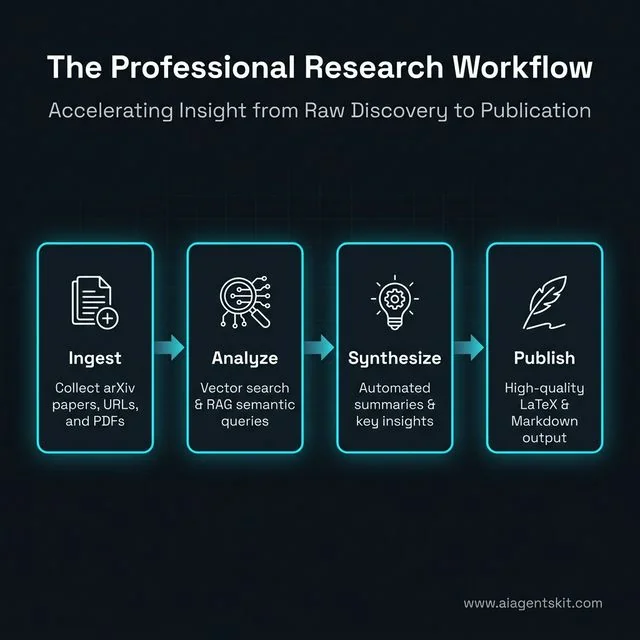
The Digital Research Studio: Accelerating the journey from raw data ingestion to polished academic publication.
Academic and financial analysis demands rapid parsing of incomprehensible data volumes. The following implementations showcase the raw analytical power of local inference.
AI Earnings Tracker
The Problem: An investor follows 12 AI and cloud computing companies. Quarterly earnings seasons are chaotic—conference calls overlap, reports are dense, and manually synthesizing the capital expenditure trends across all 12 companies takes a full day.
How OpenClaw Solves It: The agent monitors earnings calendar APIs, downloads publicly available earnings press releases as PDFs, extracts key metrics (revenue, EPS, cloud growth %, CapEx guidance), generates a structured comparison table, and sends a real-time Telegram alert with executive summary during the conference call window.
Setup Steps:
- Integrate with a financial data API like Alpha Vantage or Polygon.io for earnings calendar data.
- Create an
earnings-tracker.yamlskill that specifies the watchlist of stock tickers. - Configure PDF parsing: use PyPDF2 or pdfminer to extract raw text from downloaded reports.
- Define the metrics to extract in the prompt template and output them as a structured table.
- Schedule the skill to run on known earnings dates based on the earnings calendar feed.
Personal Knowledge Base (RAG)
The Problem: A researcher saves web articles, YouTube video transcripts, research PDFs, and X threads related to quantum computing. After six months, the knowledge base has 500+ items and traditional search returns irrelevant results based on exact keyword matching.
How OpenClaw Solves It: Users build a searchable local knowledge base by dropping URLs, PDFs, and text snippets into the chat. The agent chunks and embeds all content into a local vector database. Later, asking “What are the main error correction approaches in quantum computing?” retrieves the five most semantically relevant pieces from the entire archive, with source citations.
Setup Steps:
- Install Chroma:
pip install chromadband configure a persistent storage directory. - Create an
ingest.yamlskill that takes a URL or file path, fetches or reads the content, splits it into chunks of ~500 tokens, and stores embeddings. - Create a
query.yamlskill that takes a user question, embeds it, runs a similarity search, retrieves top results, and passes them as context to the LLM for a synthesized answer. - Expose both skills as Telegram commands:
/add [url]to ingest and/ask [question]to query.
Market Research and Product Factory
The Problem: A would-be entrepreneur wants to build a developer tool but is not sure which specific pain point to address. Generic market research reports are expensive and too broad to be actionable.
How OpenClaw Solves It: The agent mines Reddit’s developer subreddits and Hacker News posts from the last 30 days, extracts complaints and feature requests using sentiment analysis, groups them by theme, and ranks them by frequency and intensity. It then generates a list of five specific product ideas ranked by addressable market size and prototyping feasibility. The user gets original market intelligence for free in under an hour.
Setup Steps:
- Use Reddit API and Hacker News Algolia API as data sources.
- Create a
market-research.yamlskill with configurable parameters: target niche, time window, minimum upvotes, and required output format. - Instruct the LLM to classify each post by sentiment (complaint, praise, feature request) and extract core pain point.
- Generate the product idea report as a markdown file with sections: pain point, proposed solution, competitive landscape, and effort estimate.
Pre-Build Idea Validator
The Problem: A developer has an idea for a new CLI tool but worries that similar tools might already exist. Manually searching GitHub, npm, and Product Hunt takes hours and still might miss key competitors.
How OpenClaw Solves It: Before writing a single line of code, the agent automatically searches GitHub repositories by keywords, scans npm and PyPI registries for similar package names, checks Product Hunt for recent launches in the space, and analyzes the HackerNews “Show HN” feed. It returns a competitive saturation score and explicitly advises whether to proceed, pivot, or abandon.
Setup Steps:
- Configure API access for GitHub (personal access token), npm registry (no auth needed), and PyPI JSON API.
- Create a
idea-validator.yamlskill that accepts a one-line product description and runs the multi-source search. - Define a scoring rubric: high saturation if >10 active GitHub repos with >100 stars exist in the space. Low saturation if fewer than 3 results across all sources.
- Output a structured recommendation with evidence links.
Semantic Memory Search
The Problem: A developer uses OpenClaw daily and accumulates a rich history of past problem-solving sessions, code snippets, and research notes stored in markdown files. Standard grep search fails to find a previous solution when searching using different phrasing.
How OpenClaw Solves It: OpenClaw adds vector-powered semantic search to all its own markdown memory files. A user asking “how did I solve that database connection timeout issue last month?” retrieves the relevant session notes even if the original entry used the words “connection pool exhaustion” and “PostgreSQL backoff strategy” instead.
Setup Steps:
- Configure OpenClaw to auto-embed all generated notes and memory files using a background sync process.
- Set up Chroma with a persistent directory that mirrors the memory file structure.
- Create a
/search [query]Telegram command that triggers vector search across all memory embeddings. - Combine semantic results with a BM25 keyword search (hybrid retrieval) for highest accuracy.
arXiv Paper Reader
The Problem: A data scientist wants to stay current with state-of-the-art machine learning research but finds dense academic papers filled with mathematical notation nearly impenetrable without spending hours on each one.
How OpenClaw Solves It: The user sends an arXiv paper ID (e.g., 2404.01234) to the agent via Telegram. The agent fetches the full paper, reads the abstract, methodology, results, and conclusion section by section, and produces a structured summary: “What problem does it solve? What is the key insight? What are the limitations? What should practitioners take away?”
Setup Steps:
- Use the arXiv API:
https://export.arxiv.org/abs/{paper_id}to fetch paper metadata and PDF URL. - Install a PDF text extractor:
pip install pypdf2. - Create an
arxiv-reader.yamlskill that chains: fetch → extract → summarize by section. - Add a
/paper [arxiv_id]Telegram command to trigger the workflow on demand.
LaTeX Paper Writing
The Problem: A PhD student needs to write a methods section with complex mathematical notation. Switching between LaTeX syntax documentation and the writing context constantly breaks the creative flow.
How OpenClaw Solves It: The student describes what they want to write in plain language via Telegram: “Write the gradient descent equation for a two-layer neural network with L2 regularization.” The agent generates the properly formatted LaTeX source code, compiles it using a local TeX installation, and returns a PDF preview link—all without the student needing to know a single LaTeX command.
Setup Steps:
- Install a TeX distribution: TeX Live (Linux/Mac) or MiKTeX (Windows).
- Create a
latex-writer.yamlskill with a system prompt that instructs the model to output only valid LaTeX. - Configure the skill to save output to a
.texfile and runpdflatexvia a shell command. - Return the compiled PDF path as a clickable link in the Telegram response.
Finance and Trading Capabilities
Polymarket Autopilot
The Problem: A prediction market trader follows dozens of active markets on Polymarket but cannot monitor all of them simultaneously across global time zones. Manually backtesting strategies before deploying capital is prohibitively time-consuming.
How OpenClaw Solves It: The agent conducts automated paper trading on specified prediction markets. It fetches current market odds, applies a configurable resolution strategy, simulates trades, tracks performance against a historical backtest, and outputs a daily performance report: win rate, average return per trade, and which market categories have been most profitable.
Setup Steps:
- Use Polymarket’s public API to fetch market data and historical resolution outcomes.
- Create a
polymarket-autopilot.yamlskill specifying trading categories, minimum confidence threshold, and position size rules. - Store all simulated trades in a local
trades.csvfile for backtesting. - Configure a daily 6 PM report that calculates and summarizes performance metrics.
How to Set Up Multi-Agent Workflows
One of OpenClaw’s most powerful capabilities is orchestrating multiple specialized agents that collaborate on complex tasks. Understanding this architecture unlocks a completely different level of automation.
The Manager-Worker Model
The most common multi-agent pattern uses one “manager” agent that breaks down a goal and delegates subtasks to specialized “worker” agents. Here is a concrete example of a content production workflow:
- Manager agent receives the goal: “Write a comprehensive blog post about Docker networking.”
- Manager creates a task list and assigns to three workers: Researcher, Writer, Editor.
- Researcher agent (runs on a high-quality model) searches the web, reads documentation, and compiles a fact-checked brief.
- Writer agent (runs on a fast model) drafts the article against the brief and a house style guide.
- Editor agent reviews the draft for consistency, SEO optimization, and readability.
- Manager compiles the final output and notifies the human via Telegram.
Setup for Multi-Agent Orchestration:
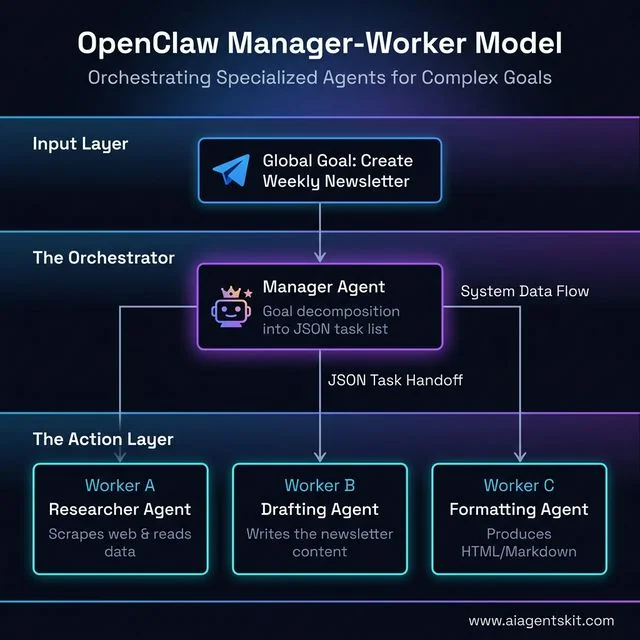
The Manager-Worker Model: How OpenClaw decomposes complex goals into manageable tasks for specialized sub-agents.
# orchestrator.yaml
name: content-factory
manager:
 model: gpt-4o
 prompt: "You are a content production manager. Break the given goal into tasks for your team."
workers:
 - name: researcher
   model: gpt-4o
   skill: web-research
 - name: writer
   model: gpt-4o-mini
   skill: article-writer
 - name: editor
   model: gpt-4o-mini
   skill: content-editor
handoff_format: json
output: telegram
STATE.yaml for Long-Running Projects
For projects that span days or weeks, the STATE.yaml pattern ensures nothing falls through the cracks:
# STATE.yaml
project: E-commerce Redesign
sprint: 3
current_task: "Implement cart abandonment email flow"
blockers:
  - "Needs SMTP credentials from client"
next_action: "Request SMTP creds, then build email template"
last_updated: 2026-03-18T14:30:00
completed_tasks:
  - "Homepage redesign"
  - "Product page templates"
  - "Checkout flow"
Any agent reading this file has immediate, unambiguous context about the project state. No standup meeting required.
How to Run OpenClaw Completely Offline with Ollama
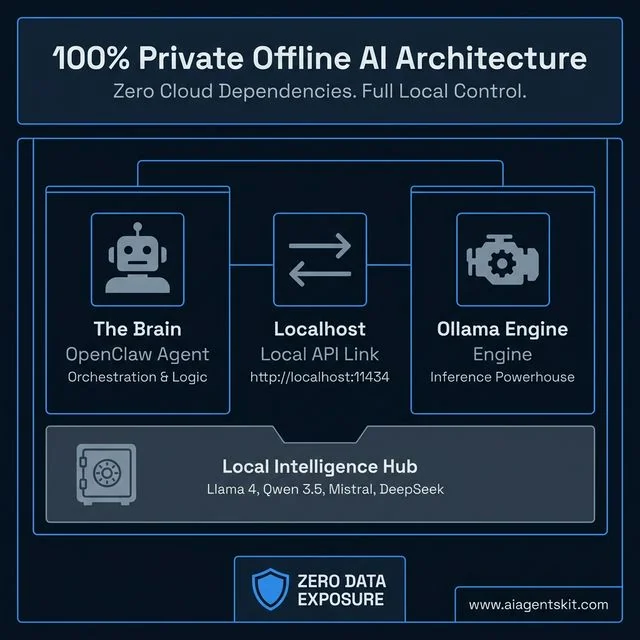
Private-by-Design: The offline architecture for running high-performance AI agents with zero cloud dependency.
One of OpenClaw’s most compelling features is the ability to run entirely disconnected from the internet. No API keys, no subscription fees, no data leaving the machine. This is possible by pairing OpenClaw with Ollama, a tool that runs large language models locally on any Mac, Linux, or Windows machine.
This setup is ideal for anyone handling sensitive data, working in air-gapped environments, or simply wanting zero ongoing inference costs.
Step 1: Install Ollama
Download and install Ollama from ollama.com. On macOS and Linux, the install command is:
curl -fsSL https://ollama.ai/install.sh | shOn Windows, download the .exe installer directly from the Ollama website.
Step 2: Pull a Local Model
Ollama manages models like a package manager. Pull the recommended model for general-purpose OpenClaw tasks:
# Best all-around choice — fast and capable
ollama pull llama4:8b-scout

# Stronger reasoning, slower — good for coding tasks
ollama pull qwen3.5-coder:14b

# Lightweight — runs well on machines with 8 GB RAM
ollama pull mistral:7b
Verify it works by running a quick test:
ollama run llama4:8b-scout "Summarize what OpenClaw is in one sentence."Step 3: Connect OpenClaw to Ollama
Edit the .env file in the OpenClaw project directory and point the model to the Ollama local endpoint:
# Fully local, zero cloud cost, zero data exposure
OPENCLAW_MODEL=ollama/llama4:8b-scout
OPENCLAW_BASE_URL=http://localhost:11434
Restart the agent:
openclaw restartOpenClaw will now send all inference requests to the local Ollama server. The experience is identical to the cloud version—same skill syntax, same Telegram interface—except every token is processed on the local CPU or GPU.
Offline Performance Expectations
| Model | RAM Needed | Tokens/Second (CPU) | Best Use Case |
|---|---|---|---|
llama4:8b-scout | 6 GB | 25–50 t/s | General tasks, daily briefings |
mistral:7b | 5 GB | 30–60 t/s | Fast summaries, email triage |
qwen3.5-coder:14b | 10 GB | 15–30 t/s | Code debugging, documentation |
llama4:70b-maverick | 40 GB | 5–12 t/s | Complex reasoning (needs GPU) |
For most productivity workflows—briefings, email triage, habit tracking—the llama4:8b-scout model running entirely on-device is more than sufficient.
Best AI Models to Use With OpenClaw (March 2026)
OpenClaw is model-agnostic, meaning it connects to virtually any LLM provider or local inference engine. The right model depends on the specific use case. Here is a practical breakdown of the best options across cloud and local deployments as of March 2026.
| Model | Provider | Context Window | Strengths | Best OpenClaw Use Cases | Est. Cost |
|---|---|---|---|---|---|
| GPT-5.4 | OpenAI | 256K tokens | Unparalleled reasoning, multimodal, best tool calling | Complex orchestration, advanced code review, business automation | ~$10–30/mo |
| Claude Opus 4.6 | Anthropic | 500K tokens | Massive context, nuanced writing, ethical alignment | Legal document analysis, research papers, creative writing | ~$10–25/mo |
| Gemini 3.1 Pro | 2M tokens | Extreme context, multimodal, real-time data integration | Analyzing vast codebases, multi-file projects, live data streams | ~$8–20/mo | |
| DeepSeek-V3.2 | DeepSeek | 128K tokens | Elite coding, highly efficient, very cheap | Developer workflows, autonomous code generation, bug fixing | ~$2–5/mo |
| Llama 4 Scout 8B | Meta (via Ollama) | 256K tokens | Fully local, zero cost, excellent generalist | Daily briefings, email triage, habit tracking, personal assistant | Free |
| Mistral 7B | Mistral (via Ollama) | 64K tokens | Fast, lightweight, good for quick tasks | Quick summaries, short tasks, mobile device deployment | Free |
| Qwen 3.5 Coder 14B | Alibaba (via Ollama) | 256K tokens | Best local coding model, strong reasoning | Autonomous code debugging, documentation generation, script writing | Free |
| Llama 4 Maverick 70B | Meta (via Ollama) | 500K tokens | State-of-the-art local reasoning (needs GPU) | Complex research, strategic planning, advanced data analysis | Free |
Pricing note (March 2026): Anthropic removed long-context pricing surcharges for Claude Opus 4.6 and Sonnet 4.6 in March 2026 — the 1M token context window is now included at standard rates. GPT-5.4 API pricing is $2.50 / $10.00 per 1M tokens (input/output). Gemini 3 Flash is the best value cloud option at $0.50 / $3.00 per 1M tokens with a free development tier available.
Practical Recommendation by Use Case (March 2026):
- Maximum privacy + best local quality →
llama4:scoutvia Ollama (10M context, zero cloud calls, runs on a single H100 or consumer GPU cluster) - Best all-round cloud choice →
GPT-5.4(most reliable tool calling, 1.05M context, 94.2% MMLU) - Best cloud coding agent →
Claude Opus 4.6(80.8% SWE-bench Verified — #1 benchmark, now 1M context at standard pricing) - Cheapest capable cloud option →
DeepSeek-V3.2(~$0.30/$1.20 per 1M tokens, optimised for agentic tool use) - Budget cloud for simple tasks →
GPT-5 mini($0.25/$2.00 per 1M tokens) orGemini 3 Flash($0.50/$3.00) - Best free local coding →
qwen3.5:32b(82.4% HumanEval+, no GPU needed at Q4 quantisation) - Tight hardware budget →
llama3.3:8borqwen3.5:9b(both run comfortably on 6–7 GB RAM) - Long document analysis →
Gemini 3.1 Pro(2M tokens cloud) orLlama 4 Scout(10M tokens local)
Recommended Ollama pull commands for March 2026:
# Best general-purpose local model
ollama pull llama4:scout

# Best local coding model (no GPU required)
ollama pull qwen3.5:32b

# Lightweight option for 8 GB RAM machines
ollama pull qwen3.5:9b

# Agentic tool-use specialist
ollama pull deepseek-v3.2

# Ultra-fast fallback for simple tasks
ollama pull mistral:7b
OpenClaw also supports model mixing per skill: route complex reasoning to Claude Opus 4.6 and fast repetitive subtasks to GPT-5 mini or a local qwen3.5:9b. Set the model field per worker inside orchestrator.yaml to make this happen automatically.
OpenClaw vs AutoGPT vs CrewAI vs n8n: Which Should You Use?
All four tools operate in the AI automation space, but they solve fundamentally different problems. Choosing the wrong tool wastes weeks of setup time. Here is an honest, direct comparison.
Side-by-Side Comparison
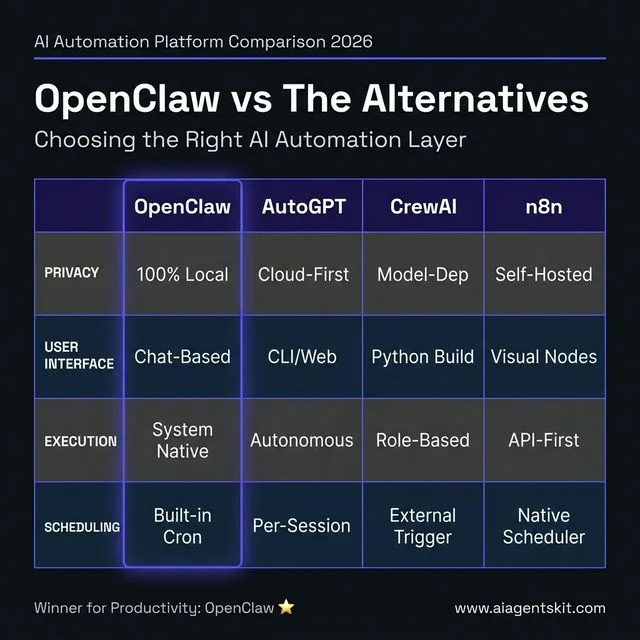
Side-by-side comparison: Why OpenClaw provides superior privacy and productivity for local-first automation.
| Feature | OpenClaw | AutoGPT | CrewAI | n8n |
|---|---|---|---|---|
| Primary Purpose | Personal AI gateway + task automation | Autonomous goal-chasing agent | Multi-agent orchestration framework | Visual workflow automation |
| Architecture | Local daemon + messaging interface | Cloud/local autonomous loop | Python framework, role-based agents | Node-based visual editor |
| Runs Locally | ✅ Yes, natively | ⚠️ Possible but complex | ⚠️ Yes (Python env required) | ✅ Yes via Docker |
| No Code Required | ✅ Natural language commands | ❌ Requires config | ❌ Requires Python | ✅ Visual interface |
| Messaging Integration | ✅ Telegram, WhatsApp, Slack, Discord, iMessage | ❌ None natively | ❌ None natively | ⚠️ Via webhooks |
| Scheduled / Always-On | ✅ Built-in cron + daemon | ❌ Runs per-session | ❌ Runs per-session | ✅ Yes |
| Data Privacy | ✅ Excellent (fully local option) | ⚠️ Cloud-dependent by default | ⚠️ Depends on model | ✅ Good (self-hosted) |
| Multi-Agent Support | ✅ Manager-worker pattern | ⚠️ Experimental | ✅ Core feature | ⚠️ Limited |
| Skill / Plugin Ecosystem | ✅ 100+ ClawHub skills | ⚠️ Plugin system | ✅ Tool integration | ✅ 400+ integrations |
| Best For | Personal + team productivity agents | Experimental goal-based tasks | Enterprise multi-agent pipelines | Visual business process automation |
| Stability | ✅ Production-ready | ❌ Often unstable, loops | ✅ Production-ready | ✅ Production-ready |
When to Choose Each Tool
Choose OpenClaw when:
- The goal is a persistent, always-on personal assistant controlled via Telegram or WhatsApp
- Privacy matters and the workload fits on local hardware
- Non-technical team members need to interact with the agent via chat, not code
- Use cases involve system-level actions: file management, server monitoring, shell commands
Choose AutoGPT when:
- The goal is to experiment with autonomous goal-decomposition in a research or learning context
- Stability and predictability are not critical
- The project is explicitly exploratory and hallucination-tolerant
Choose CrewAI when:
- The organization needs a Python-based framework to build custom multi-agent systems at scale
- Engineers are comfortable writing agent definitions in code
- The primary goal is specialized role-based collaboration, like a research agent + writing agent + QA agent pipeline
Choose n8n when:
- The team prefers a visual, low-code workflow builder
- The use case is primarily connecting SaaS tools (Salesforce, HubSpot, Stripe) via API
- No terminal-level system access is required
- Non-developers will be maintaining the workflows
The power combination: Many advanced teams use OpenClaw as the natural language interface and decision-making layer, while routing specific integrations to n8n workflows via webhooks. OpenClaw reasons and decides; n8n executes against sensitive credentials. This hybrid preserves the usability of OpenClaw with the security and visual auditability of n8n.
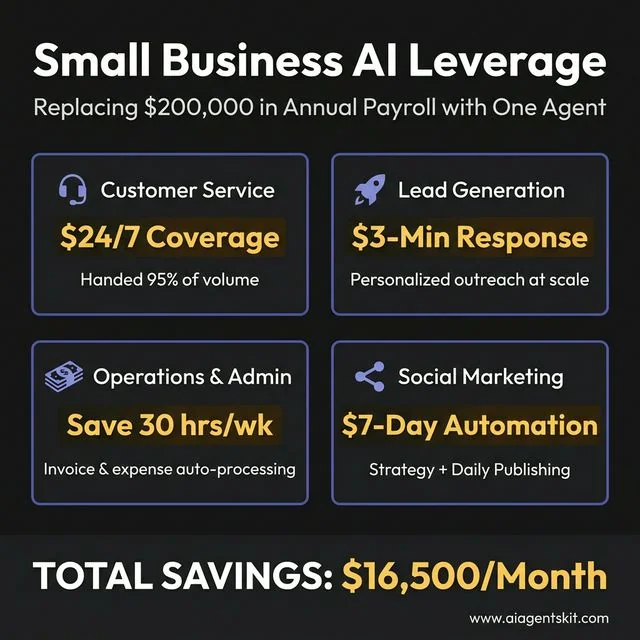
Operational Leverage: How small businesses can replace manual payroll tasks with automated agent workflows.
OpenClaw for Small Businesses: Replace $200K of Payroll With One Agent
The viral claim that first put OpenClaw on the map was straightforward: a founder replaced a $200,000-per-year go-to-market hire with a single OpenClaw configuration. While this sounds hyperbolic, the underlying logic is sound. Many high-salary roles in small businesses are 60–70% execution of repetitive, process-driven tasks that an autonomous agent handles effortlessly.
According to McKinsey’s generative AI research (2024), AI automation has the potential to take over 60–70% of employee working hours in certain roles. For small businesses with tight budgets, this represents an extraordinary competitive lever.
24/7 AI Customer Service Agent
The Problem: A 12-person e-commerce company receives 150 customer service messages daily across email, Instagram DM, and WhatsApp. The founder personally answers half of them after 10 PM.
How OpenClaw Solves It: A single OpenClaw configuration monitors all three channels, classifies each message by type (shipping question, returns request, product complaint, positive feedback), queries the order management system for relevant data, and sends polished, brand-voice replies autonomously. The founder only sees escalations—around 5% of total volume.
Estimated Value: Replaces 30–40 hours/week of customer service labor. At $20/hour, that is $40,000/year in saved labor costs.
Automated Lead Qualification and Outreach
The Problem: A B2B agency generates 200 inbound leads per month but has no SDR to qualify and respond to them within the critical first-hour window. Late responses convert at a fraction of the rate of immediate replies.
How OpenClaw Solves It: When a new lead fills out a contact form, a webhook triggers OpenClaw. The agent researches the lead’s company via web search, scores them against an ideal customer profile, drafts a personalized first-touch email referencing their specific business context, and sends it via the Gmail API—typically within 3 minutes of form submission.
Setup Steps:
- Create a Zapier or n8n webhook that fires when a new CRM lead is created.
- Configure
lead-qualifier.yamlwith the ideal customer profile criteria (company size, industry, geography). - Connect Gmail API: add
GMAIL_CREDENTIALS_FILEto.env. - Define a reply template with dynamic fields the LLM populates from web research.
Automated Invoice and Expense Processing
The Problem: A freelance studio processes 40–60 invoices monthly from different contractors, each in a different format. Manual data entry into the accounting system takes one full day per month.
How OpenClaw Solves It: Scanned invoice PDFs are dropped into a monitored Google Drive folder. OpenClaw downloads each file, runs OCR to extract vendor name, amount, date, and line items, validates the totals, and pushes structured records directly to the accounting API (QuickBooks, Xero, or Wave). Exceptions with confidence below a threshold are flagged for human review.
Setup Steps:
- Install
PyPDF2andpytesseractfor PDF text extraction. - Configure Google Drive API credentials (
GDRIVE_CREDENTIALS_FILEin.env). - Add accounting API credentials (
QUICKBOOKS_CLIENT_ID,QUICKBOOKS_CLIENT_SECRET). - Create
invoice-processor.yamlwith extraction schema and confidence threshold.
AI-Powered Social Media Manager
The Problem: A restaurant owner knows consistent social media presence drives foot traffic, but posting daily feels impossible while running operations. Hiring a social media manager costs $3,000–$5,000/month.
How OpenClaw Solves It: The owner spends 30 minutes on Sunday recording voice notes about the week’s specials, events, and upcoming changes. OpenClaw transcribes them, generates seven days of Instagram captions and stories, creates a posting schedule, and auto-publishes at optimal times via the Instagram Graph API. Total owner time: 30 minutes per week.
Estimated Value: Equivalent to a $1,500/month social media retainer, handled by an existing server subscription.
Weekly Business Intelligence Report
The Problem: A small SaaS founder has revenue data in Stripe, support tickets in Intercom, website traffic in Google Analytics, and server costs in AWS. Getting a unified weekly picture requires manually exporting and assembling four separate reports.
How OpenClaw Solves It: Every Monday at 9 AM, OpenClaw queries all four APIs, pulls the previous week’s data, calculates key deltas (MRR change, churn rate, ticket volume trend, cost-per-user), and delivers a structured Slack message with the five most important insights and one recommended action.
Setup Steps:
- Add API keys for each platform to
.env:STRIPE_API_KEY,INTERCOM_ACCESS_TOKEN,GA4_PROPERTY_ID,AWS_ACCESS_KEY_ID. - Create
weekly-report.yamldefining the metrics to pull and the comparison period. - Set the Monday 9 AM cron schedule.
- Define the Slack output format and the analytical framing the LLM should apply.
OpenClaw Skills: How to Install, Use, and Build Your Own
Skills are the core extensibility mechanism of OpenClaw. Every capability demonstrated in this article—from the Reddit digest to the podcast pipeline to the multi-agent content factory—is implemented as a skill. Understanding how skills work unlocks the full power of the platform.
What Is a Skill?
A skill is a YAML configuration file (and optionally a supporting Python or JavaScript script) that defines:
- What the agent should do (the goal and instructions)
- What tools it can use (web search, file system, APIs, shell commands)
- When and how to trigger (on-demand, scheduled, or event-driven)
- Where to output (Telegram, Slack, email, local file)
Skills sit in the ~/.openclaw/skills/ directory. OpenClaw auto-discovers them on startup.
Installing a Community Skill from ClawHub
The ClawHub registry at openclaw.ai/skills hosts hundreds of community-built skills. Installing one takes a single command:
# Install the Reddit Digest skill
openclaw skill install reddit-digest

# Install the Podcast Pipeline skill
openclaw skill install podcast-pipeline

# List all installed skills
openclaw skill list
After installation, configure the skill’s environment variables in .env and activate it:
openclaw skill enable reddit-digestSecurity reminder: Always review the YAML and any supporting scripts before enabling a community skill. Run
openclaw skill inspect reddit-digestto view the full source before enabling.
Writing a Custom Skill from Scratch
Building a custom skill requires only YAML knowledge. Here is a minimal working example that sends a daily Hacker News digest to Telegram:
# ~/.openclaw/skills/hn-digest.yaml
name: hn-digest
description: Daily top Hacker News stories delivered to Telegram
trigger:
  type: cron
  schedule: "0 8 * * *"
tools:
  - web_search
  - http_get
output:
  channel: telegram
  chat_id: "${TELEGRAM_CHAT_ID}"
prompt: |
  Fetch the current top 10 stories from the Hacker News API at
  https://hacker-news.firebaseio.com/v0/topstories.json
  For each story ID, fetch its details from
  https://hacker-news.firebaseio.com/v0/item/{id}.json
  Return the title, URL, score, and comment count for each story.
  Format as a clean markdown list ranked by score.
  Keep the summary under 400 words.
Save the file, then activate it:
openclaw skill enable hn-digest
openclaw skill test hn-digest  # Run once immediately to verify
Skill Anatomy: Advanced Options
Skills support additional configuration beyond the basics:
# Advanced skill configuration options
memory:
  enabled: true           # Agent remembers past outputs
  store: vector           # Uses local vector DB for semantic recall
fallback:
  on_error: notify        # Sends alert to Telegram on failure
  retry_count: 3          # Retries 3 times before failing
permissions:
  file_read: ["/workspace/data"]   # Limit file access
  file_write: ["/workspace/output"]
  shell: false            # Disable shell for sandboxed skills
env_required:
  - TELEGRAM_CHAT_ID
  - REDDIT_CLIENT_ID
The permissions block is critical for any skill installed from the community. Restricting file_read and file_write to specific directories prevents a rogue skill from reading sensitive configuration files elsewhere on the system.
OpenClaw Security Practices to Follow
Granting an autonomous system full access to local environments demands rigorous defensive protocols. Maintaining fairness in AI and secure execution means actively mitigating the risks associated with raw terminal access. Furthermore, as noted by Gartner’s 2024 analysis on agentic AI, the trend necessitates robust governance features to oversee agent performance.
Protecting API Keys
The most critical vulnerability for any custom installation revolves around exposed credentials. OpenClaw constantly interacts with third-party providers, meaning it handles numerous API keys. Administrators must strictly utilize environment variables (.env files) rather than hardcoding keys directly into any script or configuration manifest. The agent’s native directory must be heavily restricted using standard operating system permissions, ensuring external parties cannot read the initialization files where the core credentials reside.
A safe .env structure looks like this:
# OpenClaw Core
OPENCLAW_MODEL=gpt-4o
OPENAI_API_KEY=sk-...

# Messaging
TELEGRAM_BOT_TOKEN=...
SLACK_WEBHOOK_URL=...

# Integrations
GMAIL_CREDENTIALS_FILE=./credentials/gmail.json
JIRA_API_TOKEN=...
Never commit .env to a public repository. Add it to .gitignore immediately.
Auditing Community Skills
The open-source community provides thousands of pre-built skills that drastically accelerate deployment times. However, installing an unverified community skill grants unknown code the exact same system privileges as the core agent. Operators must manually review the source code of any downloaded extension before execution. Teams must scan for hidden networking calls, unauthorized file access patterns, and hardcoded external destinations to prevent malicious actors from exfiltrating local data under the guise of automation.
Running in Sandboxed Environments
Providing root or administrative access to an LLM constitutes an unnecessary operational hazard. Best practices dictate running the OpenClaw environment within a dedicated Docker container or a restricted virtual machine. This sandboxing approach ensures that even if the agent hallucinates a destructive command like deleting a root directory, the damage remains entirely isolated from the host operating system. The container should only mount the specific directories absolutely required for the authorized tasks.
A safe Docker setup:
FROM node:18-alpine
WORKDIR /app
COPY . .
RUN npm install -g openclaw
# Mount ONLY the required working directory
VOLUME ["/app/workspace"]
CMD ["openclaw", "start"]
Frequently Asked Questions
What are the best OpenClaw use cases for beginners?
New users should start with low-risk, high-value workflows that do not require system-level access. The morning briefing, daily Reddit digest, and meeting notes pipeline are ideal starting points. These use cases produce immediate value, are easy to configure, and build confidence before moving to more complex automations like autonomous code debugging or multi-agent orchestration.
How does OpenClaw differ from standard LLM chatbots?
Standard chatbots remain confined to a browser tab, serving strictly as conversational interfaces incapable of affecting the host machine. OpenClaw installs locally and possesses the capability to execute real actions—such as running terminal commands, creating files, and browsing independent websites to gather unformatted data. It acts as an active participant in workflows rather than a passive answering machine.
Can OpenClaw run shell commands autonomously?
Yes, the core architectural differentiator allows the agent to generate, evaluate, and execute bash or PowerShell commands natively. It reads the local file system, runs package managers, and modifies configurations exactly as a human operator would. This requires administrators to limit the agent’s permissions carefully to prevent unintended system modifications during complex, multi-step operations.
Is OpenClaw safe to run on a local machine?
The environment is safe provided administrators implement strict boundaries and adhere to fundamental security principles. Because the integration has deep access, users must avoid downloading unverified community skills, protect their API keys rigorously, and ideally run the daemon within a Docker container. Properly sandboxed, the agent operates securely without exposing the primary host operating system to hallucinations.
How do I automate my inbox with OpenClaw?
The platform integrates directly with common email providers via their official APIs or through specific community-built skills. Organizations configure the agent to monitor incoming traffic constantly, archive promotional material, flag urgent communications, and draft contextual replies based on past correspondence patterns. This entire classification engine runs silently in the background, pushing only critical alerts to the user’s connected messaging app.
Does OpenClaw require a cloud API or can it run fully local?
The framework supports flexibility between cloud infrastructure and entirely local compute. While users can connect the agent to endpoints provided by OpenAI or Anthropic, they can also point the system toward local inferencing engines like Ollama. Running the intelligence entirely on local hardware ensures maximum privacy, zero subscription costs, and the ability to operate effectively completely disconnected from the internet.
Which messaging platforms natively support OpenClaw integrations?
The ecosystem heavily favors asynchronous communication through established, secure messaging protocols. System operators commonly link their deployments to Telegram, WhatsApp, Discord, or Slack via dedicated bot tokens. This allows users to interface natively with their local agent using natural language from mobile devices, perfectly replicating the experience of texting a highly capable human assistant.
Do I need programming experience to use OpenClaw effectively?
While the initial setup involves navigating terminal commands and configuration files, daily operation does not require deep software engineering expertise. Non-technical users interact with the system entirely through natural language text messages. However, unlocking the platform’s maximum potential—specifically diagnosing complex installation errors or writing custom modular skills—benefits heavily from basic Python or scripting knowledge.
What is the best first skill to build in OpenClaw?
The morning briefing skill is the most recommended starting point. It is self-contained, delivers immediate daily value, and touches the core concepts of OpenClaw—scheduling, API integration, and Telegram output—without introducing complex file system manipulation or multi-agent coordination. Once it works reliably, expanding to the inbox triage or habit tracker follows naturally.
Can multiple people share one OpenClaw instance?
Yes, a single OpenClaw instance can serve multiple users by connecting multiple Telegram or Slack user IDs and routing tasks accordingly. For security and data isolation in team environments, the recommended approach is to run one container per user with shared read-only access to common resources like a team knowledge base or content library.
Can OpenClaw run fully offline without any internet connection?
Yes. When paired with Ollama and a locally downloaded model like Llama 3.1 or Mistral, OpenClaw processes every inference request on the local machine with zero network calls. The only exception is skills that explicitly fetch data from external sources—such as the Reddit digest or news aggregator. The core agent reasoning, memory, and task orchestration layers operate entirely on-device.
How does OpenClaw compare to n8n?
They solve different problems and work best together. n8n is a visual workflow automation tool that excels at connecting SaaS platforms, managing API credentials securely, and building approval-based logic flows. OpenClaw is a natural language AI gateway that reasons, makes decisions, and controls local systems. The optimal setup is using OpenClaw for reasoning and decision-making, then delegating execution to n8n workflows via webhooks so the AI never directly touches sensitive credentials.
What is the best LLM to use with OpenClaw for coding tasks?
For cloud-based coding assistance, GPT-4o and DeepSeek-V3 currently lead the field. DeepSeek-V3 is particularly cost-effective—roughly 90% cheaper than GPT-4o—with comparable coding performance. For fully local coding workflows, qwen2.5-coder:14b via Ollama is the strongest open-source option available without a GPU requirement, handling code generation, debugging, and documentation tasks reliably.
Can OpenClaw control a browser automatically?
Yes. OpenClaw supports browser automation through its Playwright-based tool integration. Skills can instruct the agent to open a browser, navigate to URLs, click elements, fill forms, and extract page content. This is used in the market research skill (scraping competitor pages), the product idea validator (checking Product Hunt), and the local CRM skill (automating LinkedIn data extraction). Always configure browser automation skills with specific URL allowlists to prevent the agent from visiting unintended sites.
Does OpenClaw support persistent memory across sessions?
Yes. OpenClaw builds long-term memory by summarizing completed conversations and storing relevant facts in a local vector database or structured markdown files. When starting a new session or skill run, the agent automatically queries this memory to recall user preferences, past project states, and previously solved problems. The memory is stored entirely on the local machine and is never synced to any cloud. Users can inspect, edit, or delete memory entries directly from the filesystem.
How do I update OpenClaw to the latest version?
Updating via npm takes one command:
npm update -g openclawCheck the current version before and after:
openclaw --versionAfter major version updates, run the migration helper to update any deprecated skill syntax:
openclaw migrate --dry-run  # Preview changes first
openclaw migrate            # Apply migrations
It is recommended to back up the ~/.openclaw/ directory before any major version upgrade, as skill YAML schemas occasionally change between major releases.
How do I connect OpenClaw to WhatsApp?
The WhatsApp integration uses a QR-code-based session similar to WhatsApp Web. Run the channel login command in the terminal:
openclaw channels login whatsappA QR code appears in the terminal. Open WhatsApp on the mobile device, navigate to Settings → Linked Devices → Link a Device, and scan the QR code. Once linked, OpenClaw receives and sends WhatsApp messages through the same number. The session persists until manually revoked or the linked device session expires (typically 14 days of inactivity).
Conclusion
The shift toward local-first AI permanently alters how professionals manage digital friction. Rather than relying on rigid, single-purpose software applications, users deploying self-hosted agents gain access to versatile, proactive systems that integrate natively with their specific hardware. The immediate efficiency gains achieved in daily task management demonstrate precisely why this architecture represents the next paradigm of personal computing.
The best way to approach OpenClaw is to pick one single, frustrating daily task and eliminate it first. Start with the morning briefing or inbox triage. Once that works reliably, the second and third automations take a fraction of the time to configure because the infrastructure is already in place.
Organizations that ignore the capabilities of autonomous execution will ultimately struggle to match the velocity of teams leveraging these powerful, integrated engines. The barrier to entry continues to lower, making comprehensive system automation accessible to anyone willing to install the foundational framework. The key insight for teams is that autonomy heavily outweighs mere conversational intelligence.
Consider reviewing the future of AI agents to prepare for the continued evolution of these autonomous systems. Begin by deploying a simple background workflow to immediately reclaim hours previously lost to routine administration.