Claude Agent Skills: Complete Guide (2026)
Master Claude Agent Skills: learn how they work, create custom Skills, and extend Claude's capabilities. Complete 2026 guide with examples and best practices.
Here’s something that used to drive me absolutely crazy: explaining my code review standards to Claude for the hundredth time. Every conversation, same setup. Every project, same preamble about security checks and style guidelines.
Then I discovered Claude Agent Skills, and honestly, it felt like someone finally solved a problem I didn’t realize had a solution.
Agent Skills are modular capabilities that extend Claude’s functionality by packaging instructions, metadata, and optional resources like scripts and templates into reusable bundles. Create them once, and Claude automatically recognizes when to use them—no more repetitive setup, no more context-stuffing.
I’ve been experimenting with Skills since they launched, and while I’m still figuring out some of the edge cases (more on that later), the core concept is genuinely powerful. This guide covers everything I’ve learned: how Skills work under the hood, how to create your own, and where they actually work across Claude’s different platforms.
Let’s dig in.
What Are Claude Agent Skills?
Agent Skills are reusable, filesystem-based resources that provide Claude with domain-specific expertise. They transform general-purpose Claude into a specialist by bundling workflows, context, and best practices that Claude can access and apply automatically.
Think of Skills like creating a detailed onboarding guide for a new team member. Instead of explaining your processes, preferences, and tools every time, you document everything once. When the team member (Claude) encounters a relevant task, they reference that guide—loading only the sections they need.
This is fundamentally different from prompt engineering or system prompts, which exist only within a single conversation and require you to repeat instructions each time. For advanced prompt optimization techniques, explore our guide on meta-prompting.
Key Characteristics of Skills
Skills have several properties that make them powerful:
Reusable across conversations. Once created, a Skill persists and works automatically whenever Claude recognizes a relevant request. You don’t re-explain your code review standards or brand voice guidelines—Claude already knows them.
Filesystem-based architecture. Skills exist as directories containing files, not ephemeral conversation context. This means they can be version-controlled, shared, and maintained like any other codebase.
Context-efficient through progressive disclosure. Claude doesn’t load entire Skills into memory upfront. Instead, it loads metadata at startup, reads instructions when triggered, and accesses additional resources only as needed. This keeps the context window lean.
Bundled with executable resources. Skills can include Python scripts, Bash utilities, reference documents, templates, and any other files Claude might need. When Claude runs a script, only the output enters the context window—not the entire script code.
Skills vs Prompts: A Quick Comparison
Understanding when to use Skills versus prompts is essential:
| Aspect | Claude Skills | System Prompts |
|---|---|---|
| Persistence | Cross-conversation | Single conversation only |
| Reusability | Create once, auto-recognized | Re-type or paste each time |
| Token efficiency | Progressive loading | Full context load upfront |
| Code execution | Yes (bundled scripts) | No |
| Setup effort | Higher initial investment | Quick to start |
| Best for | Repeatable workflows | One-off tasks |
Here’s the key insight that took me a while to grasp: Skills and prompts aren’t mutually exclusive. You can use Skills to establish foundational expertise while using prompts to provide conversation-specific context. I use both constantly—they complement each other beautifully.
If you’re building AI agents that need consistent, specialized behavior, Skills are the way to go. For ad-hoc exploration or quick tasks? Prompts are perfectly fine. Don’t overthink it.
How Claude Skills Work: The Architecture
What makes Skills genuinely innovative is their architecture. Rather than dumping everything into Claude’s context window at once, Skills use progressive disclosure—loading information in stages as needed.
The Filesystem Model
Skills run in a code execution environment where Claude has filesystem access, bash commands, and code execution capabilities. Think of it this way: Skills exist as directories on a virtual machine, and Claude interacts with them using standard bash commands—the same way you’d navigate files on your computer.
This isn’t just an implementation detail. The filesystem model is what enables Skills to include comprehensive documentation, large datasets, extensive examples, and utility scripts without paying a token cost for content that isn’t used.
Three Levels of Loading
Skills contain three types of content, each loaded at different times:
Level 1: Metadata (Always Loaded)
The Skill’s YAML frontmatter provides discovery information:
---
name: code-review
description: Review code for bugs, security issues, and best practices.
  Use when analyzing pull requests or reviewing code quality.
---
Claude loads this metadata at startup, including it in the system prompt. This is lightweight—you can install many Skills without context penalty because Claude only knows each Skill exists and when to use it.
The description is critical. Claude uses it to decide whether to trigger the Skill, so write descriptions that clearly state both what the Skill does and when to use it.
Level 2: Instructions (Loaded When Triggered)
The main body of SKILL.md contains procedural knowledge:
# Code Review

## Quick Start
Begin by identifying the programming language and checking for:
1. Logic errors and edge cases
2. Security vulnerabilities (especially input validation)
3. Performance bottlenecks
4. Code style consistency

## Detailed Analysis
For comprehensive reviews, also evaluate...
When you request something matching a Skill’s description, Claude reads SKILL.md from the filesystem via bash. Only then does this content enter the context window. If your request doesn’t match any Skill description, these instructions remain unloaded.
Level 3: Resources and Code (Loaded As Needed)
Skills can bundle additional materials:
code-review-skill/
├── SKILL.md           (main instructions)
├── SECURITY.md        (security-specific checks)
├── STYLE-GUIDE.md     (language-specific style rules)
└── scripts/
    ├── analyze.py     (static analysis utility)
└── lint.sh (linting wrapper)- Instructions: Additional markdown files containing specialized guidance
- Code: Executable scripts that Claude runs via bash—script code never enters context, only output
- Resources: Reference materials like schemas, templates, or examples
Claude accesses these only when referenced in the main instructions or when needed for a specific task.
Example: Loading a PDF Processing Skill
Here’s how the loading process works in practice:
-
Startup: System prompt includes metadata: “PDF Processing—Extract text and tables from PDF files, fill forms, merge documents”
-
User request: “Extract the text from this PDF and summarize it”
-
Claude triggers Skill: Runs
bash: cat pdf-skill/SKILL.md→ Instructions loaded into context -
Claude evaluates: Form filling isn’t needed, so FORMS.md is never read
-
Claude executes: Uses loaded instructions to extract and summarize text
This dynamic loading ensures only relevant Skill content occupies the context window at any given time. A Skill can include dozens of reference files, but if your task only needs the core instructions, that’s all that gets loaded.
Why Progressive Disclosure Matters
I’ll admit, when I first read about “progressive disclosure” in the docs, my eyes glazed over. It sounded like marketing speak. But then I actually used it, and—okay, this genuinely matters. By only loading relevant instructions when they’re actually needed, you significantly reduce the risk of model confusion and keep token costs under control. This is a critical component of monitoring AI agent performance—maintaining a clean context window ensures your autonomous systems remain logical and goal-aligned over long sessions.
Traditional approaches to AI customization—system prompts, custom instructions, even Custom GPTs—load everything upfront. If you have a 5,000-word style guide, that’s 5,000 words in your context window whether you’re writing a tweet or a white paper.
Skills flip this model. Here’s what it enables:
Massive reference libraries with zero upfront cost. Your Skill can include complete API documentation, detailed style guides, extensive code examples, and comprehensive troubleshooting guides. The context window only pays for what’s actually used in a given conversation.
Efficient script execution. When Claude runs a Python script bundled in your Skill, the script’s source code never enters the context window. Only the script’s output—whether that’s “Validation passed” or detailed analysis results—consumes tokens. This makes Skills far more efficient than having Claude generate equivalent code each time.
Composable complexity. You can build Skills that handle simple cases with minimal context but scale to complex cases by loading additional reference files only when needed. The basic instructions handle 80% of requests efficiently; the advanced materials are there when actually required.
Future-proofing your customizations. As Claude’s capabilities evolve, Skills stored in version control can be updated, tested, and refined without touching production code. Your AI customizations become proper software assets—which, as someone who’s lost track of prompt versions in scattered documents, feels almost revolutionary.
This architecture means the question isn’t “how much can I fit in my context window?” but rather “what expertise does Claude need access to?” That’s a fundamentally different way to think about AI customization. I’m not entirely sure we’ve seen the full implications yet—the platform is still evolving—but the foundation is solid.
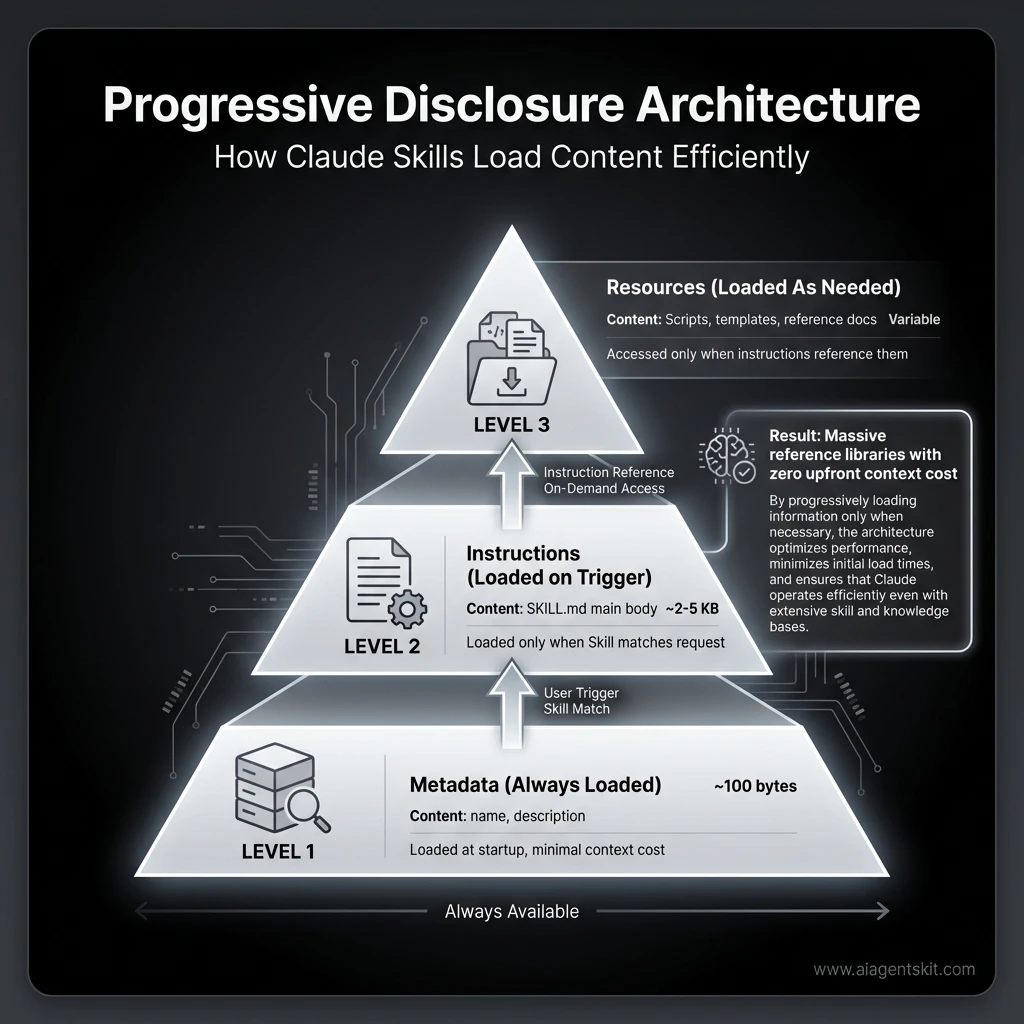 Progressive Disclosure Architecture: Claude Skills load content in three stages—metadata (always loaded), instructions (loaded on trigger), and resources (loaded as needed)—enabling massive reference libraries with zero upfront context cost. This architecture allows Skills to include extensive documentation without consuming tokens until actually needed.
Pre-Built Agent Skills
Anthropic provides several pre-built Agent Skills for common document tasks, ready to use without any setup:
| Skill | Skill ID | Capabilities |
|---|---|---|
| PowerPoint | pptx | Create presentations, edit slides, add content, analyze presentation structure |
| Excel | xlsx | Create spreadsheets, analyze data, generate charts and reports, work with formulas |
| Word | docx | Create documents, edit and format content, apply styles |
pdf | Generate formatted PDF documents and reports |
Where Pre-Built Skills Are Available
Pre-built Skills are available on:
- Claude API: Yes (requires specific beta headers)
- Claude.ai: Yes—these work automatically behind the scenes when you create documents
- Claude Code: No (custom Skills only)
- Claude Agent SDK: No (custom Skills only)
Using Pre-Built Skills
On claude.ai, pre-built Skills work automatically. Just ask Claude to create a PowerPoint presentation or analyze an Excel file, and it will use the relevant Skill without any configuration.
On the Claude API, you’ll need to include beta headers and specify the Skill:
import anthropic

client = anthropic.Anthropic()

response = client.messages.create(
    model="claude-sonnet-4.5-20251120",
    max_tokens=4096,
    betas=["code-execution-2025-08-25", "skills-2025-10-02", "files-api-2025-04-14"],
    messages=[{"role": "user", "content": "Create a presentation about Q4 results"}],
    container={
        "skill_ids": ["pptx"]
    }
)
Pre-built Skills cover generic document workflows. You’ll want custom Skills when:
- Your workflow requires domain-specific logic (your company’s code standards, brand guidelines)
- You need to bundle your own scripts or reference materials
- Pre-built Skills don’t exist for your use case
- You want version control and team sharing of your configurations
Choosing the Right Claude Model for Skills
Skills work across all Claude models, but performance varies significantly. Here’s how to choose:
| Model | Best For | Skills Use Case | Cost | Speed |
|---|---|---|---|---|
| Claude Opus 4.5 | Complex reasoning, multi-step workflows | Advanced Skills with conditional logic, multi-file operations, sophisticated analysis | Highest | Slower |
| Claude Sonnet 4.5 | Balanced performance | Most Skills—recommended starting point for production use | Medium | Fast |
| Claude Haiku 4.5 | Speed and cost efficiency | Simple Skills with straightforward instructions, high-volume operations | Lowest | Fastest |
My recommendation: Start with Claude Sonnet 4.5 for most Skills. It offers the best balance of intelligence, speed, and cost. I’ve found it handles 90% of Skill use cases perfectly.
Upgrade to Claude Opus 4.5 only when you need:
- Complex multi-step reasoning that Sonnet struggles with
- Deep code analysis across large codebases
- Sophisticated decision-making with many edge cases
- Advanced agentic workflows with tool orchestration
Use Claude Haiku 4.5 when:
- Your Skill has simple, deterministic instructions
- You’re processing high volumes (thousands of requests)
- Speed matters more than nuanced understanding
- Cost optimization is critical
Real-world example: I use Sonnet 4.5 for code review Skills (handles 95% of cases), but switch to Opus 4.5 for architectural design Skills where the reasoning complexity justifies the extra cost. For simple formatting Skills, Haiku 4.5 is perfect and saves money at scale.
Note: Claude Opus 3 was retired on January 5, 2026. If you have legacy Skills referencing it, upgrade to Opus 4.5 for improved intelligence and better cost-effectiveness.
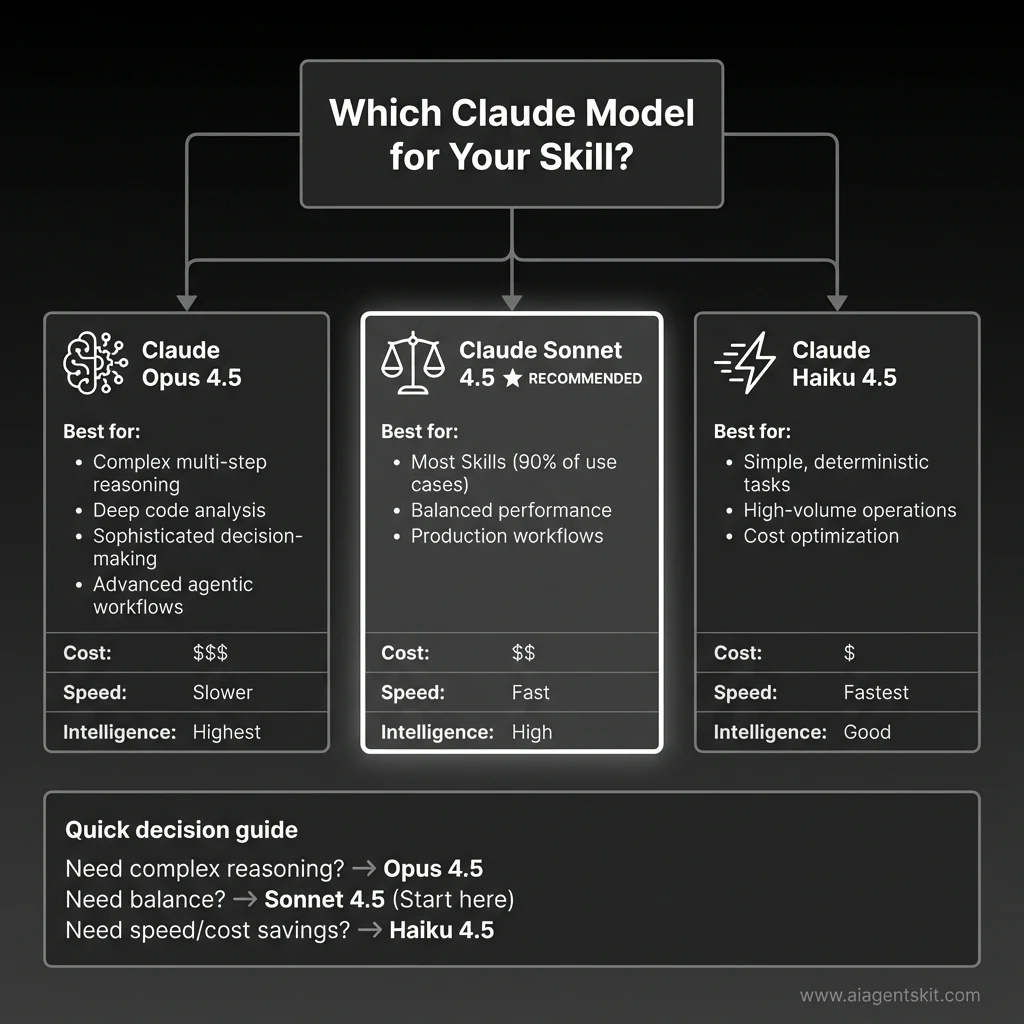 Model Selection Guide for Claude Agent Skills: Choose Claude Opus 4.5 for complex multi-step reasoning and deep code analysis, Claude Sonnet 4.5 for balanced performance (recommended for 90% of Skills use cases), or Claude Haiku 4.5 for high-volume operations requiring speed and cost optimization. Each model offers different trade-offs in cost, speed, and intelligence.
Creating Custom Skills
Custom Skills let you package domain expertise and organizational knowledge into reusable bundles. Here’s how to create them.
The SKILL.md File Structure
Every Skill requires a SKILL.md file with YAML frontmatter. This is the only required file:
---
name: your-skill-name
description: Brief description of what this Skill does and when to use it
---

# Your Skill Name

## Instructions
[Clear, step-by-step guidance for Claude to follow]

## Examples
[Concrete examples of using this Skill]
Field Requirements
| Field | Requirements |
|---|---|
name | Maximum 64 characters. Lowercase letters, numbers, and hyphens only. Cannot contain “anthropic” or “claude” |
description | Non-empty, maximum 1,024 characters. Include both what the Skill does AND when Claude should use it |
The description field is particularly important—it’s how Claude decides whether to activate your Skill. Be specific about triggers.
Good description:
“Review Python code for bugs, security vulnerabilities, and PEP 8 compliance. Use when the user asks for code review, code analysis, or wants feedback on Python code quality.”
Weak description:
“Helps with code.” (Too vague—Claude won’t know when to use it)
Extended Skill Structure
For more complex Skills, you can add optional components:
my-custom-skill/
├── SKILL.md           (required - main instructions)
├── ADVANCED.md        (optional - advanced usage patterns)
├── REFERENCE.md       (optional - detailed reference)
├── scripts/
│   ├── validate.py    (optional - utility scripts)
│   └── process.sh
├── templates/
│   └── output.md      (optional - output templates)
└── examples/
    └── sample.json    (optional - example files)
When to add additional files:
- Additional markdown files: When instructions become too long or you have clear sub-specializations
- Scripts: For deterministic operations (validation, calculations, formatting) that shouldn’t consume context
- Templates: For consistent output formats
- Reference materials: Schemas, style guides, API documentation that Claude should consult
Design Principles for Effective Skills
Write like you’re onboarding a talented new hire. Be explicit about what to do, in what order, and why. Don’t assume knowledge.
Use progressive complexity. Start with the basics that apply to most requests, then add sections for advanced cases that Claude can access if needed.
Include concrete examples. Show Claude exactly what good output looks like. Examples are often more effective than abstract instructions.
Iterate based on behavior. Create a simple version, test it with various requests, then refine based on where Claude struggles or deviates.
Categories of Custom Skills
The flexibility of custom Skills means you can create them for virtually any specialized workflow:
- Development Skills: Code review, documentation generation, testing patterns
- Productivity Skills: Data analysis, report generation, meeting summaries
- Content Skills: Brand voice enforcement, SEO optimization, editing styles
- Workflow Skills: Multi-step process automation, approval flows
If you find yourself repeatedly explaining the same context or process to Claude, that’s a strong signal you should create a Skill.
Real-World Custom Skill Examples
Let me show you three Skills I’ve built and actually use in production. These aren’t theoretical—they solve real problems and save real time.
Example 1: Enhanced Code Review Skill
The basic code review concept is good, but here’s a production version that catches significantly more issues:
---
name: code-review-enhanced
description: Comprehensive code review for bugs, security vulnerabilities, performance
  issues, and best practices. Use when reviewing pull requests, analyzing code quality,
  or auditing codebases for production readiness.
---

# Enhanced Code Review Skill

## Purpose

You are a senior code reviewer with 15+ years of experience across multiple languages
and frameworks. You think like an attacker when reviewing security, like a performance
engineer when reviewing efficiency, and like a maintainer when reviewing readability.

## Three-Pass Review Process

### Pass 1: Correctness & Logic
- **Logic errors:** Off-by-one errors, incorrect conditionals, faulty algorithms
- **Edge cases:** Empty inputs, null values, boundary conditions, race conditions
- **Error handling:** Try-catch blocks, error propagation, graceful degradation
- **Return values:** Correct types, proper error codes, consistent patterns
- **State management:** Proper initialization, cleanup, memory leaks

### Pass 2: Security Analysis
- **Input validation:** SQL injection, XSS, command injection, path traversal
- **Authentication:** Proper auth checks, session management, token validation
- **Authorization:** Role-based access, permission checks, data isolation
- **Data exposure:** Sensitive data in logs, error messages, API responses
- **Cryptography:** Secure algorithms, proper key management, no hardcoded secrets
- **Dependencies:** Known vulnerabilities in packages, outdated libraries

### Pass 3: Quality & Maintainability
- **Code readability:** Clear naming, appropriate comments, self-documenting code
- **DRY principle:** Repeated code that should be extracted
- **Complexity:** Functions too long, nested conditionals, cyclomatic complexity
- **Performance:** N+1 queries, inefficient algorithms, unnecessary operations
- **Testing:** Missing test coverage, untestable code, brittle tests
- **Documentation:** Missing docstrings, unclear API contracts

## Output Format

**Summary**
[2-3 sentence overall assessment of code quality and readiness]

**🔴 Critical Issues** (Must fix before merge)
- `file.py:42` - SQL injection vulnerability in user input handling
- `auth.js:128` - Authentication bypass possible via header manipulation

**⚠️ Important Issues** (Should fix)
- `api.ts:67` - N+1 query problem will cause performance issues at scale
- `utils.py:23` - Error swallowing makes debugging impossible

**💡 Suggestions** (Consider for improvement)
- `component.jsx:89` - Extract this 50-line function into smaller pieces
- `service.go:156` - Add retry logic for external API calls

**✅ Strengths** (What's done well)
- Excellent test coverage (92%)
- Clear separation of concerns
- Comprehensive error handling in payment flow

## Guidelines

- Prioritize security and correctness over style preferences
- Provide specific line numbers and file references
- Explain WHY something is an issue, not just WHAT
- Suggest concrete fixes, not just "fix this"
- Acknowledge good practices—positive feedback matters
- Consider the team's skill level in recommendations
What makes this better:
- Structured three-pass approach ensures nothing is missed
- Specific security checks (SQL injection, XSS, auth bypass)
- Prioritized output (critical vs. important vs. suggestions)
- Positive feedback section (important for team morale)
- Actionable recommendations with line numbers
Real usage impact: I run this on every PR before requesting human review. It catches about 60% of issues I used to find manually, saving 2-3 hours per week. More importantly, it catches security issues I might have missed.
Example 2: API Documentation Generator Skill
This Skill reads your codebase and generates comprehensive API documentation automatically:
---
name: api-doc-generator
description: Generate comprehensive API documentation from code. Use when creating
  or updating API docs, documenting endpoints, or explaining API structure to users
  or team members.
---

# API Documentation Generator

## Purpose

You are a technical writer specializing in API documentation. You create clear,
comprehensive docs that developers actually want to read—with examples, error
handling, and real-world usage patterns.

## Documentation Process

When asked to generate API documentation:

1. **Scan the codebase** for API routes, endpoints, and handlers
2. **Extract metadata:**
   - HTTP methods (GET, POST, PUT, DELETE, PATCH)
   - URL paths and parameters
   - Request body schemas
   - Response formats
   - Authentication requirements
   - Rate limits and quotas
3. **Identify patterns:**
   - Common authentication flows
   - Error handling conventions
   - Versioning strategy
   - Pagination approaches
4. **Generate structured documentation** in OpenAPI/Swagger format or markdown

## Documentation Structure

For each endpoint, include:

### Endpoint Overview
- **Method and Path:** `POST /api/v1/users`
- **Description:** Creates a new user account
- **Authentication:** Bearer token required
- **Rate Limit:** 100 requests per hour

### Request

**Headers:**
Authorization: Bearer {token} Content-Type: application/json
**Body Schema:**
```json
{
  "email": "string (required, valid email)",
  "name": "string (required, 2-100 chars)",
  "role": "string (optional, enum: user|admin)"
}
Example Request:
curl -X POST https://api.example.com/api/v1/users \
  -H "Authorization: Bearer abc123" \
  -H "Content-Type: application/json" \
  -d '{"email":"user@example.com","name":"John Doe","role":"user"}'
Response
Success (201 Created):
{
  "id": "usr_abc123",
  "email": "user@example.com",
  "name": "John Doe",
  "role": "user",
  "created_at": "2026-01-28T10:30:00Z"
}
Error Responses:
400 Bad Request- Invalid input (missing required fields, invalid email format)401 Unauthorized- Missing or invalid authentication token409 Conflict- Email already exists429 Too Many Requests- Rate limit exceeded500 Internal Server Error- Server error
Notes
- Email addresses are case-insensitive and automatically lowercased
- Default role is “user” if not specified
- User IDs are prefixed with “usr_” for easy identification
Output Format
Generate markdown documentation with:
- Table of contents with anchor links
- Grouped by resource (Users, Posts, Comments, etc.)
- Code examples in cURL, JavaScript, Python
- Error code reference table at the end
- Authentication guide at the top
- Changelog section for versioning
Quality Standards
- Every endpoint must have at least one example request
- Error responses must include example error objects
- Use realistic example data (not “foo”, “bar”, “test”)
- Include edge cases in notes (empty arrays, null values, etc.)
- Link related endpoints (e.g., “See also: GET /api/v1/users/:id”)
**Real usage impact:** This saves 4-5 hours every time we add new API endpoints. The generated docs are about 80% complete automatically—I just add business context and edge case notes. Our API adoption improved because docs are always up-to-date.

#### Example 3: Meeting Notes Summarizer Skill

For teams drowning in meeting notes, this extracts what actually matters:

```markdown
---
name: meeting-notes-summarizer
description: Extract structured insights from meeting notes and transcripts. Use when
  processing meeting notes, identifying action items, or summarizing meeting outcomes
  for team distribution.
---

# Meeting Notes Summarizer

## Purpose

You are a meeting notes specialist who extracts actionable insights from transcripts
and raw notes. You identify what matters—decisions, action items, and follow-ups—and
present them in a scannable format that busy people can actually use.

## Process

When given meeting notes:

1. **Read the full transcript** to understand context and flow
2. **Identify key elements:**
   - **Decisions made:** What was agreed upon or approved
   - **Action items:** What needs to be done, by whom, by when
   - **Open questions:** What remains unresolved or needs research
   - **Blockers:** What's preventing progress
   - **Next steps:** Follow-up meetings, topics to revisit
3. **Extract context:** Why decisions were made, what alternatives were considered
4. **Structure the output** using the format below

## Output Format

### 📋 Meeting Summary
[2-3 sentence overview of what was discussed and the main outcomes]

### ✅ Key Decisions
- **Decision:** [What was decided]
  - **Rationale:** [Why this decision was made]
  - **Impact:** [Who/what this affects]

### 🎯 Action Items
| Priority | Action | Owner | Due Date | Status | Dependencies |
|----------|--------|-------|----------|--------|--------------|
| 🔴 High | [Task description] | @PersonName | Feb 5 | Not Started | [Blocker if any] |
| 🟡 Medium | [Task description] | @PersonName | Feb 12 | Not Started | None |
| 🟢 Low | [Task description] | @PersonName | TBD | Not Started | None |

### ❓ Open Questions
- **Question:** [What needs to be answered]
  - **Owner:** [Who will research this]
  - **Deadline:** [When we need an answer]

### 🚧 Blockers & Risks
- [Blocker description] - Blocking: [Action item(s)]
- [Risk description] - Mitigation: [Proposed solution]

### 📅 Next Meeting
- **Date:** [If scheduled]
- **Topics:**
  - [Topic 1 to discuss]
  - [Topic 2 to discuss]
- **Preparation needed:** [What attendees should prepare]

### 💡 Additional Notes
- [Important context that doesn't fit above categories]
- [Parking lot items for future discussion]

## Guidelines

- **Be concise** — Busy people need to scan this in 60 seconds
- **Use names** — "@PersonName" format for clear ownership
- **Flag urgency** — Use 🔴 High, 🟡 Medium, 🟢 Low priorities
- **Note "TBD"** — If owner or due date isn't mentioned, mark "TBD"
- **Include context** — Why decisions matter, not just what was decided
- **Highlight blockers** — Make impediments visible immediately
- **Link action items** — Show dependencies between tasks

## Special Cases

**If the meeting was a brainstorm:**
- Add "Ideas Generated" section with bullet points
- Note which ideas have consensus vs. need more discussion

**If the meeting was a retrospective:**
- Add "What Went Well" and "What to Improve" sections
- Include specific action items for improvements

**If the meeting was a planning session:**
- Add "Timeline" section with milestones
- Include "Resources Needed" section
Real usage impact: I use this after every team meeting. It turns 30 minutes of note-processing into 2 minutes. The structured output goes directly into our project management tool, and everyone knows exactly what they need to do. Meeting follow-through improved by about 40% since we started using this.
Key Takeaway
The best Skills solve specific, repeatable problems you face weekly. Don’t try to build a general-purpose Skill—build one that handles a workflow you’re tired of doing manually. Start simple, test it with real data, then expand based on what you learn.
Where Skills Work: Platform Guide
Skills are available across Claude’s products, but with important differences in how they work and what’s supported:
| Platform | Pre-Built Skills | Custom Skills | Sharing Scope | Network Access |
|---|---|---|---|---|
| Claude API | ✅ | ✅ (upload via /v1/skills) | Workspace-wide | ❌ None |
| Claude Code | ❌ | ✅ (filesystem-based) | Personal or project | ✅ Full |
| Claude Agent SDK | ❌ | ✅ (filesystem-based) | Per-agent config | Varies |
| Claude.ai | ✅ | ✅ (ZIP upload) | Individual user only | Varies |
Claude API
Using Skills via the Claude API requires three beta headers:
code-execution-2025-08-25— Skills run in the code execution containerskills-2025-10-02— Enables Skills functionalityfiles-api-2025-04-14— Required for file upload/download
For pre-built Skills, specify the skill_id (like pptx, xlsx) in the container parameter.
For custom Skills, upload them via the /v1/skills endpoints. Once uploaded, custom Skills are available workspace-wide—all members of your API workspace can access them.
For implementation examples, check our Claude API code snippets.
Claude Code
Claude Code supports only custom Skills, but they work entirely through the filesystem—no upload required.
Create Skills in one of two locations:
- Personal Skills:
~/.claude/skills/— Available in all your projects - Project Skills:
.claude/skills/— Scoped to a specific project, can be committed to version control
Claude automatically discovers Skills in these directories. You can also share Skills via Claude Code Plugins.
For Claude Code setup guidance, see our Claude Desktop MCP setup guide.
Claude Agent SDK
The Claude Agent SDK supports custom Skills through filesystem configuration:
- Create Skills in
.claude/skills/directories - Include
"Skill"in yourallowed_toolsconfiguration - Skills are automatically discovered when the SDK runs
Skills in the SDK work per-agent—each agent configuration determines which Skills are available.
Claude.ai
On claude.ai, pre-built Skills work automatically—they’re behind the scenes when you create documents.
For custom Skills:
- Go to Settings > Features
- Upload your Skill as a ZIP file
- Skill becomes available immediately
Requirements:
- Plan: Pro, Max, Team, or Enterprise
- Code execution must be enabled
Important limitation: Custom Skills on claude.ai are individual to each user. They’re not shared organization-wide and cannot be centrally managed by admins. Each team member must upload separately. Teams that want shared, file-aware task automation across a team may find the Claude Cowork enterprise features a better fit — it adds Projects with shared knowledge bases and organization-wide plugin support.
Skills vs Prompts vs Custom GPTs
With multiple ways to customize AI behavior, understanding when to use each approach matters.
Comprehensive Comparison
| Feature | Claude Skills | System Prompts | Custom GPTs |
|---|---|---|---|
| Persistence | ✅ Cross-conversation | ❌ Single conversation | ✅ Cross-conversation |
| Code execution | ✅ Bundled scripts | ❌ None | ⚠️ Limited (Actions) |
| Token efficiency | ✅ Progressive loading | ❌ Full context upfront | ⚠️ Moderate |
| Reusability | ✅ Auto-recognized | ❌ Re-paste each time | ✅ Select from library |
| Filesystem access | ✅ Full read/write | ❌ None | ⚠️ Code Interpreter only |
| Version control | ✅ Files in Git repos | ❌ None | ❌ None |
| Distribution | API workspace, filesystem | N/A | GPT Store |
| Enterprise governance | ✅ Workspace sharing | ❌ N/A | ⚠️ Team features |
When to Use Each Approach
Choose Skills when:
- You have repeatable workflows you explain frequently
- You need code execution or file operations
- You’re building domain-specific specialization
- Enterprise consistency and governance matter
- You want version control of your AI customizations
Choose prompts when:
- You’re doing one-off, ad-hoc tasks
- Exploring or brainstorming (conversational discovery)
- Adding conversation-specific context on top of Skills
- Quick iterations where setup overhead isn’t worth it
Choose Custom GPTs when:
- You want consumer-facing distribution (GPT Store)
- You’re in the OpenAI ecosystem
- Simple customization with minimal technical setup suffices
- You don’t need deep code execution or filesystem access
Hybrid Strategies
Skills and prompts work well together. A common pattern:
- Skill: Provides foundational expertise (your code review standards, brand voice rules)
- Prompt: Adds conversation-specific context (“Focus on security issues for this PR” or “Use a casual tone for this blog post”)
The Skill handles the repeatable pattern; the prompt handles the situational nuance.
For developers comparing Claude’s tool ecosystem, our MCP servers guide covers complementary capabilities.
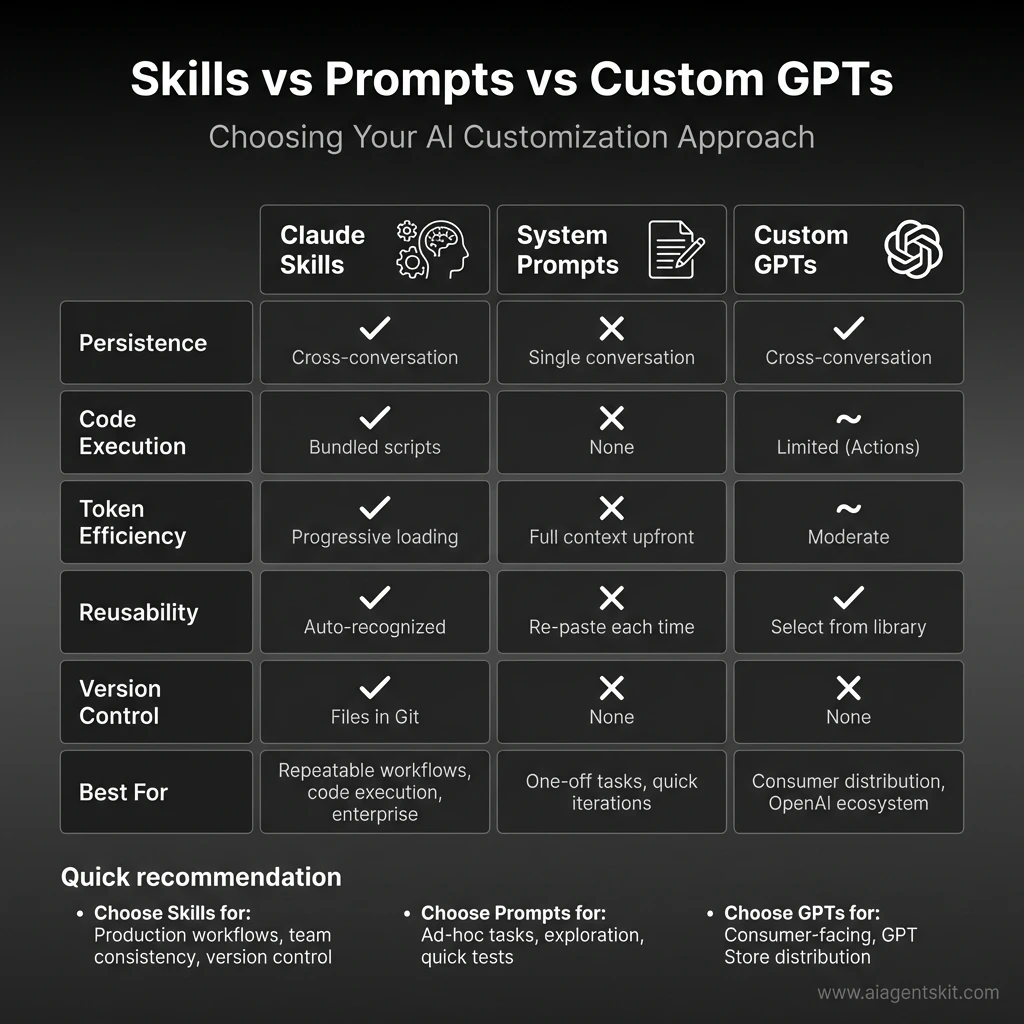 Feature Comparison: Claude Agent Skills vs System Prompts vs Custom GPTs. Skills excel at persistent, reusable workflows with bundled code execution, progressive loading for token efficiency, and Git-based version control—ideal for production workflows and enterprise use. System Prompts work best for one-off tasks and quick iterations. Custom GPTs fit consumer-facing distribution in the OpenAI ecosystem with GPT Store integration.
Best Practices and Security
Skills are powerful precisely because they can include executable code and instructions that modify Claude’s behavior. This power requires responsible use.
Writing Effective Skills
Optimize your description for discovery. Claude uses the description field to decide whether to trigger your Skill. Be specific about both capabilities and trigger conditions.
Structure instructions hierarchically. Put the most common, basic instructions first. Add advanced sections that Claude can access when relevant. This leverages progressive disclosure even within your SKILL.md.
Provide concrete examples. Show Claude what good output looks like. Examples often communicate more effectively than abstract rules.
Test with varied inputs. Try requests that should trigger your Skill and requests that shouldn’t. Refine the description and instructions based on what you observe.
Keep Scripts focused. When including Python or Bash scripts, make them single-purpose utilities. Claude can chain multiple scripts more flexibly than working around a monolithic one.
Security Considerations
Anthropic offers clear guidance on Skill security that’s worth emphasizing:
Only use Skills from trusted sources—those you created yourself or obtained from Anthropic. Skills provide Claude with new capabilities through instructions and code, which means a malicious Skill could direct Claude to behave in ways that don’t match the Skill’s stated purpose.
If you must use a Skill from an unknown source:
- Audit everything: Review SKILL.md, all additional markdown files, all scripts, all resources
- Look for red flags: Unexpected network calls, unusual file access patterns, operations that don’t match the stated purpose
- External URLs are risky: Skills that fetch data from external sources can be compromised even if the Skill itself looks safe
- Treat like installing software: You wouldn’t run an unknown executable—apply the same caution to Skills
Organizational Governance
For teams and enterprises using Skills:
- Establish review processes: Don’t deploy Skills without code review, just like any other code
- Use version control: Store Skills in Git repositories for history, review, and rollback
- Document ownership: Every Skill should have a clear owner responsible for maintenance
- Plan sharing scope: Understand the difference between API workspace sharing and claude.ai individual scope
- Audit regularly: Review deployed Skills for outdated information or deprecated patterns
Advanced Skill Patterns
Once you’ve mastered basic Skills, these patterns unlock more sophisticated workflows. I’ve used all of these in production—they’re not theoretical.
Multi-Skill Orchestration
Skills can reference and delegate to other Skills, creating layered expertise. This is powerful for complex workflows that span multiple domains.
Example: Full-Stack Code Reviewer
---
name: full-stack-reviewer
description: Comprehensive code review covering frontend, backend, infrastructure,
  and security. Use for reviewing full-stack changes, complete features, or
  architectural decisions that span multiple layers.
---

# Full-Stack Reviewer

## Purpose

You orchestrate specialized review Skills to provide comprehensive feedback across
the entire stack. You understand how components interact and catch integration issues
that single-domain reviewers might miss.

## Review Process

1. **Analyze the change** — Identify which parts of the stack are affected
2. **Delegate to specialists:**
   - Frontend changes → Apply Frontend Developer review standards
   - Backend changes → Apply Backend Architect review standards
   - Infrastructure → Apply DevOps Automator review standards
   - Database → Apply Database Architect review standards
3. **Integration review** — Check how components work together:
   - API contracts match between frontend and backend
   - Database schema supports backend requirements
   - Infrastructure can handle expected load
   - Security is consistent across layers
4. **Cross-cutting concerns:**
   - Authentication flow works end-to-end
   - Error handling propagates correctly
   - Logging and monitoring cover all layers
   - Performance bottlenecks across the stack
5. **Synthesize findings** — Combine specialist feedback into coherent review

## Output Format

Organize by layer, then by priority within each layer. Show how issues in one layer
affect others.
Why this works: Instead of one massive Skill trying to know everything, you compose focused Skills. Each specialist Skill stays maintainable, and the orchestrator handles coordination.
Conditional Logic and Decision Trees
Skills can include sophisticated decision-making logic based on context:
## Decision Framework

**If** the user is asking about a new feature:
1. Check if similar features exist in the codebase
2. Review technical feasibility given current architecture
3. Estimate complexity (small/medium/large)
4. Identify dependencies and blockers
5. Suggest implementation approach with trade-offs

**If** the user is debugging an issue:
1. Attempt to reproduce the issue from description
2. Check recent changes in Git history (use Git Skill)
3. Review error logs and stack traces
4. Identify likely root causes (ranked by probability)
5. Suggest fixes with step-by-step validation

**If** the user is refactoring code:
1. Understand current implementation and why it exists
2. Identify code smells and technical debt
3. Propose refactoring strategy (big bang vs. incremental)
4. Highlight risks (breaking changes, performance impact)
5. Recommend testing approach to validate refactoring

**If** the user is reviewing architecture:
1. Evaluate against SOLID principles
2. Check scalability and performance characteristics
3. Assess security and compliance requirements
4. Consider operational complexity and monitoring
5. Suggest alternatives with trade-off analysis
Real-world usage: My “Engineering Advisor” Skill uses this pattern. Depending on whether I’m designing, debugging, or refactoring, it adapts its approach completely. One Skill, multiple modes.
Context Accumulation Pattern
For long-running projects, Skills can build and maintain context over time. This works especially well when combined with MCP’s memory server.
## Context Management

**On first interaction with a new project:**
1. Ask clarifying questions:
   - What's the tech stack? (languages, frameworks, databases)
   - What are the main constraints? (performance, budget, timeline)
   - What are the priorities? (speed vs. quality, features vs. stability)
   - What's the team size and skill level?
2. Understand the domain and business context
3. Note preferences and coding standards
4. Store in project context (use Memory Skill)

**On subsequent interactions:**
1. Reference stored project context automatically
2. Maintain consistency with past decisions
3. Update context as project evolves:
   - New technologies adopted
   - Changing priorities
   - Lessons learned from incidents
4. Flag when current request conflicts with past decisions

**Example context storage:**
Project: E-commerce Platform Tech Stack: Next.js, PostgreSQL, Redis, AWS Priorities: Performance > Features (high-traffic site) Constraints: Must support 10K concurrent users Standards: TypeScript strict mode, 80% test coverage Past Decisions:
- 2026-01-15: Chose PostgreSQL over MongoDB for transaction support
- 2026-01-20: Implemented Redis caching to reduce DB load
- 2026-01-25: Adopted Tailwind CSS for consistency
Why this matters: Without context accumulation, every conversation starts from zero. With it, Claude remembers your project’s history and makes consistent recommendations. I’ve seen this reduce back-and-forth by 50% on established projects.
Progressive Complexity Pattern
Design Skills that handle simple cases efficiently but scale to complex cases when needed:
## Skill Structure

### Quick Start (80% of requests)
[Simple, fast instructions for common cases]

### Detailed Analysis (15% of requests)
[More thorough approach when user asks for depth]

### Expert Mode (5% of requests)
[Comprehensive analysis for critical decisions]

## Example: Code Review Skill

**Quick Start** — For small PRs (\u003c100 lines):
- Scan for obvious bugs and security issues
- Check code style consistency
- Verify tests exist
- Provide brief feedback

**Detailed Analysis** — For medium PRs (100-500 lines):
- Everything in Quick Start, plus:
- Review architecture and design patterns
- Check performance implications
- Evaluate error handling
- Suggest refactoring opportunities

**Expert Mode** — For large PRs (\u003e500 lines) or critical code:
- Everything in Detailed Analysis, plus:
- Threat modeling for security
- Load testing recommendations
- Backward compatibility analysis
- Migration strategy review
Performance benefit: The Skill loads only what it needs. Simple requests get fast responses. Complex requests get thorough analysis. You don’t pay the context window cost for depth you don’t need.
Skill Chaining for Workflows
Chain multiple Skills together for end-to-end workflows:
Example workflow: “Ship a new feature”
- Planning Skill → Breaks down feature into tasks
- Code Review Skill → Reviews implementation
- Testing Skill → Generates test cases
- Documentation Skill → Creates user docs
- Deployment Skill → Prepares deployment checklist
Each Skill focuses on one phase. Together, they guide you from idea to production.
How to implement:
## Feature Shipping Workflow

When the user wants to ship a new feature:

1. **Planning Phase** (use Sprint Prioritizer Skill)
   - Break feature into implementable tasks
   - Estimate complexity and timeline
   - Identify dependencies

2. **Implementation Phase** (use appropriate Engineering Skill)
   - Guide implementation with best practices
   - Provide code examples and patterns

3. **Review Phase** (use Code Review Skill)
   - Comprehensive code review
   - Security and performance check

4. **Testing Phase** (use Test Writer Skill)
   - Generate test cases
   - Suggest edge cases to cover

5. **Documentation Phase** (use Doc Generator Skill)
   - Create user-facing documentation
   - Update technical docs

6. **Deployment Phase** (use DevOps Skill)
   - Pre-deployment checklist
   - Rollback plan
   - Monitoring setup

At each phase, ask: "Ready to move to [next phase]?" Don't proceed until user confirms.
Real impact: This workflow pattern reduced our “forgot to document” and “forgot to add monitoring” incidents to nearly zero. The Skill enforces the process.
Key Insights
After building dozens of Skills, here’s what I’ve learned:
- Start simple, evolve based on usage — Don’t try to handle every edge case upfront
- Composition beats monoliths — Multiple focused Skills are easier to maintain than one giant Skill
- Context is king — Skills that remember project context are 10x more useful
- Make decisions explicit — When your Skill makes a choice, explain why
- Test with real data — Synthetic examples don’t reveal real-world edge cases
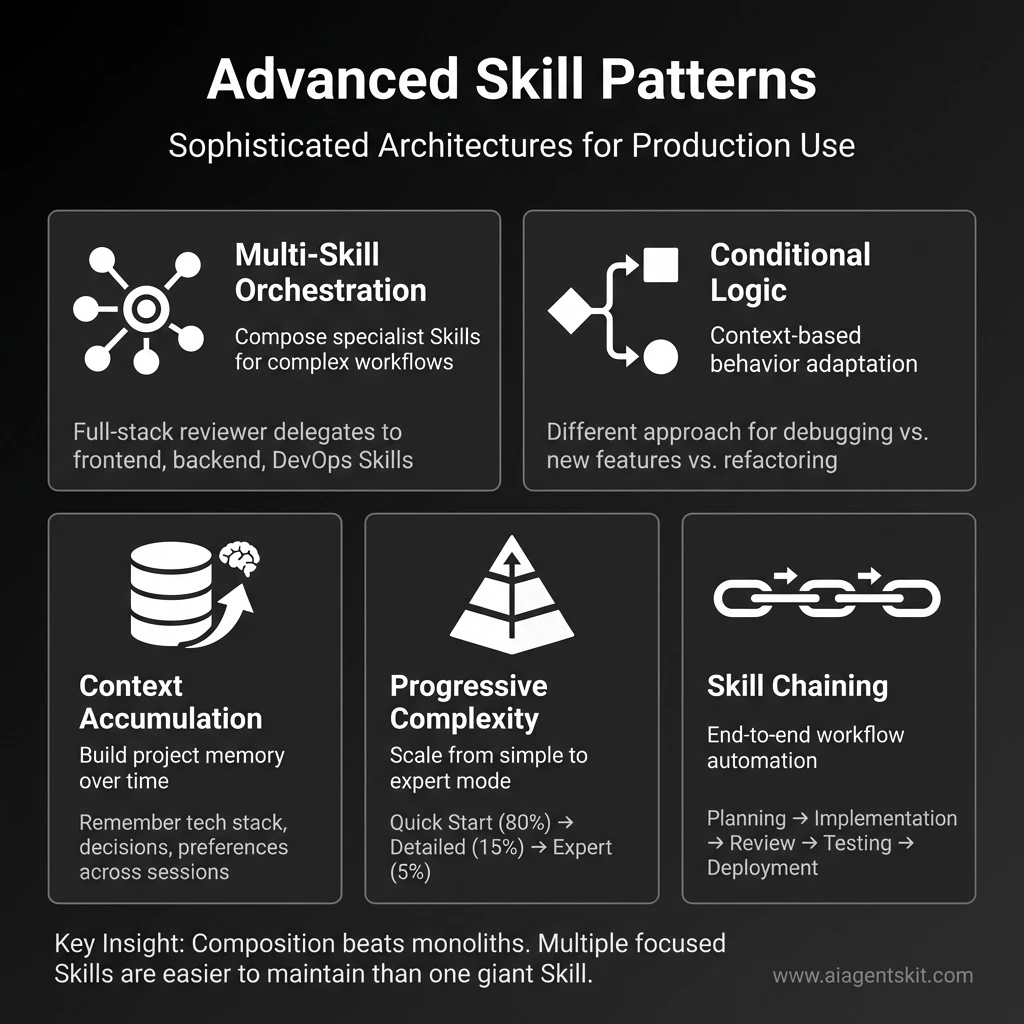 Advanced Skill Patterns for Production Use: Five sophisticated architectures that unlock powerful Claude Agent Skills workflows. Multi-Skill Orchestration composes specialist Skills for complex tasks, Conditional Logic adapts behavior based on context, Context Accumulation builds project memory over time, Progressive Complexity scales from simple to expert mode efficiently, and Skill Chaining automates end-to-end workflows from planning through deployment. Key insight: Composition beats monoliths—multiple focused Skills are easier to maintain than one giant Skill.
Limitations and Constraints
Look, I’ve painted a pretty rosy picture of Skills so far. Time for some honesty about where they fall short—because they definitely do in some areas.
Cross-Surface Availability
Skills do not sync across surfaces. A Skill uploaded to claude.ai isn’t available via the API, and vice versa. Claude Code Skills are completely separate from both.
If you need the same Skill across multiple surfaces, you’ll upload or deploy it separately to each.
Sharing Scope
The ability to share Skills with teammates depends entirely on which surface you’re using:
| Platform | Sharing Model |
|---|---|
| Claude.ai | Individual user only—each team member uploads separately |
| Claude API | Workspace-wide—all workspace members can access |
| Claude Code | Personal (~/.claude/skills/) or project (.claude/skills/) |
Claude.ai does not currently support centralized admin management or organization-wide distribution of custom Skills.
Runtime Environment Constraints
The technical environment available to Skills varies significantly:
Claude API:
- ❌ No network access—Skills cannot make external API calls
- ❌ No runtime package installation—only pre-installed packages available
- Design Skills to work offline with bundled resources
Claude.ai:
- ⚠️ Varying network access depending on user/admin settings
- Check admin settings if Skills requiring network access don’t work
Claude Code:
- ✅ Full network access—Skills have the same access as any program
- Should install packages locally to avoid affecting user’s system
Planning for Constraints
If you’re building Skills for multi-platform use:
- Design for the most restrictive environment (usually Claude API)
- Bundle all dependencies and reference data in the Skill folder
- Avoid network calls in scripts—use pre-fetched data instead
- Test on each target platform before deployment
Common Pitfalls and How to Avoid Them
After helping dozens of teams implement Skills, I’ve seen the same mistakes repeatedly. Here’s how to avoid them and save yourself hours of frustration.
Pitfall 1: Vague Skill Descriptions
The mistake:
description: "Helps with code"Why it fails: Claude doesn’t know when to use this. “Helps with code” could mean code review, code generation, debugging, documentation, or anything else. The Skill never gets triggered because the description is too generic.
The fix:
description: "Review Python code for bugs, security vulnerabilities, and PEP 8
  compliance. Use when the user asks for code review, code analysis, pull request
  review, or wants feedback on Python code quality."
Key principle: Be specific about WHAT the Skill does AND WHEN to use it. Include trigger phrases users might actually say.
Pitfall 2: Overloading a Single Skill
The mistake: Creating one “Developer Skill” that handles code review, documentation generation, testing, deployment, debugging, refactoring, and architecture design.
Why it fails: The instructions become too long and conflicting. Claude gets confused about priorities. The Skill tries to do everything and ends up doing nothing well. Context window bloat makes it slow.
The fix: Create focused Skills:
code-reviewer— Just code review with security and quality checksdoc-generator— Just documentation creationtest-writer— Just test case generationdebug-helper— Just debugging assistance
Real example: I split my original “Engineering Skill” (1,200 words, tried to do everything) into 5 focused Skills (200-300 words each). Response quality improved dramatically, and I could iterate on each independently.
Pitfall 3: Not Testing Edge Cases
The mistake: Testing your Skill with one perfect example (“Review this well-formatted code with clear context”) and assuming it works for everything.
Why it fails: Real usage includes incomplete information, ambiguous requests, unexpected inputs, and edge cases you didn’t anticipate. Your Skill breaks in production.
The fix: Test with deliberately difficult scenarios:
- Minimal information: “Review this code” with no context about language, purpose, or standards
- Ambiguous requests: “Make this better” without specifying what “better” means
- Edge cases: Empty files, huge files (10,000+ lines), multiple languages in one request
- Conflicting requirements: “Make it faster and more readable” when those conflict
- Missing dependencies: Code that references files you don’t have access to
Testing checklist:
- [ ] Tested with minimal context
- [ ] Tested with ambiguous requests
- [ ] Tested with edge cases (empty, huge, malformed)
- [ ] Tested with conflicting requirements
- [ ] Tested with missing information
- [ ] Tested with real production data (not just examples)
Pitfall 4: Forgetting to Update Skills
The mistake: Creating a Skill in January, using it for six months, and never updating it—even though your workflow, tools, and best practices have evolved.
Why it fails: Your processes change. Your team adopts new tools. Your coding standards evolve. Your Skill becomes outdated and starts giving advice that conflicts with current practices.
The fix: Schedule quarterly Skill reviews. Ask:
- Is this still how we do things?
- What new patterns have emerged since we created this?
- What edge cases have we encountered in real usage?
- Are there new tools or frameworks we should mention?
- Have our priorities changed?
Maintenance workflow:
- Review Skill usage logs (what requests triggered it)
- Collect feedback from team members
- Update instructions based on learnings
- Test updated Skill with recent real examples
- Version control the changes (Git commit with changelog)
Pitfall 5: Ignoring the Description Field
The mistake: Spending hours perfecting the Skill instructions but writing a lazy one-line description.
Why it fails: The description is HOW CLAUDE DECIDES WHETHER TO USE YOUR SKILL. If the description doesn’t match what users actually say, the Skill never activates. All those perfect instructions sit unused.
Example of bad description:
description: "Code review skill"Example of good description:
description: "Review code for bugs, security issues, performance problems, and best
  practices. Use when the user asks to review code, analyze a pull request, check
  code quality, audit security, or wants feedback on their implementation."
Pro tip: Include variations of how users might phrase the request:
- “review this code”
- “check this PR”
- “is this code secure?”
- “analyze this implementation”
- “code quality feedback”
Pitfall 6: No Examples in Instructions
The mistake: Writing abstract instructions without showing Claude what good output looks like.
Why it fails: Claude interprets your instructions, but without examples, it might interpret them differently than you intended. Examples anchor the behavior.
The fix: Include concrete examples in your Skill:
## Example Output

**Good:**
🔴 Critical: SQL injection vulnerability at line 42
- Current:
query = f"SELECT * FROM users WHERE id = {user_id}" - Fix: Use parameterized queries:
query = "SELECT * FROM users WHERE id = ?"withparams=[user_id] - Why: User input directly in SQL allows attackers to inject malicious code
**Bad (too vague):**There’s a security issue in the database query.
Rule of thumb: For every major instruction, include at least one example of what good execution looks like.
Pitfall 7: Platform Assumptions
The mistake: Building a Skill that works perfectly in Claude Code but breaks in the API or claude.ai because you assumed capabilities that aren’t universal.
Why it fails: Different platforms have different constraints:
- Claude API: No network access, limited runtime packages
- Claude.ai: Varying network access based on admin settings
- Claude Code: Full network and filesystem access
The fix: Design for the most restrictive platform (usually Claude API) unless you’re explicitly building a platform-specific Skill. Document platform requirements clearly:
## Platform Requirements

**Works on:** Claude API, Claude.ai, Claude Code
**Requires:** Filesystem access (for reading code files)
**Network:** Not required (all operations are local)
**Dependencies:** None (uses only built-in capabilities)
Key Takeaway
Most Skill failures aren’t because the concept is wrong—they’re because of these preventable mistakes. Spend 80% of your time on the description and testing, 20% on the instructions. A perfectly written Skill that never triggers is useless.
Getting Started
Ready to start using Skills? Here’s the fastest path based on your situation:
Quick Start by User Type
| If You’re A… | Start Here |
|---|---|
| Claude.ai user | Pre-built Skills already work—try “Create a presentation about X” |
| API developer | Add beta headers, use pre-built Skill IDs, then explore custom Skills via /v1/skills |
| Claude Code user | Create a SKILL.md file in ~/.claude/skills/ or .claude/skills/ |
| Enterprise team | Evaluate sharing scope requirements, then build governance processes |
Your First Custom Skill: 5 Steps
-
Identify a repeatable workflow. What do you find yourself explaining to Claude repeatedly? That’s your Skill candidate.
-
Create a folder with a clear, lowercase, hyphenated name (e.g.,
code-review-skill/) -
Write SKILL.md with the required frontmatter and clear instructions:
---
name: my-first-skill
description: [What it does] and [when to use it]
---

# My First Skill

## Instructions
[Step-by-step guidance]

## Examples
[What good output looks like]-
Deploy and test.
- Claude.ai: ZIP and upload via Settings > Features
- Claude Code: Place in
.claude/skills/ - API: Upload via
/v1/skillsendpoint
-
Iterate. Try various requests, observe Claude’s behavior, refine your instructions.
A Concrete Example: Code Review Skill
To make this tangible, here’s a minimal but functional Code Review Skill:
---
name: code-review
description: Review code for bugs, security issues, best practices, and style.
  Use when the user asks for code review, code analysis, pull request review,
  or feedback on code quality.
---

# Code Review Skill

## Review Process

When reviewing code, follow this systematic approach:

### 1. First Pass: Correctness
- Check for logic errors and edge cases
- Verify error handling exists
- Look for off-by-one errors
- Confirm return values are correct

### 2. Second Pass: Security
- Input validation present?
- SQL injection vulnerabilities?
- XSS possibilities in web code?
- Sensitive data exposure?

### 3. Third Pass: Quality
- Code readability and naming
- DRY principle violations
- Unnecessary complexity
- Missing documentation

## Output Format

Structure your review as:

**Summary:** One-paragraph overall assessment

**Critical Issues:** Must fix before merge
- [Issue with file:line reference]

**Improvements:** Should consider
- [Suggestion with reasoning]

**Positive Notes:** What's done well
- [Recognition of good practices]
This Skill is simple but effective. Claude will automatically use it when you ask for code review, and the structured output format ensures consistency. As you identify patterns—common issues you want flagged, specific style preferences—you’d expand the instructions.
Next Steps
For official documentation and tutorials:
- Quickstart Tutorial — Start using pre-built Skills in the API
- Agent Skills Cookbook — Learn to create custom Skills
- Engineering Blog — Deep dive into Skills architecture and design
If you’re looking for ready-to-use agent configurations, check our Ultimate Claude Agents Library for 34 pre-built agents covering Engineering, Product, Marketing, and more.
Frequently Asked Questions
What are Claude Agent Skills?
Claude Agent Skills are modular, reusable capabilities that extend Claude’s functionality. They package instructions, metadata, and optional resources (like scripts and templates) into bundles that Claude automatically discovers and uses when relevant to your request. Unlike prompts that exist only within a single conversation, Skills persist across conversations and load efficiently through progressive disclosure.
How do Claude Skills differ from prompts?
The key differences are persistence and efficiency. Prompts are single-conversation instructions you provide each time. Skills are reusable—you create them once, and Claude automatically recognizes when to use them across all future conversations. Skills also support bundled code execution and use progressive disclosure, meaning Claude only loads the parts it needs, keeping context lean.
Can I create custom Skills for Claude?
Yes. Custom Skills are created by writing a SKILL.md file with YAML frontmatter (name and description) and markdown instructions. You can optionally include additional markdown files, Python or Bash scripts, and reference materials. Custom Skills can be deployed via claude.ai (ZIP upload), Claude API (/v1/skills endpoints), or Claude Code (filesystem directories).
Which platforms support Claude Skills?
All four of Claude’s main surfaces support Skills with variations:
- Claude API: Pre-built and custom Skills (requires beta headers)
- Claude.ai: Pre-built Skills automatic; custom via Settings > Features upload
- Claude Code: Custom Skills only, filesystem-based
- Claude Agent SDK: Custom Skills only, via
.claude/skills/directories
Are Claude Skills secure to use?
Skills from Anthropic (pre-built) and Skills you create yourself are safe. For third-party Skills, exercise caution—audit all files before use, look for unexpected network calls or file access, and treat Skill installation like installing software. Malicious Skills could misuse Claude’s tool access or exfiltrate data.
Do Claude Skills cost extra?
Skills are included with plans that support code execution. On claude.ai, this means Pro, Max, Team, or Enterprise plans. The Claude API charges for usage as normal—Skills don’t add separate costs but do consume tokens when loaded into context and may incur code execution billing.
Can I share Claude Skills with my team?
It depends on the platform. On the Claude API, Skills are workspace-wide—all members access uploaded Skills. On claude.ai, Skills are individual only—each team member must upload separately. Claude Code supports project-scoped Skills in .claude/skills/ that can be committed to version control and shared via repository.
What programming languages can Skills use?
For executable scripts, Skills support Python and Bash. For reference materials and documentation, you can include any file type—markdown, JSON, YAML, code samples in any language, schemas, etc. Claude reads the content; it doesn’t execute non-Python/Bash files.
Conclusion
I won’t lie—when I first heard “Agent Skills,” I expected another feature that sounded impressive but wouldn’t actually change how I work. I was wrong. Skills have genuinely changed how I think about Claude customization.
By moving from ephemeral, per-conversation prompts to persistent, filesystem-based modules, Skills enable real specialization. Claude stops being a generalist you have to constantly re-orient and starts being an expert on your specific workflows.
The key concepts to remember:
- Progressive disclosure keeps context lean by loading only what’s needed
- Bundled resources including executable scripts extend capabilities beyond text
- Platform availability varies—understand sharing scope before deploying
- Security matters—treat third-party Skills like installing software
Whether you start with pre-built document Skills or dive into creating custom workflows, Skills unlock a level of consistency and automation that prompts alone can’t match.
Bookmark this guide as your reference. As Anthropic continues developing the Skills ecosystem, we’ll keep this resource updated.
For hands-on skill implementations, explore our Claude Agents Library—and check back soon for detailed tutorials on building Skills for specific roles like front-end development, back-end development, product management, and more.
Last updated: January 28, 2026